Inspiring
May 14, 2019

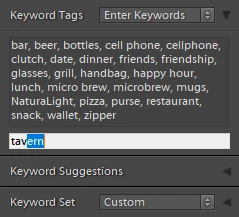
P: Auto-complete text in Keyword Tags field...

  • May 14, 2019
  • 4 replies
  • 285 views

... won't turn off. See screen caps. 

What else do I need to do to stop it?

Thanks

This topic has been closed for replies.

4 replies

Rikk Flohr_Photography
Community Manager
August 18, 2020
Updates to Camera Raw, Lightroom Classic, and the Lightroom Ecosystem were released yesterday evening and contain a fix for this issue.  Please install the appropriate update and see if it solves this problem. 

Thank you for your patience.
Rikk Flohr: Adobe Photography Org
johnrellis
Legend
February 2, 2020
As a workaround while waiting for this to be fixed, try deleting the Helper.lrdata folder (Windows) / file (Mac).  See here for details: 
https://feedback.photoshop.com/photoshop_family/topics/deleting-a-keyword-from-the-keyword-list-does...

The unwanted auto-completes may start slowly coming back, and then you could delete Helper.lrdata again (ugh).
Inspiring
February 1, 2020
So... it's been nine months and multiple releases, but this PITA is still negatively impacting my sanity. My stock agency wants a zillion keywords per image, so having a majority of my entries auto completed WRONG burns up a lot of whatever lifetime I have left.
Smit K
Participating Frequently
May 14, 2019
Hi Michael,

Thanks for reporting this. We have been able to reproduce this and have logged a bug for the same.

Thanks,
Smit Keniya
Lightroom Classic Team
Adobe
Smit | Lightroom Team
