

johnrellis
Legend
September 2, 2021

P: Auto-Stack By Capture Time sometimes stacks photos incorrectly

  • September 2, 2021
  • 8 replies
  • 2272 views

[This post contains formatting and embedded images that don't appear in email. View the post in your Web browser.]


Auto-Stack By Capture Time sometimes stacks photos whose capture times are separated by more than specified by Time Between Stacks.  To reproduce:


1. Create a new catalog.


2. Make a copy of a raw.


3. Import the raw and its copy into the catalog.


4. Select the copy, do Metadata > Edit Capture Time, and change its time to one year earlier.


5. Do Photo > Statcking > Auto-Stack By Capture Time, with Time Between Stacks set at the default 0:08:00. 


Observe that the the two photos are stacked, even though their capture times are separated by a year:
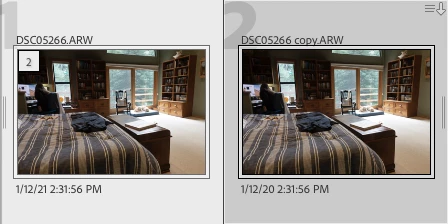


Doing Metadata > Save Metadata To File followed by Read Metadata From File and then auto-stacking doesn't avoid the bug.


I've observed that sometimes exporting the catalog as a new catalog avoids the bug, sometimes not.


A couple other recent reports of similar symptoms:

https://community.adobe.com/t5/lightroom-classic-bugs/auto-stacking-by-capture-time-goes-wrong/idi-p/12358279 

https://community.adobe.com/t5/lightroom-classic-discussions/stacking-problem-auto-stack-virtual-copies-in-lightroom/td-p/12390454


Yet another symptom of the broken internal architecture for storing photo capture times.


Tested on LR 10.4 / Mac OS 11.3.1.  

This topic has been closed for replies.

8 replies

ben446
Inspiring
March 30, 2024

Stacking issue is back 😞

Again one camera works, the older one once again does not.

Sonoma 14.2.1

LRC 13.2

johnrellis
Legend
October 25, 2023

"Update to OS X Sonoma 14 / LRC  13.0.1 seemed to fix stacking issue in my case"


Excellent. Unfortunately, I just retested the bug recipe at the top of this thread in my LR 13.0.1, and it's still failing.

ben446
Inspiring
October 25, 2023

Update to OS X Sonoma 14 / LRC  13.0.1 seemed to fix stacking issue in my case 🙂

Rikk Flohr_Photography
Community Manager
October 11, 2023

Updating status

Rikk Flohr: Adobe Photography Org
johnrellis
Legend
October 11, 2023

@Rikk Flohr: Photography, this apparently never got assigned a tracking number? I just tested the bug recipe, and it still occurs in LR 13.0.

Rikk Flohr_Photography
Community Manager
October 11, 2023

Looks like this one was lost in the forum transition two years go. I will log it. 

Rikk Flohr: Adobe Photography Org
ben446
Inspiring
October 11, 2023

Any fix for this yet?

Auto-Stack By Capture Time stacks photos incorrectly?  

M1 Ultra / Ventura 13.6

LRC 12.5

Pics from 1 camera stack correctly, not from the other older one.  Same brand.  Was working for both.

johnrellis
Legend
October 11, 2023

@ben446, upload two sample pics that don't stack correctly to Dropbox, Google Drive, or similar and post the sharing link here.  I'll dig into what might be going wrong and file or update a bug report as appropriate.

Known Participant
September 18, 2021

Hi -

I'm having an issue, that when I create virtual copies they are not automatically stacked. This would be fine, however when I try to use "AUTO STACK BY CAPUTRE TIME" it is grouping too many of the images together, even when I am on 00:00:00 time between stacks. So now some images have 2 in the stack, and some stacks have 4 images or more depending on how quickly my camera fired off.


Is there an easier way than needing to manually go through and split all the stacks and to just have the virtual copy and the master in a stack to start with?


Second question, now that the stack is created, is there a way to move BOTH the virtual copy and the master image to a new collection if the stack is collapsed? Currently only the image selected is being moved when I use shortcut "B"


Thanks in advance for any help!

johnrellis
Legend
September 18, 2021

[This post contains formatting and embedded images that don't appear in email. View the post in your Web browser.]


"is there a way to move BOTH the virtual copy and the master image to a new collection if the stack is collapsed?"


You'll have to expand the stack and select all the stacked photos before typing B.  A shortcut for doing that: double-click or shift-click the stacking badge in the upper-left corner of the thumbnail:


Participating Frequently
September 2, 2021

Since the June update Auto stacking does not work anymore.

Although photos have the same capture time, or a few seconds apart, Lightroom Classic does not recognize it as a Stack.

Also, it sometimes stacks photos that are minutes apart.

I use an Olympus EM-5 MIII.

I also use DxO PureRaw (which copies the Capture Time into the DNG file)

Everywhere I look in Lightroom, the Capture times are correct, and thus Auto Stacking seems to have some bug in reading / comparing.

In the image below you see the result of Auto Stacking. The filenames reflect the Capture Times. (I rename them on Import)

johnrellis
Legend
September 2, 2021

"I also use DxO PureRaw (which copies the Capture Time into the DNG file)"


Please upload some sample files that get stacked incorrectly to Dropbox or similar and post the sharing link here. It's possible that PurRaw didn't copy the capture time into the DNG in a way that's compatible with LR.  LR has longstanding bugs when it isn't able to read capture time from the EXIF metadata.