
Community Expert
Sep 22, 2016 2:15 AM UTC
Released

P: Badge numbers in Grid view not visible on Sierra

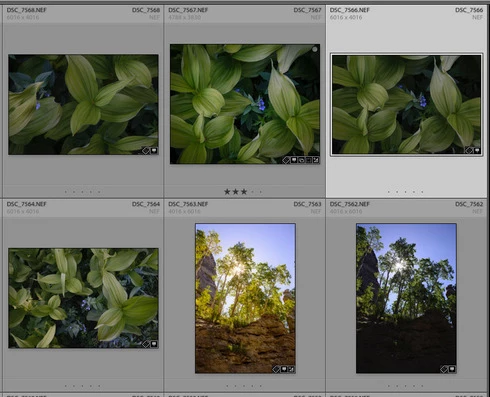
Since updating to LR 2015.7 and Macs OS X Sierra, the badge numbers in the grid view are no longer visible no matter what view I choose (expanded, compact, etc.). For good measure I recalibrated my display and that doesn't make a difference. This is not a problem for 2015.7 using other machines running El Capitan and Yosemite.
This topic is closed to new replies. Start a new post to keep the conversation going.

34 replies

Sunil_Bhaskaran
Inspiring
Dec 9, 2016 5:08 AM UTC
This issue has been fixed in the latest version of Lightroom 6.8.

Thanks,
Sunil
Translate
Participating Frequently
Dec 6, 2016 8:49 PM UTC
It's not only because of Sierra. If you are running Sierra but still run LR 2015 without the update, they are there. Very annoying. ;/
Translate
Inspiring
Nov 30, 2016 10:54 AM UTC
Same problem - the large index numbers are soooo useful and can't believe they're gone now I've updated to Sierra. Please please fix asap!!
Translate
ntompson
Known Participant
Nov 5, 2016 8:35 AM UTC
Same problem here - glad to see it's not just me - but keen to see a fix!
Translate
Inspiring
Nov 4, 2016 10:48 AM UTC
Same problem, for me!
Translate
Inspiring
Nov 1, 2016 9:35 PM UTC
Same problem here too...
Translate
Inspiring
Oct 31, 2016 8:05 PM UTC
I just noticed this issue when culling my first wedding after upgrading to Sierra. This is seriously messing with my flow. I realize that I can switch to expanded cells and see the index numbers, but compact cells is my preference. Please address soon!
Translate
Inspiring
Oct 22, 2016 3:11 PM UTC
Same here! 
It's really annoying.
Translate
Legend
Oct 4, 2016 3:23 PM UTC
Different issue than the thread it was originally posted.

Please reference the new conversation here: Lightroom: System/computer freeze after using Develop module after macOS Sierra u...
Translate
Legend
Oct 4, 2016 3:22 PM UTC
This sounds like a different issue than is being discussed here. If the whole system is locking up, that could be a bad driver (try disabling Graphics Processor under Preferences > Performance. It could also indicate a hardware failure (failing hard disk, bad RAM, or Graphics Card). It could also indicate a damaged OS.
Translate