
Inspiring
August 19, 2019

P: Badges not shown in cell borders, but are still clickable

  • August 19, 2019
  • 5 replies
  • 389 views

In the Library grid view or anywhere the filmstrip is displayed, if a cell is too small to display all the badges for an image, clicking on the left border area acts like you're clicking on a badge, even though it's not visible.

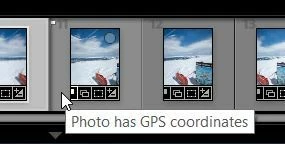
In the screenshot below, the cursor is in the border area, but you can see the partially hidden GPS/map badge is highlighted and active.  Clicking in that area of the border should just select the image, but instead takes you to the Map module.


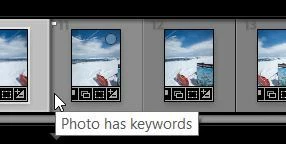
In this screenshot, the mouse is a little further left in the border and the tool tip shows that the keyword badge is active in that space.  Clicking in that area should just select the image, but instead takes you to the Keyword panel in the Library module.


I have "Ignore clicks on badges" turned off in preferences and prefer that behavior, but I would still expect that clicking anywhere in the blank border space would only select the image.

I have been able to replicate this on multiple machines with Win10 / Lr Classic 8.4 both with GPU on & off.  I don't remember coming across it in previous versions.

This topic has been closed for replies.

5 replies

tmickowAuthor
Inspiring
June 22, 2020
Checked on two computers & the problem appears to be fixed in 9.3.
Thanks.
Rikk Flohr_Photography
Community Manager
June 16, 2020
Version 9.3, an update to Lightroom Classic, went live on June 15, 2020 and contains a fix for this issue. Please install the update and respond back if it does not cure the issue for you. Thank you for your patience!
Rikk Flohr: Adobe Photography Org
tmickowAuthor
Inspiring
August 19, 2019
Yep, the cells are definitely on the smaller side and I know that the badges don't expand / shrink, but that's not the issue.

The issue is that you can click in the empty border space and Lr acts like you're clicking on a badge, even though it's not visible.  Bug/no bug is up to somebody else to determine, but I can't imagine that behavior is working as designed.
Just Shoot Me
Legend
August 19, 2019
You are showing the Film strip in your screen shots and it is so small it can't show all of the badges you have. The badges do not shrink or expand. They are always the same size no matter how big or small the thumbnail images are.
What you are seeing is normal and has been like that from at least LR5.

No BUG

Make the Filmstrip larger and you won't have this happen.
This is from LR 5.


See it shows the same thing, a partially shown badge.

Making the filmstrip even smaller and the badge completely disappear.
Rikk Flohr_Photography
Community Manager
August 19, 2019
I can duplicate, Tom. I will file a bug. Thanks!

Rikk Flohr: Adobe Photography Org