
Inspiring
May 16, 2016

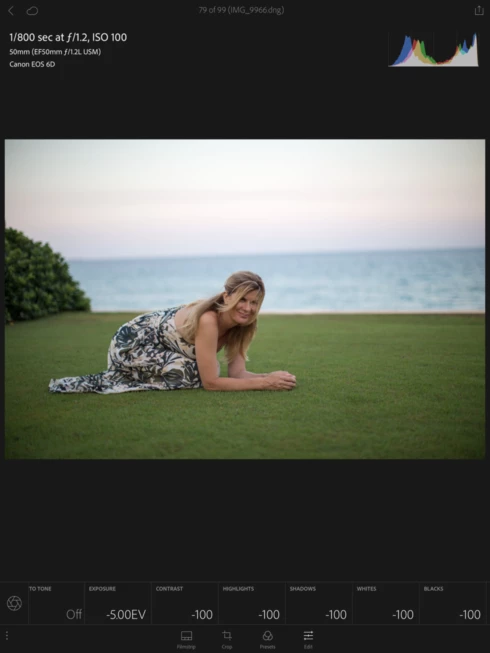
P: basic controls set to full minus (exposure to -5.00ev and all others to -100) on import

  • May 16, 2016
  • 15 replies
  • 754 views

When raw files are imported into light room with auto tone applied on import, when added to a collection and edited on light room mobile, the files have Full negative values in all adjustments .
This topic has been closed for replies.

15 replies

Inspiring
April 12, 2017


Just upgraded to latest version of Lightoom Mobile and now auto tone does not work.  Auto tone is now OFF and exposure is -5ev with all other settings be -100.  If you change them it does nothing to the photo.  Cleared the cache but did nothing.

Can't edit any pictures now on the ipad!
Inspiring
April 12, 2017
I also have this problem.. even with latest LR mobile (12th April 2017). 

This screenshot is old, but I checked this morning after LR update and the problem persists. 


Related forum post: https://forums.adobe.com/message/9424919#9424919

Tweet: https://twitter.com/wherenow_hugh/status/833664267886985216
Participating Frequently
January 9, 2017
I get it set to -10 etc for dng files generated from HDR (haven't tried it for Panos)
Inspiring
May 18, 2016
Palm Beach Golden Hour. I think it was all of them, or at least most. If you can't find any in the log, I'll try to recreate the bug and not fix them like I did with these.
Rikk Flohr_Photography
Community Manager
May 18, 2016
Danny, Can you give me a collection name and file name for one of the errant photos?
Rikk Flohr: Adobe Photography Org
Rikk Flohr_Photography
Community Manager
May 17, 2016
I have emailed you. 
Rikk Flohr: Adobe Photography Org
Inspiring
May 17, 2016
Of course. How do I private message you?
Rikk Flohr_Photography
Community Manager
May 17, 2016
Danny, can you get me a screen shot of your Import Screen RH Side with the settings you are using? 

Also, are you willing to provide your Adobe ID so that we can look at the server side?
Rikk Flohr: Adobe Photography Org
Inspiring
May 17, 2016
Yes. On my desktop I import and convert to dng. At the time of import, I also create a second copy to my NAS for backup, add to a collection set to synch to mobile and apply keywords and auto tone upon import. Then, before I even go back to the desktop, I view the pictures on my phone or iPad. When I look at the iPad in LRM, I SEE the picture perfectly even though all the settings are at -5 or -100 and auto tone is Not selected. If I apply a crop or other edit, the picture then goes black and I can't see it (because it's at -5ev) and I then have to reset it or hit auto tone on the mobile device.

I'm wondering if it's because I don't view the shots on my desktop first and so there's a preview issue.

This ONLY happens when I apply auto tone on import.
Rikk Flohr_Photography
Community Manager
May 17, 2016
Just to make sure I understand, the photos were on your Desktop.
The photos had AutoTone applied on Import.
The photos were synced to a device.
On the device (looks like an tablet?) the readings show as in your photo above?

Do I have that all correct?
Rikk Flohr: Adobe Photography Org