
Participant
January 24, 2017

P: Book module: Preview panel Drag Visible only works vertically

  • January 24, 2017
  • 2 replies
  • 899 views

Hi!

Basics: LR6 on pc.

Book module.


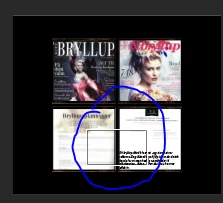
To see the individual book pages better, I zoom in by pressing 1:4 in the preview panel. But I don't get to move freely around the page, only up and down in the middle part of the page. The square (within the blue circle - see the print screen below) only moves up and down, not to the left or right. Is this a bug - or am I doing something wrong? I don't seem to have a horizontal scrolling option, either, so I don't get to check to the left and right of the square. Thanks a lot for your help!


Ingrid
This topic has been closed for replies.

2 replies

Rikk Flohr_Photography
Community Manager
Community Manager
December 18, 2021

Setting status to acknowledged and adding bug number.

Rikk Flohr: Adobe Photography Org
Participant
January 24, 2017

Oh- and I forgot to write that it doesn't work to move around the page when holding down the Spacebar, either. Looks like a bug to me.

Ingrid

benjam2222
Participant
November 22, 2018

Has anyone figured this out yet??? I am using Lightroom Classic CC 8.0 and this is still a problem. Zooming seems like the only way to get photo cells sized the same, but can't do that when only the middle is visible.

Rob_Cullen
Community Expert
Community Expert
November 24, 2018

Has anyone figured this out yet?

No. The same problem exists for me with Classic 8.0 in Windows.

Best I can do in 1:1 view is to zoom the images to completely fill the cells (which are aligned in templates)

[Shift+Tab] will hide panels to show the single page in full-screen view.

Regards. My System: Windows-11, Lightroom-Classic 15.1.1, Photoshop 27.3.1, ACR 18.1.1, Lightroom 9.0, Lr-iOS 10.4.0, Bridge 16.0.2 .