

P: Camera model names containing parentheses are treated inconsistently
LR handles camera model names containing parentheses inconsistently (e.g. "iPhone SE (2nd generation)"). The model name shown in the Metadata panel and returned to plugins via photo:getFormattedMetadata () discards everything from the first parenthesis to the end, while smart collections and the Camera column in the Metadata browser see the entire model name.
I first noticed this using my Any Filter plugin.
1. Make a new catalog.
2. Import the attached photo.
3. In the Metadata > EXIF panel, observe that Model is "iPhone SE":

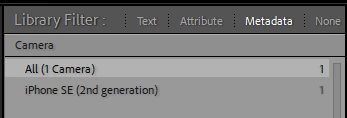
4. Observe that the Camera column in the Metadata browser shows "iPhone SE (2nd generation)":
5. Create a smart collection "Camera contains words 2nd generation".
6. Observe that the smart collection matches the photo.
7. Exiftool shows that EXIF:Model is:
$ exiftool -a -G -s -model IMG_2955.jpeg
[EXIF] Model : iPhone SE (2nd generation)
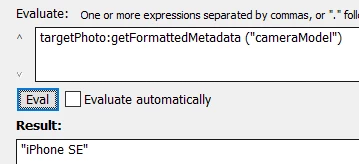
8. Observe that photo:getFormattedMetdata ("cameraModel") returns "iPhone SE":
9. Use Exiftool to change EXIF:Model to:
$ exiftool -a -G -s -model IMG_2955.jpeg
[EXIF] Model : Johns phone (is very very tiny)
9. Do Metadata > Read Metadata From File.
10. Observe similar inconsistent results as in steps 3 - 8.
Tested on LR 11.4 / Mac OS 12.4 and Windows 10.
 AdChoices