
Participant
November 14, 2021

P: Can't access masking tool above top toolbar after last update (Phone in Landscape orientation)

  • November 14, 2021
  • 4 replies
  • 243 views

Mobile version.

When I move masking tool (brush/linear/radial) above top toolbar (will attach picture), it cannot be accessed anymore and have to removed and recreated, but effectively top of the pic cannot be used without zooming in or out, is there other walk around or zoom in out is the only way?


On pic attached, any mask tools above green line are not accessible without zooming, if display clicked once to remove toolbars touching and dragging becomes picture graging or bringing back toolbar if just touch.

Thank you,

Pavel
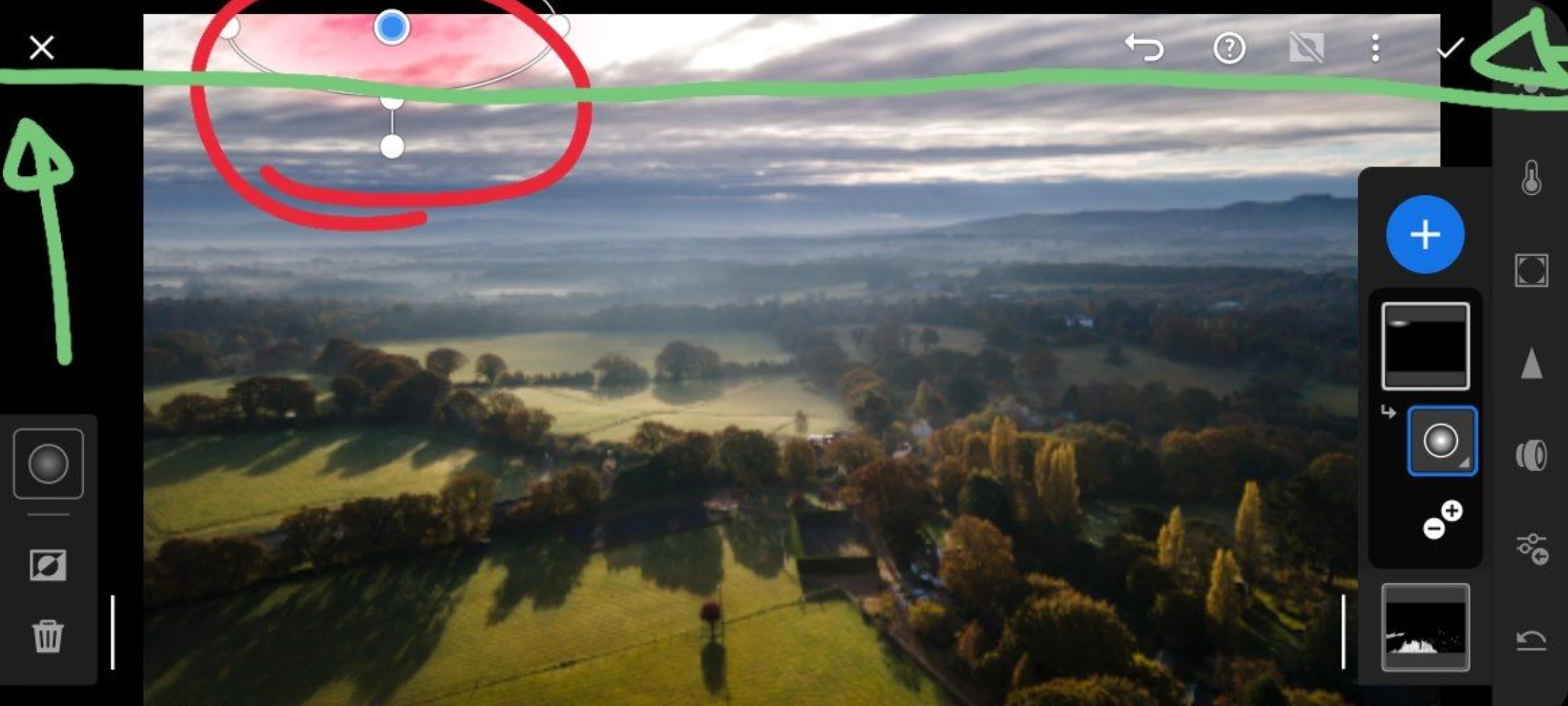
4 replies

Rikk Flohr_Photography
Community Manager
November 16, 2021

Setting status

Rikk Flohr: Adobe Photography Org
GoldingD
Legend
November 15, 2021

Moderator

Is this not in the wrong community?

Rikk Flohr_Photography
Community Manager
November 15, 2021

While the team evaluates the issue I can give you a couple workarounds.


  1. You can use a 'pinch' gesture to shrink the image so you can get at the control.
  2. Rotate your phone to Portrait Orientation and it will allow you to select and modify the Radial Gradient - after you are finished with that Local Adjustment instance, you can rotate back to Landscape. 
Rikk Flohr: Adobe Photography Org
Pavel5C1EAuthor
Participant
November 15, 2021

Thank you, appreciate your response

Rikk Flohr_Photography
Community Manager
November 15, 2021

I am able to replicate - I will check with the team.

Rikk Flohr: Adobe Photography Org