

johnrellis
Legend
April 22, 2019

P: Caption ignores Mac shortcut for entering accented characters

  • April 22, 2019
  • 4 replies
  • 226 views

On Mac, you can enter an accented "o" by holding down the "o" key and then selecting the appropriate variant:
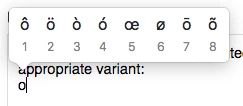

But when you do that in the Metadata panel's Caption field, you just get a plain "o".

However, you can use the Mac's Input menu to enter an accented "o" (both the Latin Small Letter O With Acute and the Latin Small Letter O followed by Combining Acute Accent).

Screen recording: 
https://www.dropbox.com/s/zkyp4pfw8031vgt/holding-down-o-key.2019.04.22.mov?dl=0

Tested on LR 8.2.1 / Mac OS 10.14.3.

This topic has been closed for replies.

4 replies

johnrellis
Legend
April 23, 2019
Thanks.
Adobe Employee
April 23, 2019
A bug is opened for this issue: LRD-4200961, assigned to Lightroom core team.
johnrellis
Legend
April 23, 2019
Typing the number under the choice also works for me. But clicking on the choice with the mouse doesn't work.

Try clicking on one of the choices with the mouse in the Caption field. Then try it in TextEdit.
Inspiring
April 23, 2019
It's ok for me : macOS 10.14.4 LR Classic 8.2.1

My choice : 5 and the result is "į"


Yves Crausaz, Suisse, retraité actif dans le monde de la photo et des arts graphiques.