
charlesl75177870
Participating Frequently
March 27, 2025

P: Color issue with Raw files from Sony A1 ii and lightroom classic 14.2 and Photoshop 26.5

  • March 27, 2025
  • 45 replies
  • 10518 views

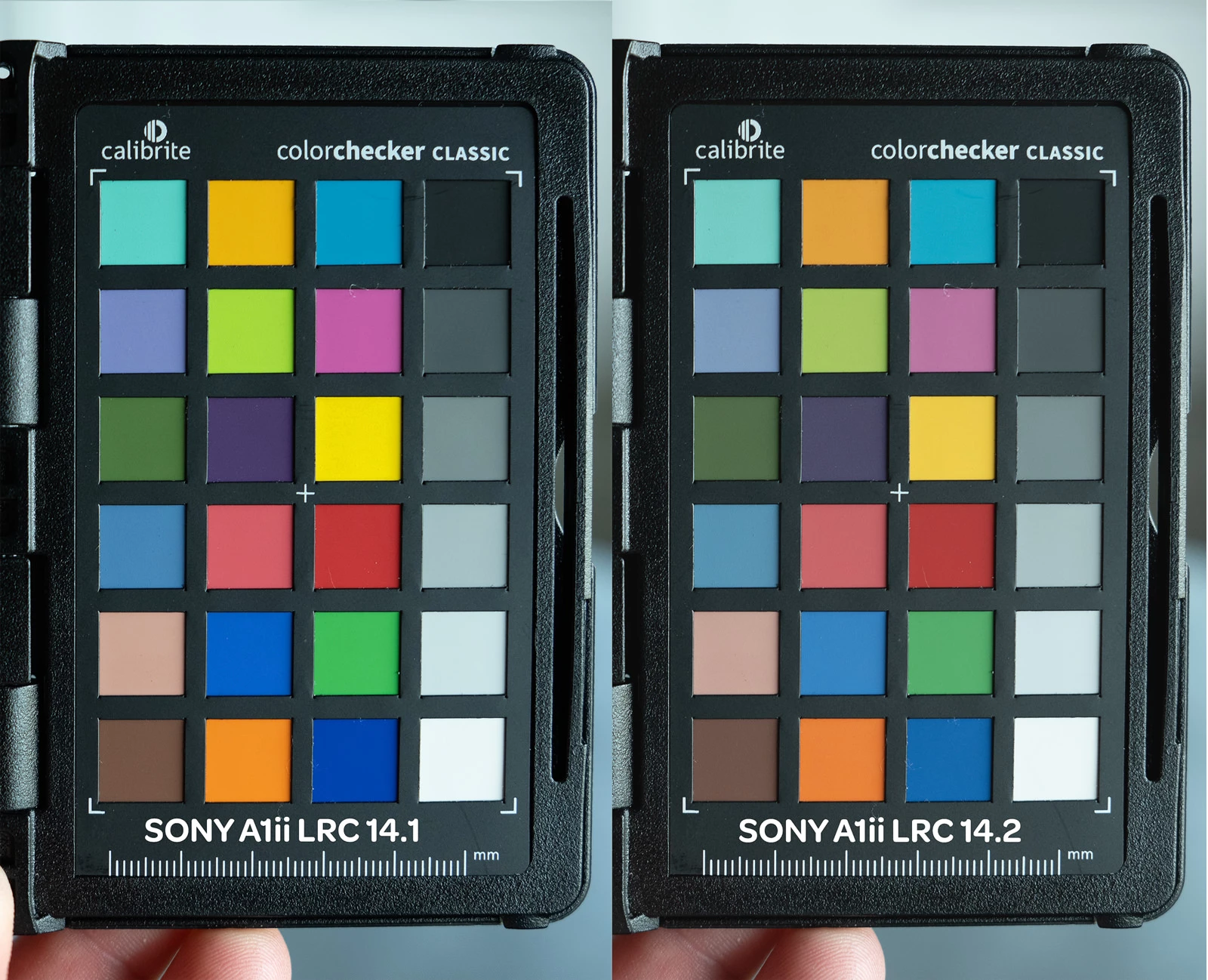
I've been having color issues using adobe color profile and LRC 14.2 and PS 26.5 and my Sony A1 ii.  I have a Sony a9iii and a7rv with no issues and LRC 14.1 the colors are fine.  The work around right now is converting the raw to dng in LRC 14.1 before editing in PS.  I reached out to Adobe and they confirmed the issues with the samples I provided.  Since it's isolated to the A1 ii it's not a monitor or icc issue.  see the issue in the pic below
45 replies

Inspiring
August 13, 2025

@charlesl75177870  I'm glad that the problem has finally been fixed.

charlesl75177870
Participating Frequently
August 13, 2025

The LR14.5 Adobe color Profile on the A1ii now matches the a9III profile

Participating Frequently
August 13, 2025

I wonder if it would work to upgrade from 14.1 to 14.2 to 14.3 all the way to 14.5? That would still be quicker than for me to click every single image

Inspiring
August 13, 2025

Unfortunately, yes, anyone who stayed with version LR 14.1 or with the DCP 14.1 profile will have this problem. Those who were on 14.4 and edited it will not be affected. Adobe took too long to release this fix, so anyone who noticed this problem and stayed with 14.1 is now penalized.

Participating Frequently
August 13, 2025

Thank you. That works now. Do I have to do that for every single image in all of my current catalogs? I have shot throusands of images in the last few months. That would be awful!

Inspiring
August 13, 2025

@Rikk Flohr: Photography 

The problem is that people who stayed with version 14.1 and edited their photos with that version will need to select the Adobe Color or Adobe Standard v2 image profile when installing version 14.5 in order for the colors to appear normally. Those who never noticed anything in version 14.4 will not see the difference.

Inspiring
August 13, 2025

@elisabethm83122842  You need to reset the editing settings for your photo or click on the profile and select Adobe Color, even if it is already in Adobe Color, it will work in 14.5 🙂

Rikk Flohr_Photography
Community Manager
August 13, 2025

@elisabethm83122842 

I am curious. What happens if you open the same file in Camera Raw? Which does it more closely resemble (14.1 or 14.5)?

Rikk Flohr: Adobe Photography Org
Participating Frequently
August 13, 2025

I jsut updated to 14.5 again and the colors are still messed up in LR 14.5.

On the collage, I included the Adobe Popup that shows that I am on 14.5. The image still has a red hue and the greens are very clearly desaturated. 

DdeGannes
Community Expert
Community Expert
August 13, 2025

Correct, there will be no update to 14.4.


Regards, Denis: iMac 27” mid-2015, macOS 11.7.10 Big Sur; 2TB SSD, 24 GB Ram, GPU 2 GB; LrC 12.5,; Lr 6.5, PS 24.7,; ACR 15.5,; (also Laptop Win 11, ver 24H2, LrC 15.0.1, PS 27.0; ) Camera Oly OM-D E-M1.