



johnrellis
Genius
October 14, 2024

P: Command + Option + O Masking Panel KBSC can conflict with Library Show Overlay

  • October 14, 2024
  • 5 replies
  • 1401 views

Command + Option + O doesn't toggle Remove > Detect Objects on Mac, though Control + Alt + O works on Windows.  Tested on LR 14.0 / Mac OS 14.6.1, Windows 11.   


To reproduce:


1. In Develop, open the Remove panel and click on Mode: Remove.


2. Type Command + Option + O and observe that instead of toggling Detect Objects, it invokes View > Loupe Overlay > Show (incorrect).


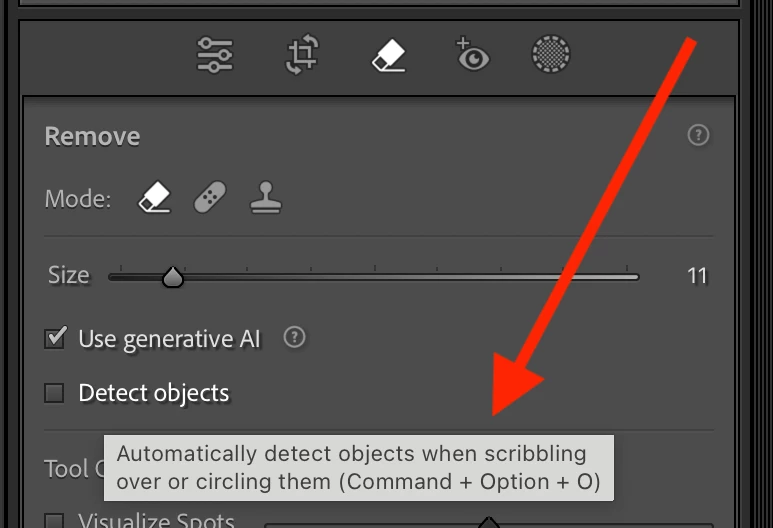
3. Hover the mouse over Detect Objects and observe that Command + Option + O is advertised as its keyboard shortcut:
 

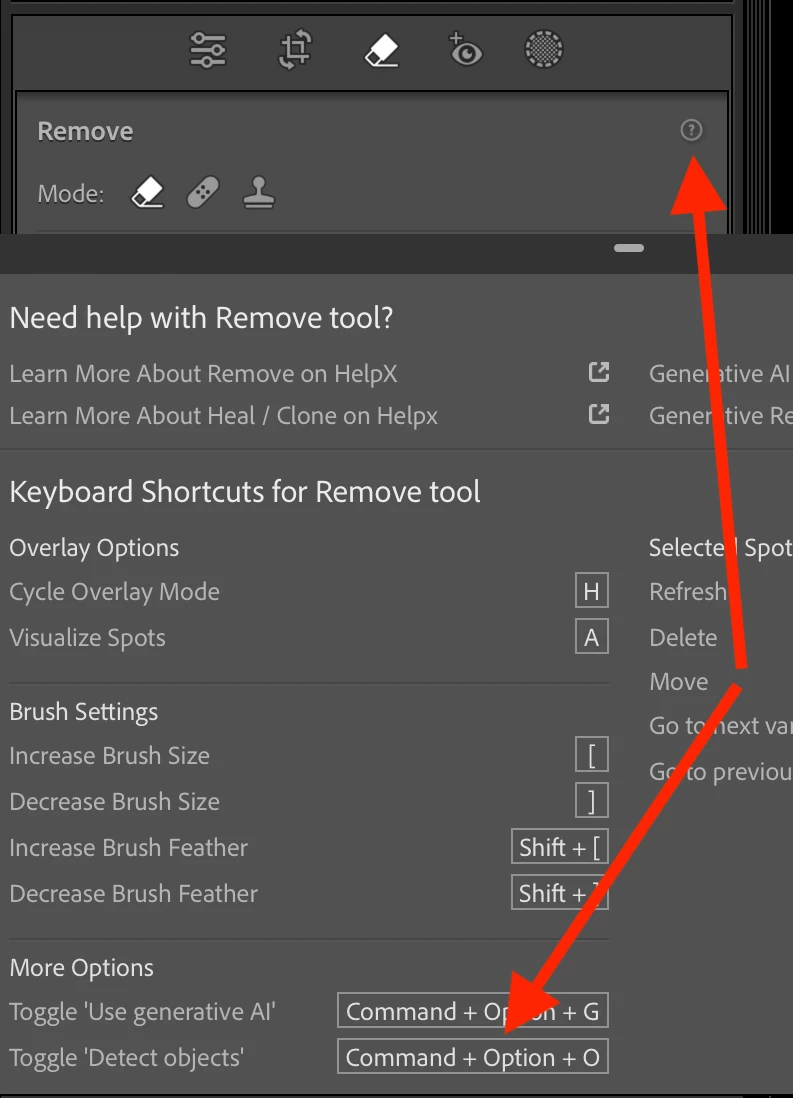
4. Click the "?" icon in the Remove panel and observe that Command + Option + O is advertised as the shortcut for Toggle Detect Objects:
 

4. Close the Remove panel and observe that Command + Option + O invokes View > Loupe Overlay > Show (correct)


This topic has been closed for replies.

5 replies

johnrellis
Genius
December 13, 2024

LR 14.1 fixed the issue by assigning different shortcuts to Toggle Use Generative AI (Alt/Opt Shift O) and to Toggle Detect Objects (Alt/Opt Shift G).

Rikk Flohr_Photography
Community Manager
Community Manager
December 12, 2024

Greetings all, 


A new update for Adobe Photography Products has been released.  The December update contains an update for this issue. 

If you do not see the update in your Creative Cloud Application, you can refresh it by hitting [Ctrl/Cmd]+[Alt/Opt]+[ R ].

Note: It may take up to 24 hours for your update to be available in your Creative Cloud app.


Thank you for being so patient.

Rikk Flohr: Adobe Photography Org
Rikk Flohr_Photography
Community Manager
Community Manager
October 14, 2024

I have enough info on this one and have written the bug. 

Rikk Flohr: Adobe Photography Org
Ian Lyons
Community Expert
Community Expert
October 14, 2024

Cmd + Option + O works as expected on the 3 Macs that I've checked. Each is running macOS 15.0.1


Having reviewed comment by @Rikk Flohr: Photography and video by @johnrellis above and enabled Loupe Ovelay, I experience the same isssue as described in original post.

Rikk Flohr_Photography
Community Manager
Community Manager
October 14, 2024

It is working for me here @johnrellis  Cmd Opt O is toggling Detect Objects here (14.0 on macOS 14.7).

I am not able to reproduce. 


I am going to amend this. I am seeing the correct behavior if No Loupe Overlay is specified.  With an image in Loupe Overlay, it seems to conflict. I am going to check with the team as the behavior of Library and Develop shortcuts should be independent. 

Rikk Flohr: Adobe Photography Org
johnrellis
Genius
October 14, 2024

"I am seeing the correct behavior if No Loupe Overlay is specified."


Interesting -- on my Mac OS 14.6.1, in Develop, Cmd Opt O always invokes View > Loupe Overlay > Show, regardless of whether the overlay was previously being displayed.  See the attached screen recording.


On Windows, it works correctly, invoking Loupe Overlay > Show when the Remove panel is closed and Detect Objects when the panel is open.