

johnrellis
Legend
April 7, 2020

P: Confirming a face name breaks the current Keyword column in the Metadata browser

  • April 7, 2020
  • 4 respuestas
  • 2219 visualizaciones

Confirming a name suggested by face recognition breaks the current Keyword column in the Metadata browser, such that the column won't display the photo with the confirmed name. To reproduce:

1. Create a new catalog, enabling face recognition.

2. Import two copies of the same photo containing a clearly recognizable face.

3. Assign both photos the keyword "John".

4. In the Keyword List panel, click the arrow to the right of "John", which opens a Keyword column in the Metadata browser with "John" selected.

5. Select the first photo, go to Library Loupe view, and enable the viewing of faces by clicking the Draw Face Region in the toolbar.

6. Label the face with "John".

7. Move to the next photo, which should show "John?" above the face rectangle. Confirm that name by clicking the check mark.

8. The current photo disappears from grid view, even though the Keyword column shows two photos assigned to John:
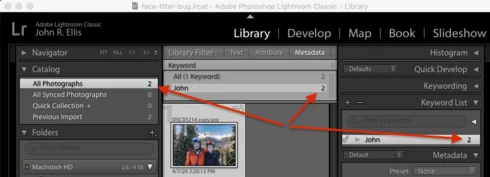


9. Disabling filters and re-enabling them or re-clicking on the arrow to the right of "John" in the Keyword List doesn't bring back the second photo -- it still looks like the screenshot.

The Keyword column is now permanently broken. There are two workarounds -- 1) restart LR, or 2) add a second Keyword column and delete the first one.

Tested on LR 9.2 / Mac 10.14.6.

Este tema ha sido cerrado para respuestas.

4 respuestas

johnrellis
Legend
February 15, 2023

I confirmed that the recipe now works correctly in LR 12.2, thanks.

Rikk Flohr_Photography
Community Manager
Community Manager
February 14, 2023

Greetings all,


Updates for Adobe Photography products have been released.  The February 2023  updates contain a fix for this issue. 

If you do not see the update in your Creative Cloud Application, you can refresh it by hitting [Ctrl/Cmd]+[Alt/Opt]+[ R ].

Note: It may take up to 24 hours for your update to be available in your Creative Cloud app.


Thank you for your patience.

Rikk Flohr: Adobe Photography Org
Smit K
Community Manager
Community Manager
April 9, 2020
Hi John,

Thanks for detailed steps. We were able to reproduce this and have logged a bug for the same.

Thanks,
Smit
Lightroom Classic Team
Adobe 
Smit | Lightroom Team
Known Participant
April 7, 2020
Oh yeah, the famous "restart Lightroom" bug. I fought with this for months, round tripping from Photoshop for focus stacking. Then day before yesterday for no reason that I can determine, the bug went away. 
 
Didn't work for me but other have claimed that bouncing between keywords fixes it. Of course, you'd have to add a couple extra photos (unrelated to "John") and give them different keywords. Probably a waste of time but quick and easy to try plus it doesn't hurt anything.