Bob Somrak
Legend
July 13, 2019

P: Cosmetic glitch when using right-click on the filter bar

  • July 13, 2019
  • 5 replies
  • 183 views

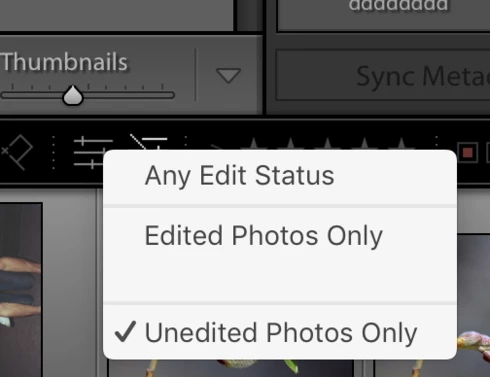
There is an unneeded blank line when using the right-click popup menu on the filter bar for the edited-unedited filters.

This topic has been closed for replies.

5 replies

Bob Somrak
Legend
August 13, 2019
Its fixed on Lr 8.4 and macOS 10.14.6.  Thanks
M4 Pro Mac Mini. 48GB
Rikk Flohr_Photography
Community Manager
August 13, 2019
Lightroom Classic 8.4 was released today and contained a fix for this issue. Please update to 8.4 and verify that you are no longer seeing the issue. Thank you!
Rikk Flohr: Adobe Photography Org
Adobe Employee
July 15, 2019
Hi Robert,

thanks for reporting the issue. We will work on fixing it.

Thanks
Bob Somrak
Legend
July 13, 2019
When clicking on it the photos are "Filtered" so it is a "real" filter bar.  The top filter bar is ONLY available in Library Grid view.  The bottom filter bar is available everywhere.   The setting in the two filter bars sync together.

I agree with you 100% that the right-click popup menu for "edits" and "labels" are kind of useless but the right-click popup menu for the "flags" is a lot faster and more intuitive than clicking away at the three icons to get what you want and is the only popup I use on this bar.  I just noticed this.

Its not a big issue but makes it look like something is missing.
M4 Pro Mac Mini. 48GB
Just Shoot Me
Legend
July 13, 2019
That is not the Filter bar. The Filter bar is at the top of the screen.

What you are showing is part of the Filmstrip.
Collapse the Filmstrip and the bar you are showing is hidden.

That space is also in the real Filter Bar right click menu too. But IMHO there shouldn't be a right click option (menu) for the filter bar. Kind of pointless as the options are already in the filters icons. Why even right click on one of the icons.