
P: Crash on use of AI Settings (11562305) (11564853)
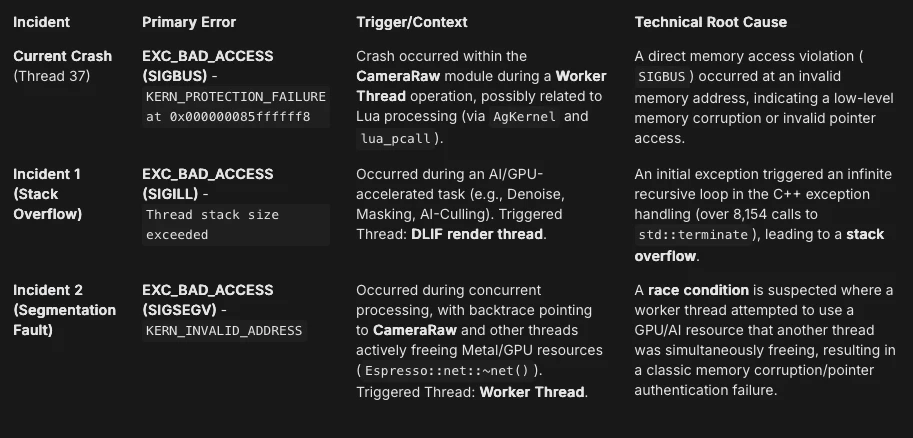
-
Version of the app:
Adobe Lightroom Classic 15.0 (Build 15.0) -
Platform and OS version:
-
Platform: Mac mini (Apple M1)
-
OS: macOS 26.1 (Build 25B78)
-
-
Core Application/Hardware Details:
-
Application Architecture: arm64
-
Logical processor count: 8
-
Built-in/Real memory: 8,192.0 MB
-
Dedicated GPU memory: 104.9MB used / 5,461.3MB max
-
Core Technology: CameraRaw (v18.0), AgKernel, AgSubstrate, Chromium Embedded Framework, libadobe_c2pa.dylib.
-
Key Configuration: Catalog file resides on an external SSD (/Volumes/2030/...).
-
AI/GPU Usage: GPU for Image Processing supported by default, but User Preference: Off, GPU for Preview Generation: Off(S3_5).
-
-
Basic steps to reproduce the problem:
AI Culling is the culprit each time, a tiny bulk of images under 3,000 will crash every single time. -
Expected result:
The AI task (Denoise, Lens Blur, etc.) should complete successfully, and Lightroom should remain stable. -
Actual result:
The application freezes and crashes (multiple distinct crash patterns observed related to AI/GPU processing). -
Full Crash Log: Attached (Data from previous step included above)
Lightroom Classic version: 15.0 [ 202510171722-44f87028 ]
License: Creative Cloud
Language setting: en-US
Operating system: Mac OS 26
Version: 26.1.0 [25B78]
Application architecture: arm64
Logical processor count: 8
Processor speed: NA
SqLite Version: 3.36.0
Built-in memory: 8,192.0 MB
Dedicated GPU memory used by Lightroom: 104.9MB / 5,461.3MB (1%)
Real memory available to Lightroom: 8,192.0 MB
Real memory used by Lightroom: 170.2 MB (2.0%)
Virtual memory used by Lightroom: 427,161.3 MB
Memory cache size: 278.3MB
Internal Camera Raw version: 18.0 [ 2389 ]
Maximum thread count used by Camera Raw: 5
Camera Raw SIMD optimization: SSE2
Camera Raw virtual memory: 35MB / 4095MB (0%)
Camera Raw real memory: 36MB / 8192MB (0%)
Cache1:
NT- RAM:0.0MB, VRAM:0.0MB, Combined:0.0MB
Cache2:
m:278.3MB, n:0.0MB
U-main: 195.0MB
Standard Preview Size: 3840 pixels
Displays: 1) 3840x2160
Graphics Processor Info:
Metal: Apple M1
Init State: GPU for Image Processing supported by default
User Preference: Off
Enable HDR in Library: OFF
GPU for Preview Generation: Off (S3_5)
Application folder: /Applications/Adobe Lightroom Classic
Library Path: /Volumes/2030/EXTRACTO_THE_MAGNIFICO/EXTRACTO_THE_MAGNIFICO.lrcat
Settings Folder: [USER_HOME]/Library/Application Support/Adobe/Lightroom
Installed Plugins:
1) AdobeStock
2) jf Bag-o-Goodies
3) jf Collection Publisher
4) jf Data Explorer
5) jf Metadata Viewer
6) jf Tumblr
7) ON1 Resize AI 2026
😎 Pic-Time
9) Shuffles
Config.lua flags:


 AdChoices