


Inspiring
February 13, 2025

P: Custom pages in book module overlaps in selection dialog

  • February 13, 2025
  • 4 replies
  • 823 views

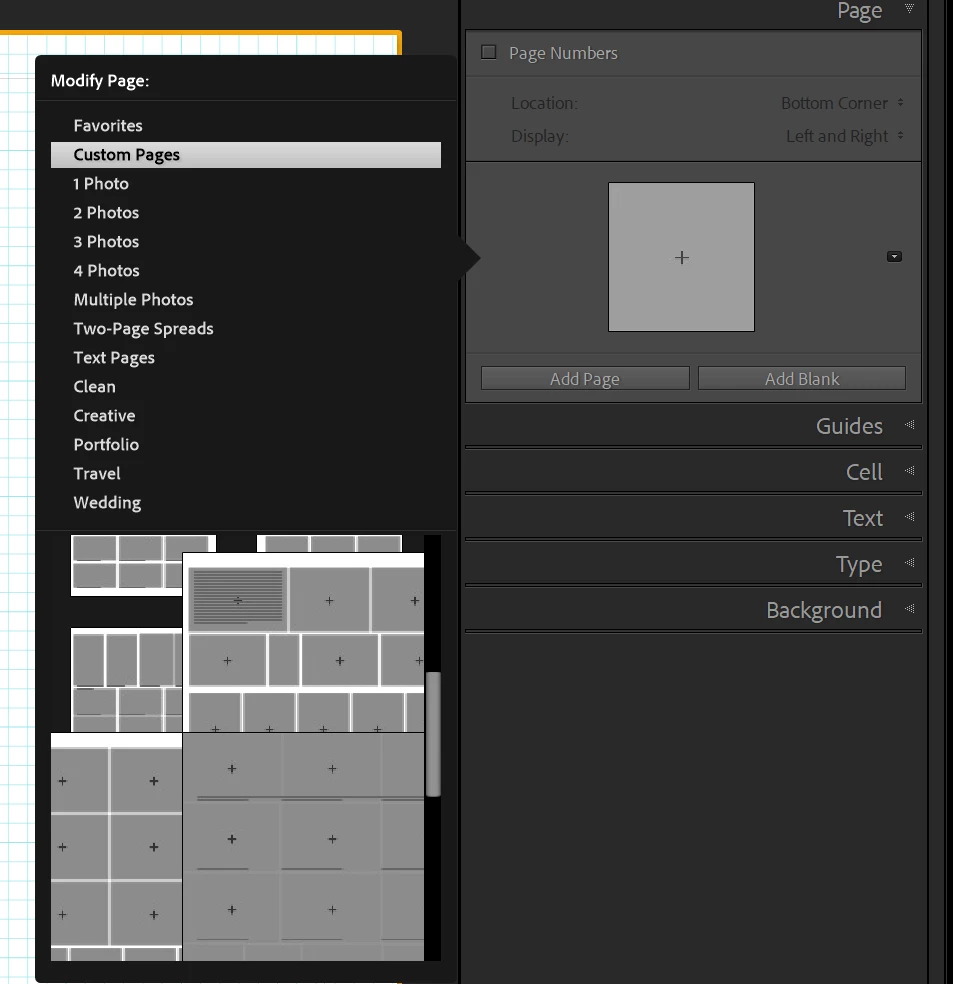
I have created customs pages in the book module and some of them overlaps so they are very difficult to see and select. Is there any trick to fix this or is it a bug? I have tried with different font sizes in the application prefs but not difference, now I use the default Automatic setting.

I find now way to expand the page selection dialog.

Here an example.
Cheers

Sten Palmqvist

4 replies

Rikk Flohr_Photography
Community Manager
Community Manager
August 13, 2025

Greetings all, 


A new update for the Adobe Photography products has been released.  The August update contains an update regarding this issue. 

If you do not see the update in your Creative Cloud Application, you can refresh it by pressing  [Ctrl/Cmd]+[Alt/Opt]+[ R ].

Note: It may take up to 24 hours for your update to be available in your Creative Cloud app.


Thank you for being so patient. 

Rikk Flohr: Adobe Photography Org
sten pAuthor
Inspiring
February 17, 2025

Great news!

Rikk Flohr_Photography
Community Manager
Community Manager
February 17, 2025

(Windows only) It looks like this has been around a couple of versions (was present in 14.1.1 also). We've opened a ticket for this. 

Thank you for your report. 

Rikk Flohr: Adobe Photography Org
Rob_Cullen
Community Expert
Community Expert
February 14, 2025

Weird.!  I doubt it is a "bug" as I see Custom Pages as expected with the scroll bar-  (No overlap as your screen-clip shows, and multi-cell pages show OK )


First try a Reset of the Preferences file- It often fixes unusual problems.

PREFERENCES RESET (Lr Queen)

Or try removing some of the problem page templates [Right Click] > [Remove from Custom Pages]


Regards. My System: Windows-11, Lightroom-Classic 15.1.1, Photoshop 27.3.1, ACR 18.1.1, Lightroom 9.0, Lr-iOS 10.4.0, Bridge 16.0.2 .
sten pAuthor
Inspiring
February 14, 2025

Thanks for your help and suggestions, I have tested them.

Preferences reset did not help, Custom Pages where not affected and still the same problem.

Removing from Custom Pages does not help, as soon as I add a page to Custom Pages it will appear in the same large size in the selection dialog.

I have also tried to add the Custom Page to Favorites so Favorites only contain one Custom Page but it is still displayed in the same large way and adding another Custom Page to Favorites overlaps the first one.

sten pAuthor
Inspiring
February 14, 2025

To reset preferences was a dangerous advice. Even though I made a copy of the whole Lightroom settings folder and restored it, all my color labels disappeared, who knows what else is gone. As I am working on a book I have made several pages in the book before noticing this so it is not really an option to restore a backup of the catalog.

I am not happy.