

johnrellis
Legend
Jun 6, 2019 9:04 PM UTC
Released

P: Develop Auto produces incorrect histograms

Develop Auto can produce noticeably incorrect histograms. To reproduce:

1. Import this raw file.

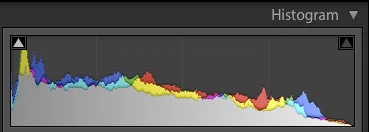
2. In Develop, click Auto. Observe this histogram:


3. Go to Library, then back to Develop on the same photo.

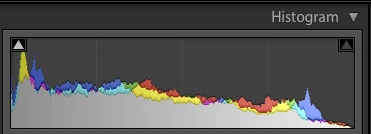
4. Observe this histogram, which differs a fair bit in the highlights:


Tested on LR 8.3.1 / Mac OS 10.14.5.

----------------------------------

The bug's cause: Auto doesn't set the following Develop settings, which are normally present in Process Version 5 photos:

Brightness = 50
Contrast = 25
Exposure = 0
Shadows = 5

Even though these settings are for Process Versions 1 and 2 and don't normally affect Process Version 5, somehow their absence is tripping up the histogram.

To prove this, insert these steps:

2b. Use  the Show Catalog Metadata plugin to examine the develop settings -- those  four settings are all nil.

3b. Use the plugin to examine the settings again, and notice those settings are now present with their default values.

4b. Use an SDK debugger to remove those settings from the photo, and notice the histogram changes immediately back to that from step 2:

s = targetPhoto:getDevelopSettings ()
s.Brightness, s.Contrast, s.Exposure, s.Shadows = nil, nil, nil, nil
catalog:withWriteAccessDo ("", 
    function () targetPhoto:applyDevelopSettings (s) end)


This topic is closed to new replies. Start a new post to keep the conversation going.

7 replies

Todd Shaner
Legend
Jun 17, 2020 9:02 PM UTC
The Auto Tone histogram bug is no longer exhibited on my Windows 10 system with LR 9.3
Translate
johnrellis
Legend
Jun 16, 2020 7:52 PM UTC
I tested the bug recipe in the first post and it no longer shows the bug, thanks.  LR 9.3 / Mac OS 10.15.5.
Translate
Rikk Flohr-Retired
Adobe Employee
Jun 16, 2020 1:12 PM UTC
Version 9.3, an update to Lightroom Classic, went live on June 15, 2020 and contains a fix for this issue. Please install the update and respond back if it does not cure the issue for you. Thank you for your patience!
Translate
Rikk Flohr: Adobe Photography Org
johnrellis
Legend
Jun 7, 2019 2:11 PM UTC
"Also the Histogram reverts to step 2 when you edit any settings after applying Auto. So it might not be specifically elated to the four settings you mentioned."

Agreed.
Translate
Todd Shaner
Legend
Jun 7, 2019 11:46 AM UTC
I can confirm this issue as well. It may be related to this other report John posted.

https://feedback.photoshop.com/photoshop_family/topics/lightroom-different-histograms-for-identical-...

Translate
Adobe Employee
Jun 7, 2019 4:08 AM UTC
Hi John,

Thanks for reporting this issue. I am able to reproduce it and have filed a bug for this.

Also the Histogram reverts to step 2 when you edit any settings after applying Auto. So it might not be specifically elated to the four settings you mentioned. In any case, we will investigate the issue.

Thanks,
Chinoy
Translate
johnrellis
Legend
Jun 6, 2019 11:18 PM UTC
To download the test photo, click the RAW link on this page: https://www.dpreview.com/sample-galleries/5097268292/fujifilm-x-pro2-real-world-samples/1294394279
Translate