Participant
April 3, 2018

P: Develop presets not sorting correctly

  • April 3, 2018
  • 123 replies
  • 2273 views

They used to be sorted alphabetically. In version 7.3 the order is random

This topic has been closed for replies.

123 replies

Rikk Flohr_Photography
Community Manager
June 25, 2018
The Lightroom Classic CC team is aware that there are still some sorting issues and are working through it for the next release. We appreciate your patience. 
Rikk Flohr: Adobe Photography Org
Inspiring
June 25, 2018
It's not clear to me if this issue is fixed or not. Many of the presets are not in alphabetical order but I'm not sure if they were designed to be so ordered. See the following post from about three months ago by Nathan Johnson:

"Nathan Johnson

  • 19 Posts
  •  
  •  18 Reply Likes
OK - I think I've solved this little mystery... it doesn't have anything to do with High Sierra (it's happening to me on El Capitan) BUT with the XMP presets conversion (and differences in convention between the .lrtemplate files and the .xmp files). 

Inside an .lrtemplate file, there are two name properties... "internalName" and "title"... when you initially create a preset file, they are both the same. But it is possible for the "title" to become different than the "internalName" (especially for preset developers who are editing .lrtemplate files directly). 

Example of .lrtemplate file:


So here, I must have changed the title directly in a text editor.

In any case, this didn't matter, because ALL PREVIOUS VERSIONS OF LIGHTROOM only looked at the "title" property to determine how to sort presets.

Enter LR Classic 7.3 and the .xmp conversion...

XMP also has a number of properties related to the name of the preset. The "Name" property is the displayed name...

BUT... XMP has a "SortName" propertyAnd this property determines how Lightroom actually sorts the presets.

When LR 7.3 converted .lrtemplate files to .xmp files, it took the "internalName" and placed it in the "SortName" property... 

Example...


AND unlike all previous lightroom versions, the .xmp presets actually do get sorted by the sortName property... 

So now, inside Lightroom Classic, you see presets that are mostly sorted, but with seemingly random deviations from that sorting...


All that to say, I wish that Adobe hadn't assumed that we wanted the internalName to now be used a sorting device (which it never had been before). But I don't think it is cool that now we have the ability to do custom orders without changing the display name!

Now... I've got a lot of presets to update..."

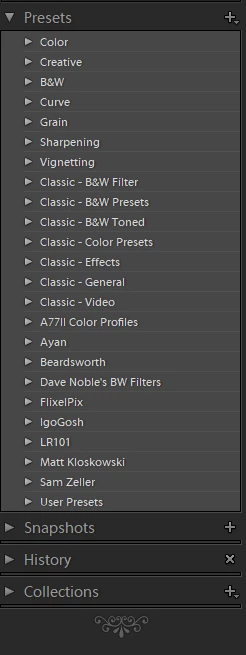
Here is a sample of what I am seeing in LR CC 7.4 after updating.

Todd Shaner
Legend
June 25, 2018
New Develop presets I create with LR 7.4 are out of sort order. It looks like they are being placed near the bottom of the folder list. I just created two presets shown below inside the red outline. I used John Ellis' 'Fix Presets' plugin with 7.3, which fixed the preset sort order. It's my understanding with LR 7.4 this plugin shouldn't be needed.

Victoria Bampton LR Queen
Community Expert
Community Expert
June 25, 2018
> I still have Presets scrambled all over the place.

Can you give examples Christine? Screenshots would be ideal. They've fixed the obvious issues, but there clearly could still be some outlying situations they haven't caught yet.
Victoria - The Lightroom Queen
Participating Frequently
June 25, 2018
I am sticking with 7.2 until this situation is resolved.
Inspiring
June 24, 2018
I still have Presets scrambled all over the place.  I now have went back AGAIN to the version that works.  When is this getting fixed please!!!! (June 24th)
Inspiring
June 21, 2018
This should be very helpful to Adobe as they continue to evolve LR Classic CC going forward. They seem like reasonable and useful features.
gregseth
Known Participant
June 20, 2018
Nothing more than a consistent folder system (we can consider preset groups are folders) so you can delete/rename/create folders independently from their content, and all actions accessible *at the same place* (right now new=create new preset to create parent group (!), rename=right click, hide=manage window, unhide=manage or right click).
Concerning sort, alphabetical order is fine as long as *all* groups are sorted even the default ones. If you can't do that, instead allow custom sort.
Inspiring
June 19, 2018
Grégory, you have registered your complaint. Now, as a developer could you offer your clear advice on what you'd consider to an acceptable implementation that would meet your needs and expectations.
JohanElzenga
Community Expert
Community Expert
June 19, 2018
Presets should sort alphabetically. You cannot choose another kind of sort yourself.
-- Johan W. Elzenga