
Participant
December 15, 2018

P: Develop sliders should only accept numeric inputs

  • December 15, 2018
  • 10 replies
  • 483 views

In Lightroom Classic CC 8.1, the inputs for develop settings accept alphanumeric characters instead of only numeric ones, which causes accessibility issues because it unnecessarily breaks keyboard shortcuts while the input is in focus.

I'm a heavy keyboard user in Lightroom, so a common workflow for me in the "develop" tab is to move from setting to setting using the tab key, then modify the setting using the up and down keys, or by directly typing a number, and pressing "J" to toggle shadow and highlight clipping. In Lightroom Classic 8.0 and below, this worked fine. In Lightroom Classic 8.1, pressing a keyboard shortcut like "J" while an input is selected results in this:
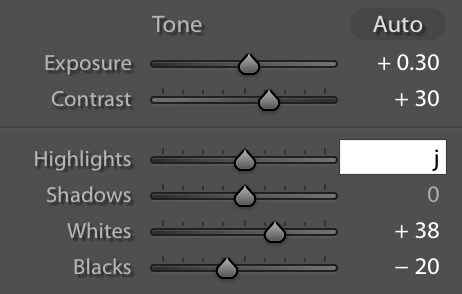


This of course results in a error message because "j" is obviously an invalid value, so why let me enter it to begin with? Could you go back to the previous behavior, which was ignoring non-numeric values on these inputs, so the keyboard shortcuts aren't broken?

This topic has been closed for replies.

10 replies

gfestevesAuthor
Participant
February 13, 2019
Yep, confirmed working on MacOS Mojave. Thank you!
Paul Tansley
Known Participant
February 12, 2019
Appears to be fixed - in 8.2 - I can go to any Develop box, enter a number - but if I press a shortcut key, it correctly goes to the shortcut R for rotate etc. Thx for fixing.
Hampshire Wedding Photographer / Documentary Wedding Photographer
Rikk Flohr_Photography
Community Manager
February 12, 2019
Greetings

Updates to Lightroom Classic CC (8.2), Lightroom CC for desktop (2.2), Lightroom CC.Mobile (Android and iOS) were released on Monday, February 11, 2019. Please verify that your issue is fixed by the current update.

Thank you for your patience.
Rikk Flohr: Adobe Photography Org
gfestevesAuthor
Participant
January 3, 2019
That's great to hear. Thanks, Rikk!
Rikk Flohr_Photography
Community Manager
January 3, 2019
We have a bug for this in the system and the original behavior should be restored in the next update. Thanks for the reports. 
Rikk Flohr: Adobe Photography Org
Paul Tansley
Known Participant
January 3, 2019


Pretty sure this is a new issue - as I've never noticed it before. 
When you are in an adjustment box (Develop Module), lets say Exposure for example. If you hit the G key (for example) it used to take you into Grid mode. Now it doesn't. It actually enters the character G in the exposure box.....!   Why would it do that? Clearly G or any other of the shortcuts is not a logical entry for any of the adjustment boxes. 
Very frustrating. As I automatically use M, Shift+M, Z, G etc. as shortcuts while I work. Now they don't auto jump out of the adjustments - as I'm sure they used to. 
Hampshire Wedding Photographer / Documentary Wedding Photographer
Participant
January 2, 2019


After installing version 8.1, when in the Develop Module if a numeric entry box has focus (the box is white and the cursor is in the box) when I type a keyboard shortcut, like "e" to go back to the Library module, instead of performing the action, a "e" is entered into the numeric entry box.  This is new behavior with this release.  It is annoying as I now have to press the "esc" key to defocus the numeric entry box and then use the shortcut key.  I am using a MacBook with OS 10.13.6.
Inspiring
December 17, 2018
I am using MacOS 10.12.6, recently updated Lightroom Classic CC to 8.1, and I am experiencing this problem. It was not a problem before the update. It is disrupting my workflow. 
gfestevesAuthor
Participant
December 17, 2018
Hmm, now I'm second guessing if this was an issue before or not (although it is an issue for me now). I'm using MacOS 10.14.1 and just updated Lightroom Classic CC to 8.1.
Legend
December 16, 2018
I tried LR versions 8.0, 7.5, 2015.14 & 5.71 and all had the same behaviour of showing an error message of 'invalid numeric entry' when typing an alpha character in these fields (All on Windows 7/10)
Are you using Windows or Mac OS?