

johnrellis
Legend
June 29, 2026

P: Edit Capture Time with multiple videos selected shows wrong message

  • June 29, 2026
  • 9 replies
  • 122 views

When multiple videos are selected, Edit Capture Time incorrectly shows the message for a single photo selected, rather than a message that indicates the capture times of the other videos will be adjusted by the same amount as the first:
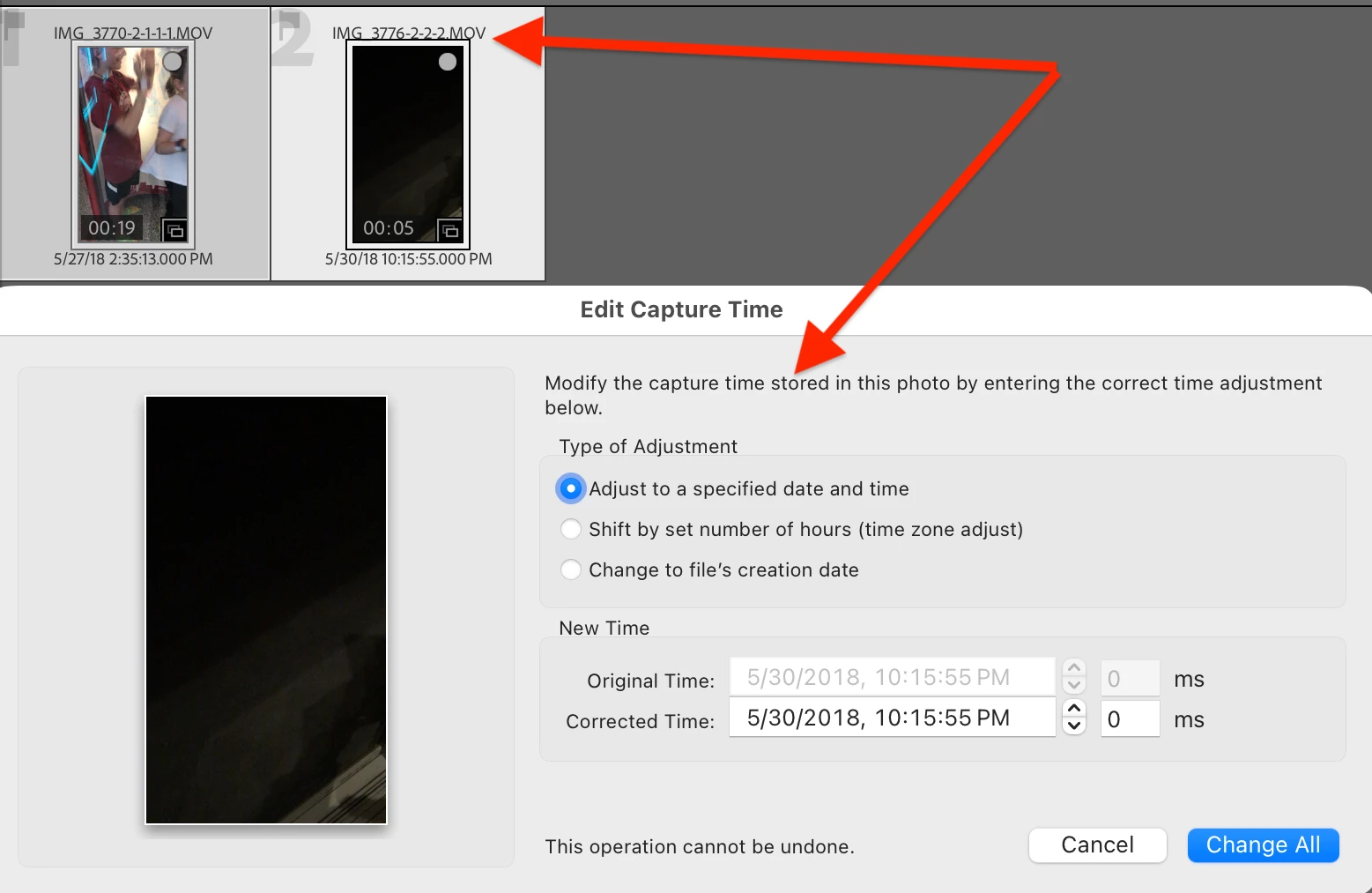
 

When multiple photos and at least one video is selected, the message incorrectly states that videos will not be adjusted:
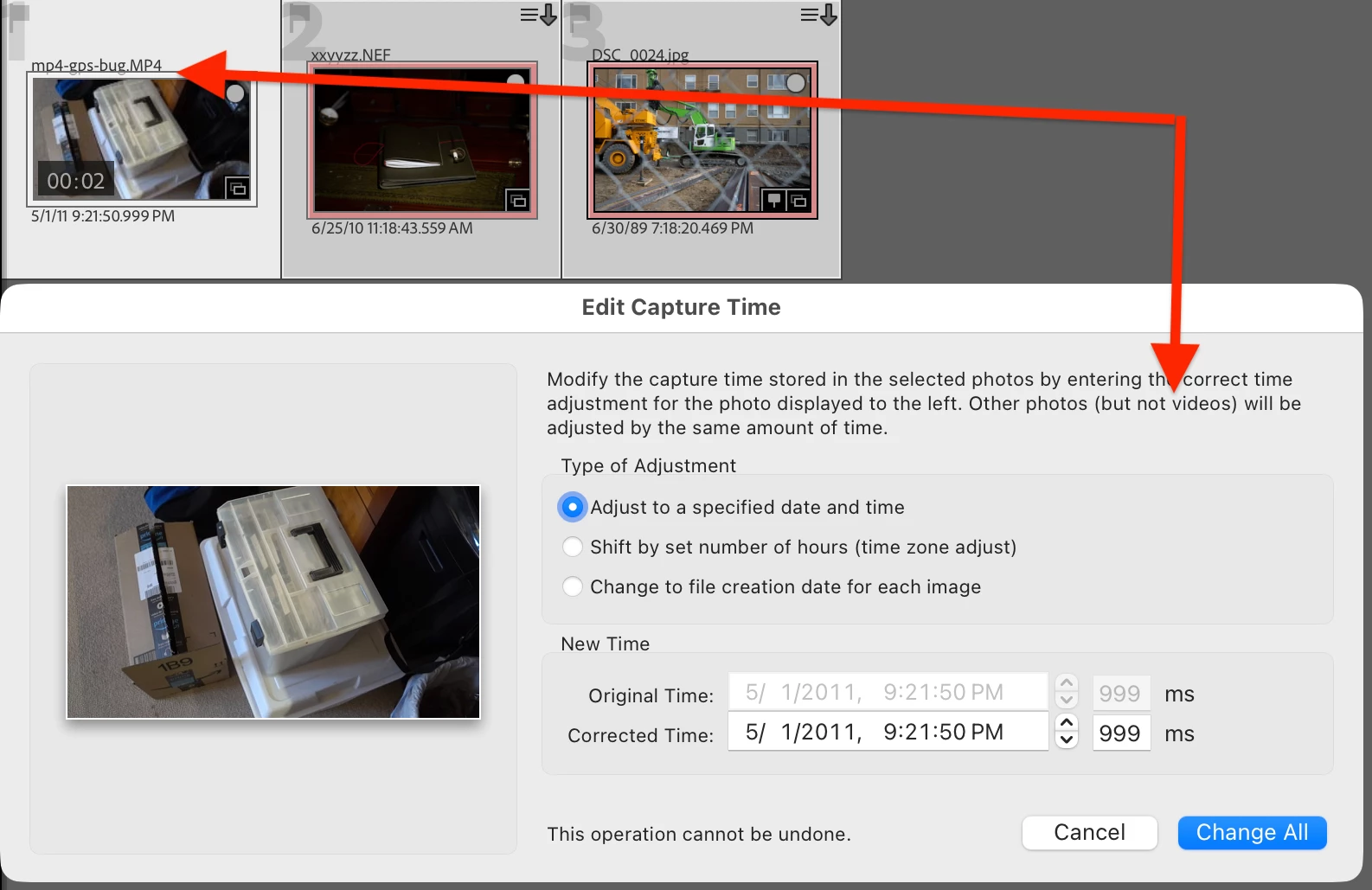
 

But in these cases, the problem is just with the message being displayed. Clicking Change All correctly adjusts the capture times of the other videos by the same amount as the most-selected photo/video.


Tested on LR 15.4.1 / Mac OS 26.4.1.

    9 replies

    johnrellis
    Legend
    August 3, 2026

    [View this post in your web browser. It contains formatting and images that don't appear in email.]

    @DClark064 it does not adjust the Capture Date/Times of the files to the specified date and time, but instead shifts them all by the same number of days, hours and minutes as the most selected file. 


    That is the normal behavior of Edit Capture Time when multiple files are selected. Normally, the dialog will display a message informing you of that:


    DClark064
    August 4, 2026

    delete

    johnrellis
    Legend
    August 3, 2026

    [View this post in your web browser. It contains formatting and images that don't appear in email.]

    @DClark064 I see a different message, 

    It appears that you have multiple files selected, so LR displays “Change All”. But the message displayed is for when a single photo is selected:


    I’m not able to reproduce this on LR 15.4.1 / Windows 11. So to guarantee Adobe has the necessary information to fix the bug:


    In Library Grid view, please do View > View Options > Grid View and ensure that File Name is displayed on the thumbnails.   


    Then post a screenshot showing the thumbnails selected along with the Edit Capture Time dialog, as shown in the top post of this thread. With that screenshot, hopefully we’ll be able to narrow down this variant and reproduce it for Adobe.

    DClark064
    August 4, 2026

    In grid view I see the same message you showed.  I loupe view I see the message I showed. 

    In the course of doing some testing of Edit Capture Time with video and RAW files I discovered that for video files the date/time metadata in the video file is not modified.  I was using Edit Capture Time to edit video files one at a time and saw in the LrC metadata panel that the Capture Date/Time, Date Time Original, and Capture Time are all modified, and the sort by capture time works, as expected.  But if I use the OS to copy the video file to a new folder, then sync the new folder in LrC, the imported copy shows the original Capture Date/Time, Date Time Original, and Capture Time metadata.  That means that I have two copies of the same file in two different folders in LrC with different date/time metadata.  If I examine the two video files using Sony’s Catalyst Browse, it shows the original date/time metadata for both files.  It seems that LrC Edit Capture Time is only modifying the metadata shown in the LrC metadata panel, not editing the metadata in the file itself.  This bizarre behavior makes using Edit Capture Time a bad idea for video files.  It would be best if it did nothing rather than present misleading information in the metadata panel.  I agree that the message presented needs to be modified, but the more troubling problem in my opinion is that the file metadata and the metadata presented in the metadata panel are not in agreement. 

    DClark064
    August 2, 2026

    I see a different message, and it does not adjust the Capture Date/Times of the files to the specified date and time, but instead shifts them all by the same number of days, hours and minutes as the most selected file. Consequently all but one is set incorrectly.  This is true for both RAW files and video files.


    I tested using LrC 15.4.1 Win 11.


    Unfortunately I now have lots of files with the wrong Capture Date/Time  and Date Time Original metadata.  What a mess!

    Known Participant
    July 13, 2026

    Why is an incorrect message a Feature Request and not a bug?

    johnrellis
    Legend
    July 13, 2026

    This thread is still in Bug Reports section, not the Feature Request section (look at the subheading at the top of the thread).

    Known Participant
    July 13, 2026

    My bad.  I saw the “Vote” option, and my head went to the voting on Feature Requests.