
Participant
November 12, 2014

P: "Edit in PS 2014" opens PS 2014 in Wrong Location

  • November 12, 2014
  • 32 replies
  • 945 views

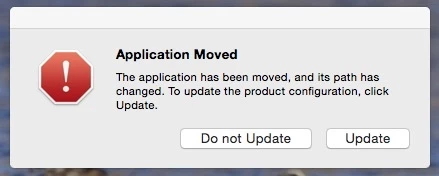
Software bug. MAC OS X Yosemite (and Mavericks before it). Using LR 5.6 & Photoshop CC2014.2.1 CC subscription. When an external firewire backup drive is connected (the backup drive is a clone of my MacBook Pro that stays connected for scheduled automatic backups, etc.), when I am in Lightroom and I select "Edit (an image) in Photoshop", Photoshop opens in the wrong location. In other words, it opens the Photoshop application on my backup drive instead and I get a warning dialogue box that says "The application has been moved, and its path has changed. To update the product configuration, click update". I have a choice to update or not. Of course, I choose to not update that. That's a bug (in my opinion.) When the backup drive is not connected the correct PS 2014 application opens. Bottom line: I should be able to keep a backup drive connected and have the Edit in Photoshop open the correct application.

One way you could easily solve this issue is to change External Editing in Preferences - change the first listing where it shows by default "Edit in Adobe PS CC 2014" - simply have the the user actually confirm where the application is located, thus forcing the user to choose (and thus confirm) the location of the PS 2014 application on the primary volume that the user intends to lave Lightroom open (would be similar to what the user has to do to choose an additional external editor in the same Preferences panel.

I'e tried everything to solve this bug. Reinstalling PS 2014 does not work. Deleting plists files does not work. There seems to be no user workaround available. Please solve this problem with a fix. Thank you. James Farrell, Prescott, AZ - jamesfarrell7681@gmail.com
This topic has been closed for replies.

32 replies

Inspiring
February 9, 2016
As a temporary measure rename the backup app to something like AAALightroom.
murmuring
Participating Frequently
February 9, 2016


This issue was happening in the previous version as well and I was hoping it would be fixed in this update, but it hasn't. After making a backup of my main drive to another, external drive, opening a file for the first time from LR calls the backup version instead of my original version.

bradleykincaid
Participant
February 3, 2016
PS-picker plugin still there and enabled. Disabled the plugin and it seems to be working now... Will keep an eye on it.
bradleykincaid
Participant
February 3, 2016
Does this plug-in still work. I have the same problem as I had last year in which LR edit in PS opens my backup copy of PS. Now I have latest versions of LR and PS and recently installed El Capitan. Seems that the plugin should still be there.
Participant
October 3, 2015


Whenever I try to edit a photo from lightroom using Photoshop (by pressing command-E), I get an error stating Adobe Photoshop CC 2015 cannot be opened because of a problem. I have tried uninstalling and reinstalling both Photoshop and Lightroom, but the error persists. I can edit if I start Photoshop first, and then, from Lightroom, press command-E.

Here are the problem details and system configuration:

Process: Adobe Photoshop CC 2015 [63083]
Path: /Volumes/VOLUME/_CCC SafetyNet/*/Adobe Photoshop CC 2015.app/Contents/MacOS/Adobe Photoshop CC 2015
Identifier: com.adobe.Photoshop
Version: ???
Code Type: X86-64 (Native)
Parent Process: ??? [1]
Responsible: Adobe Photoshop CC 2015 [63083]
User ID: 501

Date/Time: 2015-09-30 18:27:46.738 -0500
OS Version: Mac OS X 10.10.5 (14F27)
Report Version: 11
Anonymous UUID: DE4016F7-7980-DF15-C53A-355DFCF79AE0

Sleep/Wake UUID: 6E6AF816-B394-4683-8C58-C51FFCCFF946

Time Awake Since Boot: 150000 seconds
Time Since Wake: 670 seconds

Crashed Thread: 0

Exception Type: EXC_BREAKPOINT (SIGTRAP)
Exception Codes: 0x0000000000000002, 0x0000000000000000

Application Specific Information:
dyld: launch, loading dependent libraries

Dyld Error Message:
Library not loaded: @6878337_path/../Frameworks/aif.framework/Versions/A/aif
Referenced from: /Volumes/VOLUME/_CCC SafetyNet/*/Adobe Photoshop CC 2015.app/Contents/MacOS/Adobe Photoshop CC 2015
Reason: no suitable image found. Did find:
/Volumes/Cinderella/_CCC SafetyNet/2015-08-16 (August 16) 19-52-05/Applications/Adobe Photoshop CC 2015/Adobe Photoshop CC 2015.app/Contents/MacOS/../Frameworks/aif.framework/Versions/A/aif: code signature invalid for '/Volumes/Cinderella/_CCC SafetyNet/2015-08-16 (August 16) 19-52-05/Applications/Adobe Photoshop CC 2015/Adobe Photoshop CC 2015.app/Contents/MacOS/../Frameworks/aif.framework/Versions/A/aif'

/Volumes/Cinderella/_CCC SafetyNet/2015-08-16 (August 16) 19-52-05/Applications/Adobe Photoshop CC 2015/Adobe Photoshop CC 2015.app/Contents/MacOS/../Frameworks/aif.framework/Versions/A/aif: code signature invalid for '/Volumes/Cinderella/_CCC SafetyNet/2015-08-16 (August 16) 19-52-05/Applicat

Binary Images:
0x7fff6ceac000 - 0x7fff6cee2887 dyld (353.2.3) /usr/lib/dyld
0x7fff86e99000 - 0x7fff86ee8ff7 com.apple.opencl (2.4.2 - 2.4.2) /System/Library/Frameworks/OpenCL.framework/Versions/A/OpenCL

Model: MacBookPro8,2, BootROM MBP81.0047.B2A, 4 processors, Intel Core i7, 2 GHz, 16 GB, SMC 1.69f4
Graphics: Intel HD Graphics 3000, Intel HD Graphics 3000, Built-In
Graphics: AMD Radeon HD 6490M, AMD Radeon HD 6490M, PCIe, 256 MB
Memory Module: BANK 0/DIMM0, 8 GB, DDR3, 1333 MHz, 0x029E, 0x434D5341384758334D314131333333433920
Memory Module: BANK 1/DIMM0, 8 GB, DDR3, 1333 MHz, 0x029E, 0x434D5341384758334D314131333333433920
AirPort: spairport_wireless_card_type_airport_extreme (0x14E4, 0xD6), Broadcom BCM43xx 1.0 (5.106.98.100.24)
Bluetooth: Version 4.3.6f3 16238, 3 services, 27 devices, 1 incoming serial ports
Network Service: Wi-Fi, AirPort, en3
Serial ATA Device: HGST HTS721010A9E630, 1 TB
Serial ATA Device: HL-DT-ST DVDRW GS31N
USB Device: FaceTime HD Camera (Built-in)
USB Device: Hub
USB Device: BRCM2070 Hub
USB Device: Bluetooth USB Host Controller
USB Device: Apple Internal Keyboard / Trackpad
USB Device: Hub
USB Device: USB 2.0 Hub [MTT]
USB Device: Keyboard Hub
USB Device: Apple Keyboard
USB Device: USB Receiver
USB Device: Backup+ Desk
USB Device: USB 2.0 Hub
USB Device: LaCie Hard Drive USB
USB Device: IR Receiver
Thunderbolt Bus: MacBook Pro, Apple Inc., 22.1
Inspiring
August 18, 2015
The plugin works for me. Cannot understand why it is needed in August 2015 after the bug was raised so long ago. I have CC 2015 and a backup mirror permanently mounted that Lightroom seems to have the hots for!
Participant
June 3, 2015
I have this too: Open with... from Finder behaves like Edit in... out of LR did (although the Plugin has fixed the issue from LR)
So just fyi
Participant
April 22, 2015
This is my problem and I do not think it is the same....
When PS is not open and I edit from LR>PS, PS will open in the front. If PS is open and I edit from LR>PS w a DNG PS will not come to the front (stay in background but images opens) but it will come to the front if I edit a .tiff, .jpg or png that is in LR. This happened when I moved LR cat from an external HD to the internal HD and that is where it is now and staying. It must have to do with a preference somewhere or how LR reads the DNG file or the sequencing of LR.

Additionally I just had a new 2Tb HD installed. Also I just finished loading the CC updates.

Any suggestions are appreciated and all ARC is up to date.

PShop always opens in the correct CC copy, just not in front
Inspiring
April 7, 2015
Thanks for this work around. I have been dealing with this on and off for awhile, and this seems to be working!
Inspiring
February 20, 2015
I too suffered from Lightroom 5 using PS CS6 on my backup disk.
I simply changed the name of the backup app to AAAAAdobe Photoshop CS6.app
Lightroom then used the correct app on my system disk.
Just remember to change the name back if when restoring from backup.