

P: Export doesn't choose a new name on case-sensitive volumes
Export doesn't always choose a new name for files exported with the option Existing Files: Choose A New Name when exporting to case-sensitive volumes.
To reproduce:
1. Import a photo with an upper-case file extension, e.g. DSC02512.ARW, that resides on a case-sensitive volume.
2. Export the photo with these options:
Export To: Same folder as original photo
Add to This Catalog
Existing Files: Choose a new name for the exported file
Image Format: Original
3. Observe this error message: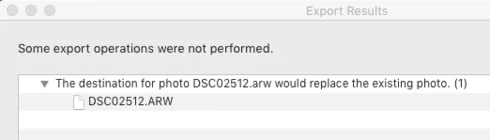
The fix is simple -- when checking whether the file already exists, LR should use the original path to the photo unmodified, rather than lower-casing the extension.
Someone tripped over this bug with an Export preset that duplicated cataloged photos:
https://community.adobe.com/t5/lightroom-classic/problem-with-virtual-copies/m-p/10751757#M163989
(And yes, that user had a good reason for not using virtual copies.)


 AdChoices