



johnrellis
Legend
November 24, 2024

P: ExtractPreviews script in help article always fails

  • November 24, 2024
  • 11 replies
  • 1902 views

The ExtractPreviews script in this help article:

https://helpx.adobe.com/lightroom-classic/kb/extract-previews-for-lost-images-lightroom.html 


doesn't work in LR 14.0.1 on Mac OS 14.6.1 or Windows 11. No matter which photos are selected, it always produces this error:
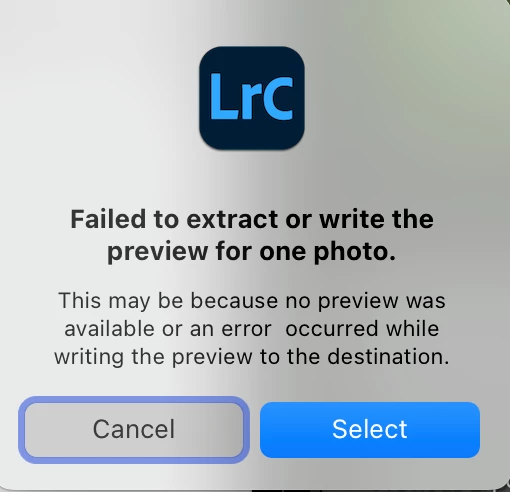
 

This appears in the console log when you run the script:


2024-11-24 11:54:29.038 Adobe Lightroom Classic[77127:11037041] Could not open file "/Users/john/Lightroom/cats/Test-14/Test-14 Previews.lrdata/0/062F/062F71E0-1BE7-43EA-B951-332C8CF33405-2bbfa387aba361443ffb2e579b214e8c.lrprev"
    0: field    parseMultiSectionFile          - C
    1: upvalue  ?                              - 71:134+5
    2:          [unnamed]                      - 108:205+4
    3: global   pcall                          - C
    4: method   next                           - 187:445+27
    5: upvalue  ?                              - 1438065897:158+21
    6: upvalue  ?                              - 1438065897:489+11
    7: upvalue  ?                              - 1478146055:232+7
    8:          [unnamed]                      - 1131627717:301+11
    9: global   pcall                          - C
   10:          [unnamed]                      - 1131627717:313+21
   11: method   handleResponse                 - 1131627717:526+84
   12: method   handleResponse                 - 435542093:498+14
   13:          [unnamed]                      - 435542093:442+45
   14: global   pcall                          - C
   15: method   processPendingResponses        - 435542093:549+31
   16:          [unnamed]                      - 435542093:331+6
<end>


That error message indicates that the script, though advertised as being for LR 13.3 and later, is still looking for ".lrprev" files in the pre-13.3 preview cache format.


11 replies

johnrellis
Legend
January 16, 2025

[This post contains formatting and embedded images that don't appear in email. View the post in your Web browser.]


@Jessica_Rod7


That's curious, since the selected photo clearly has a preview that's being displayed!


You might try the Extract Cached Image Previews plugin. The developer has an excellent reputation for robust, featureful plugins, and that plugin is more useful than Adobe's script.


Participant
January 16, 2025

This is the error message I get. I followed the link: https://helpx.adobe.com/lightroom-classic/kb/extract-previews-for-lost-images-lightroom.html Extracted preview script for Lightroom Classic 13.3 and later. 
I was able to extract 231 out of 1,110 previews but the rest give me this error message.  Any help would greatly be appreciated! Thank you.

johnrellis
Legend
January 16, 2025

@Jessica_Rod7: "Any update? I'm having trouble with my deleted photos and can't extract preview photos"


The problem reported at the top of this thread, ExtractPreviews producing an error, was fixed just a few days after it was reported.  


Please provide more details about the precise steps you're taking and what you're observing. If you see an error message, please provide a full-resolution screenshot (not a phone pic) of the ENTIRE LR window, including the error message.

Participant
January 16, 2025

Any update? I'm having trouble with my deleted photos and can't extract preview photos 😞

johnrellis
Legend
December 14, 2024

@defaultz450rk3zctwv: "Despite what the latest comment says I have updated and it still does not work!"


I tested again with my LR 14.1 / Mac, and the script extracted previews as its supposed to.


Perhaps delete the existing script from the Scripts folder and start the instructions from scratch:

https://helpx.adobe.com/lightroom-classic/kb/extract-previews-for-lost-images-lightroom.html


And if that doesn't work, please describe in more detail what you're seeing or not seeing.

Participant
December 13, 2024

Despite what the latest comment says I have updated and it still does not work!

Rikk Flohr_Photography
Community Manager
December 12, 2024

Greetings all, 


A new update for Adobe Photography Products has been released.  The December update contains an update for this issue. 

If you do not see the update in your Creative Cloud Application, you can refresh it by hitting [Ctrl/Cmd]+[Alt/Opt]+[ R ].

Note: It may take up to 24 hours for your update to be available in your Creative Cloud app.


Thank you for being so patient.

Rikk Flohr: Adobe Photography Org
johnrellis
Legend
November 28, 2024

Very good, I'll let the original thread know.

Sunil_Bhaskaran
Inspiring
November 28, 2024

Please check the Helpx page now. This issue is fixed. 

Thanks,
Sunil

Mohit Goyal
Community Manager
Community Manager
November 26, 2024

Hi John,


We're able to reproduce this at our end and logged a bug. We will share an update with you all here.


Thanks,

Mohit