

johnrellis
Legend
April 28, 2015

P: Face tagging with Parent > Child keyword notation causes errors

  • April 28, 2015
  • 10 replies
  • 790 views

You can't use the Parent > Child keyword notation when tagging faces -- LR will rename the child keyword to be a screwy name, and it can cause an internal error.

To reproduce:

1. Create two parent keywords, Friends and Family.

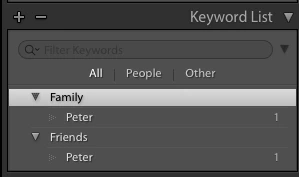
2. Under each of those keywords, create the child keywords Peter and assign each Peter to a separate photo. The hierarchy now looks like:

3. Go to a photo with no keywords, draw a face rectangle, and enter "Family > Peter" into the person box.

4. LR incorrectly renames the keyword Family > Peter to be Family > "Family > Peter":
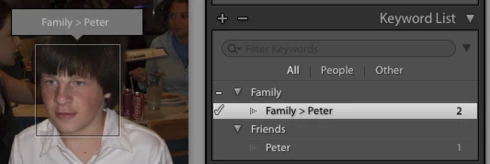

Sometimes this can result in a LR internal error, "name is not unique", though I haven't been able to reproduce the exact steps for this to happen:

This topic has been closed for replies.

10 replies

johnrellis
Legend
June 18, 2015
Very good, thanks.
Rikk Flohr_Photography
Community Manager
June 16, 2015
This was fixed in the CC 2015.1 / 6.1 Update.
Rikk Flohr: Adobe Photography Org
Known Participant
May 8, 2015
Thanks!
Participating Frequently
May 8, 2015
Hi John,

I'm not able to reproduce the "internal error" problem, but I am able to reproduce the other problem, and have reported it to the Lightroom engineers.

Thanks,
Ben
johnrellis
Legend
April 28, 2015
You did indeed mention that.
Victoria Bampton LR Queen
Community Expert
Community Expert
April 28, 2015
I guess some hierarchies could get too long to show in the Faces field under the face itself. That's why I specifically mentioned making them unique in the blog post (or I hope I did.... I'll go running off to check!)
Victoria - The Lightroom Queen
johnrellis
Legend
April 28, 2015
This arose when someone reported having two members of the family with the exact same first, middle, and last name (no Jr, Sr, or II). I have a number of people in my family with the exact same name, as well. There are two Ellis Ellis Ellises (yeah, New Englanders were sometimes quite strange).

While these relatively rare use cases can be worked around (e.g. with "Cousin" or "Uncle" or other annotations), it seemed natural to use the keyword hierarchy to resolve the ambiguity. (I first thought of that after reading your Whats New page, where you mention using the hierarchy for organization.)
Victoria Bampton LR Queen
Community Expert
Community Expert
April 28, 2015
Hmm, I think the renaming bit's a bug, and internal error's clearly not meant to happen. So yeah, I think you're right, reading back through the steps again.
Victoria - The Lightroom Queen
johnrellis
Legend
April 28, 2015
Is it expected behavior that a keyword named "Family > Peter" is created underneath Family? Or that an internal error sometimes occurs? Both seem like bugs.
Victoria Bampton LR Queen
Community Expert
Community Expert
April 28, 2015
It's expected behavior - faces ignores hierarchy. Use full names so you don't end up with duplicates.
Victoria - The Lightroom Queen