



P: Focus On Subject ignored when copying Lens Blur from master to a virtual copy or vice versa
When copying Lens Blur settings from a master photo to a virtual copy, or vice versa, the Focus On Subject setting is ignored.
To reproduce on LR 14.5 / Mac OS 15.5:
1. Download and open this tiny catalog:
It has three photos: a.jpg, a virtual copy of a.jpg (Copy), and b.jpg.
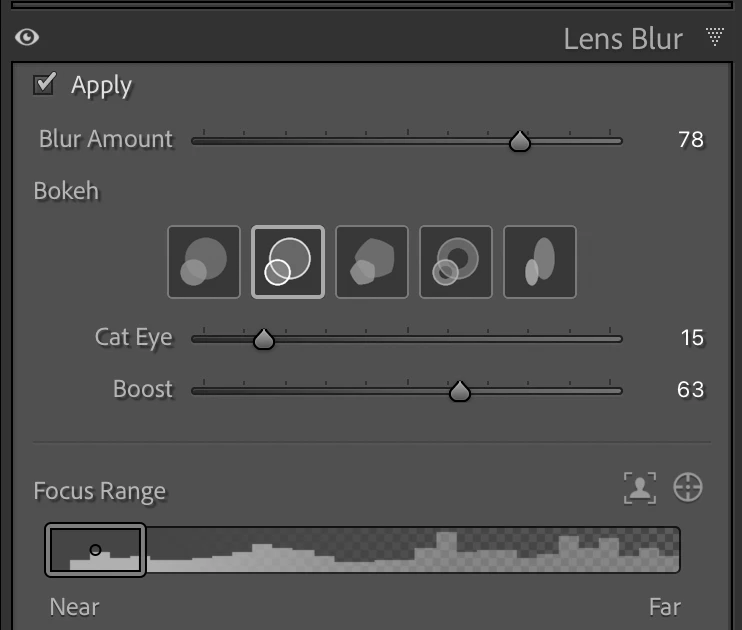
2. Observe that a.jpg has these Lens Blur settings, including a Focus Range that's been changed from the initial AI subject detection:
3. Select all three photos, with a.jpg most selected, and do Sync Settings, checking just Lens Blur and Focus On Subject.
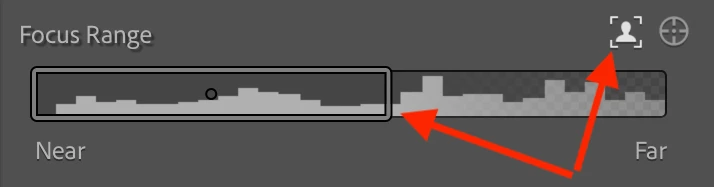
Observe that on b.jpg, all Lens Blur settings have been copied, except for Focus Range, which has been reset to the initial AI subject detection (correct):
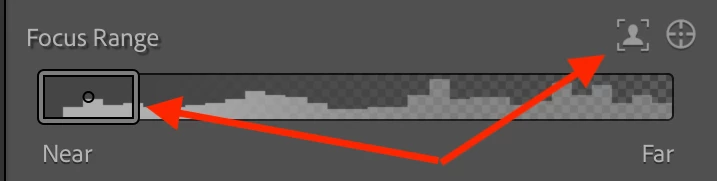
On the virtual copy a.jpg (Copy), however, the Focus Range remains the manually set range from the source photo a.jpg (incorrect):
4. Select just a.jpg and b.jpg and click Quick Develop > Reset All.
5. Select all three photos, with a.jpg (Copy) most selected. Do Sync Settings, checking just Lens Blur and Focus On Subject.
Observe that settings have been correctly copied to b.jpg, except for Focus Range, which which has been reset to the initial AI subject detection (correct).
Observe that the settings have been correctly copied to a.jpg, except that Focus Range remains the manually set range from the source photo a.jpg (Copy) (incorrect).


 AdChoices