
Participating Frequently
Apr 8, 2014 6:57 PM UTC
Released

P: Fujifilm X-trans cameras and halo around blue areas

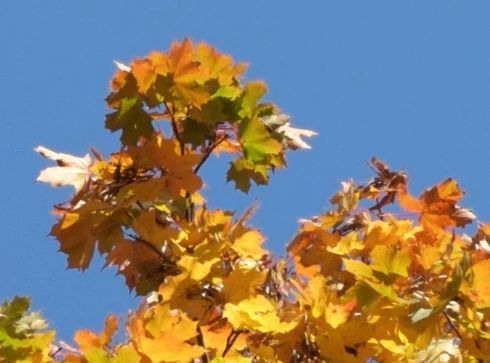
Objects photographed against the sky or other blue coloured areas get a "halo" when images from Fujifilm X-trans cameras are developed in Lightroom.

My camera is a Fujifilm X-T1. Before this, I owned the X-E series cameras and noticed the same thing with them. Today I installed the latest version of Lightroom (5.4) and the problem is still there.

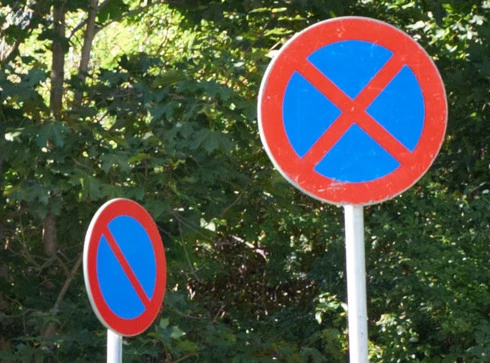
Lightroom doesn't handle blue coloured areas well. Take a look at the blue and red traffic signs. You may need to click the images to view them full size (they are 100 % crops).
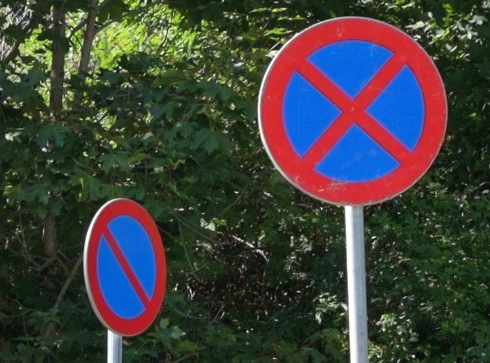


Compare this with the same raw file developed in Capture One:


Things photographed against a blue sky get a soft "halo":


Looking at the red channel only shows this clearly
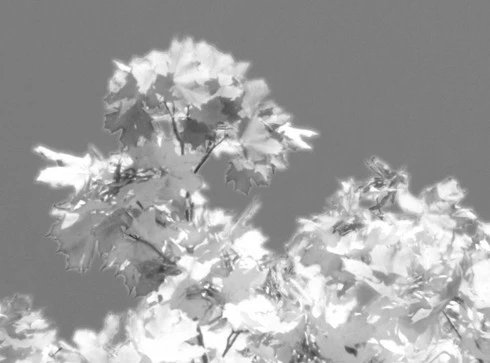


For comparison, the same image in Capture One
This topic is closed to new replies. Start a new post to keep the conversation going.

16 replies

Participating Frequently
Jun 17, 2015 5:20 PM UTC
That's a good question. I used to use DNG but with Fuji I use RAF because I don't know what the converter does.
Translate
Inspiring
Jun 17, 2015 5:15 PM UTC
Does the improvement also apply to files converted to DNG on import, or only to original RAW processing? (Sorry if this is too simple a question, but I'm not sure what the conversion to DNG entails - is it via the ACR Converter, in which case the damage has already been done?
Translate
Participating Frequently
Jun 17, 2015 2:30 PM UTC
I also can confirm that 6.1 produces better results than 6.0. I have some old pictures I processed with Iridient trial and the 6.1 are much closer in quality than the 6.0 ones were. But there is still room for improvement.
Translate
Inspiring
Jun 17, 2015 2:21 PM UTC
Apparently not. At least the problem is still evident in the tram photo used in this DPR article: http://www.dpreview.com/articles/1887...
Translate
Barwick Green
Participant
Jun 17, 2015 10:40 AM UTC
I have processed the same image in LR5.7 and LR6.1 and there's a significant improvement, here are some 100% crops. In each case the LR5.7 image comes first followed by the LR6.1 image. Processing was fairly normal, modest sharpening with detail at 100%. The first two shots are from near the centre of the image, the second two are from the corner. Shot with 18 - 135 at f8.


Translate
Participating Frequently
Jun 17, 2015 10:30 AM UTC
I wasn't able to find the same raw file. For the LR 6.1 conversion I used another raw file from the same day, shot with a smaller aperture, so the background is sharper/more contrasty.

What's important to me is the rendering of the blue/red areas of the traffic sign (you need to click the images to see them at 100 %). LR 6.1 is a clear improvement.
Translate
Inspiring
Jun 17, 2015 9:55 AM UTC
Also a huge difference in sharpness. Did you change any other settings between both versions, or is this the default rendering?
Translate
Participating Frequently
Jun 17, 2015 5:23 AM UTC
Yes, there is an obvious improvement. Compare the traffic sign above (LR 5.x) with this image from LR 6.1. Both are 100 % crops; you need to click the images to see them att full size.

Translate
Participating Frequently
Jun 16, 2015 7:46 PM UTC
Will this improve already processed images I have in LR?
Translate
Barwick Green
Participant
Jun 16, 2015 7:22 AM UTC
Now I might pay for the upgrade from LR5!
Translate