



ouiouiphoto
Known Participant
November 7, 2023

P: GPU used even if you deactivate it when exporting and confirm to LrC not to use it

  • November 7, 2023
  • 15 replies
  • 3594 views

Dear all


Windows11

LrC 13.0.1


Step to reproduce. 


1) Activate GPU. Select several photos with development. Export them. Look at your resource monitor for GPU
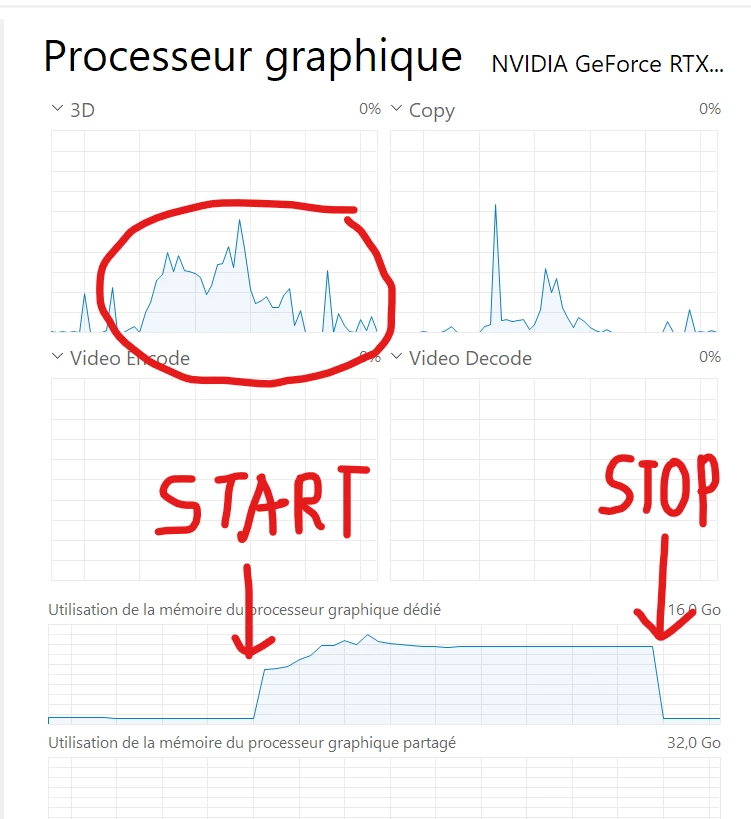
 

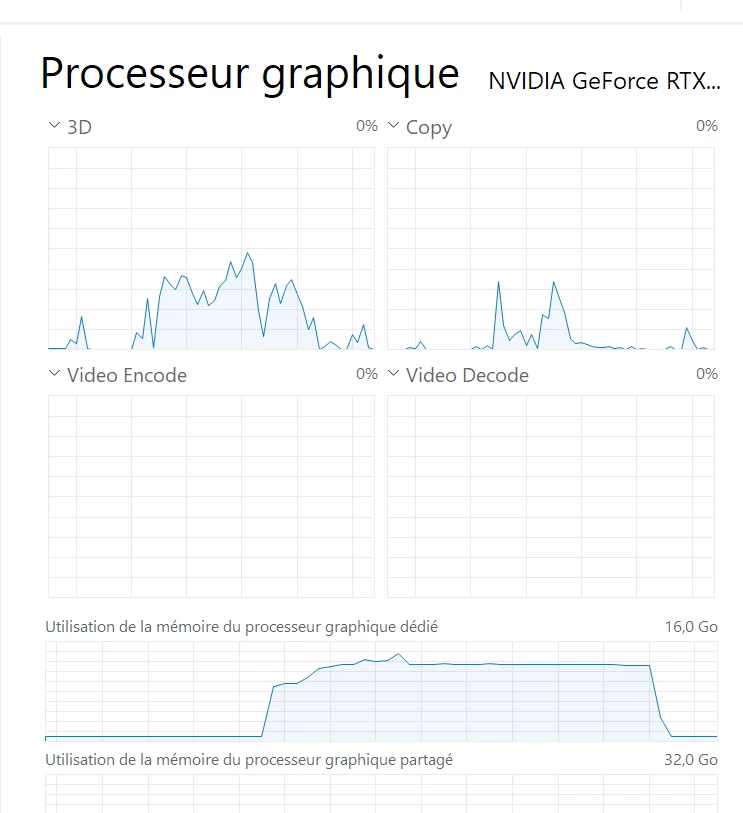
2) Deactivate GPU. Restart Lightroom. Select the same photos. Launch the same export 


3) A warning message tells you that the GPU is deactivated and ask you if you want to activate to speed up export. Press cancel to keep it deactivated. Look at you resource monitor for the GPU. The GPU and GPU memory is used anyway
 

 Kind regards

This topic has been closed for replies.

15 replies

EnergyPhotos
Known Participant
December 10, 2023

I have the exact same problem. GPU is always used, no matter if i check it in preferences or not. 

I am looking at resource monitor and other hardware monitors, and i am 100% sure. 

In the past, checking or unchecking "use GPU for export" did make a big difference (off  = CPU ~100%, GPU 0%, on = CPU 40%, GPU 35%) 


Participant
December 10, 2023

Same problem with my iMac late 2015 with AMD Radeon R9 M390 2gb using v13.02

Stuck on my work, please make something about it.

Participating Frequently
November 26, 2023

Observing exactly the same discussion. I mean bug. Waiting for reply. I mean fix.

Rikk Flohr_Photography
Community Manager
Community Manager
November 10, 2023

The team has confirmed and we've logged a bug for the behavior. 

Rikk Flohr: Adobe Photography Org
ouiouiphoto
Known Participant
November 7, 2023

Hello @Rikk Flohr: Photography Any idea why this one has been moved to Discussions. As far as I remember, I have created it as a bug. And using GPU when you ask not to use it seems a bug to me no ? 


Kind regard

.Sheepdog trying to help Lightroom and Photoshop beginners
Rikk Flohr_Photography
Community Manager
Community Manager
November 7, 2023

Short answer 24/25 'bugs' posted to this forum do not turn out to be actual new bugs.  (2) are already reported and (~22) are not really a bug.  

Long answer: I attempted to replicate what you are seeing on your system with my Windows system and I do not see that bad behavior.  I cannot reproduce the behavior so it gets kicked to Discussions which has 10x the traffic of bugs to see if anyone else sees what you see. 

But, the most common answer for why bugs are moved is they simply lack the necessary information to even begin to attempt to reproduce. 

Additionally, Bugs is only for confirmed bugs who have a matching ticket in our bug tracking system. The goal is that if you see it in Bugs - you can bank on its being reported and triaged by the team. It is not a dumping ground for every bad behavior experienced.


Rikk Flohr: Adobe Photography Org
ouiouiphoto
Known Participant
November 7, 2023

Thanks for your answer @Rikk Flohr: Photography 


If you follow this bug https://community.adobe.com/t5/lightroom-classic-bugs/p-artifacts-resembling-clipping-warnings-odd-bright-colored-pixels-in-shadow-areas-older-macs/idi-p/13865745 you will see that deactivating the GPU is one solution. But some user has done it and the problem still exist in export. And my print screen explain why


Lets see if it is more useful in the discussion side of this forum


 Kind regards


.Sheepdog trying to help Lightroom and Photoshop beginners