


P: Histogram behavior in out of range areas
Lightroom Classic 13.0, macOS Ventura 13.6
Lightroom 13 introduced new histogram style purportedly to accomodate HDR but the new style makes it difficult to actually use histogram to determine areas in gistogram free of data and settong white/black levels correctly.
This all being discussed to death in this post https://community.adobe.com/t5/lightroom-classic-ideas/p-reinstate-version-12-histogram/idi-p/14157437 which was moved to ideas preseumably because it asks to reinstate v12 histogram. It is also being discussed here https://www.alex-kunz.com/new-features-in-lightroom-classic-13/ .
I now rephrase the request for bugfix - fix the new histogram in v13 to make it show gaps in highlights and blacks clearly (similarly to the way v12 one did where it can be done with ease).
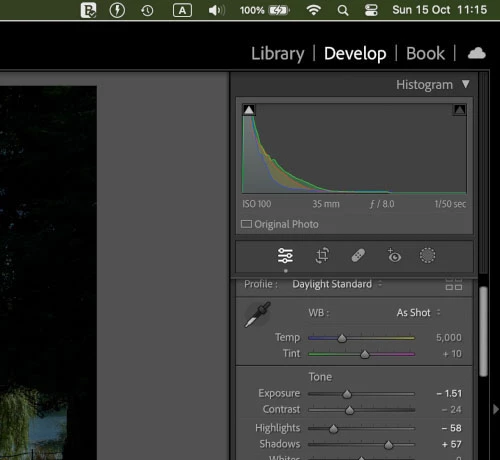
The demonstration of the differences between old style and new style where 1-1.5 stop free part of histogram in highlights can clearly be seen in v12:
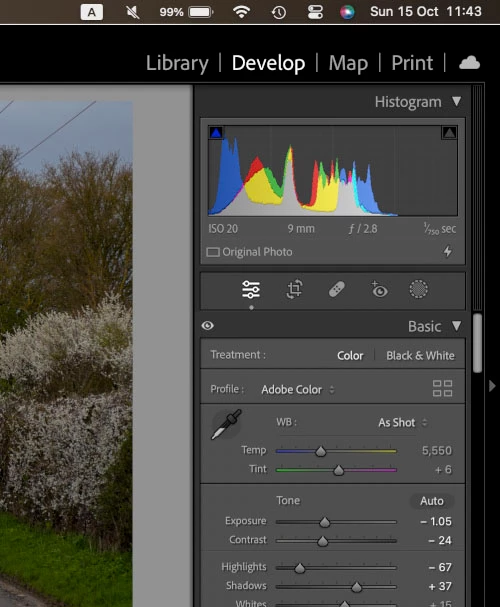
and not so clearly in v13
 AdChoices