
Participating Frequently
July 16, 2018

P: HTC U12+ Raw files shows incorrect color temperature number

  • July 16, 2018
  • 6 replies
  • 300 views

After I imported raw photos taken with HTC U12+, it shows incorrect temperatures and tint, as it's showed in the following picture:
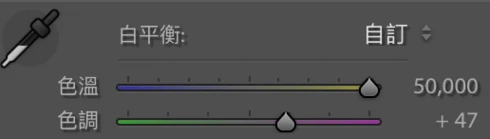
Every raw photo, no matter what temperature I've adjusted before I took it with U12+, showed the temperature at 50,000k, which is not supposed to happen.
Also, the Tint shows rather high digits compared to the normal ones.
It doesn't happen in other softwares that are able to edit raw files, such as Snapseed, which shows the correct temperature (4900k)
Such an issue has been recognized by HTC, and they're working on it, but I was told to report the bugs here as well since it's not clear whose fault it is. Please fix this bug. Thank you.

This topic has been closed for replies.

6 replies

Rikk Flohr_Photography
Community Manager
March 26, 2020
HTC has updated their firmware for this device and this will correct this issue. Please update your firmware.

Thank you. 
Rikk Flohr: Adobe Photography Org
Rikk Flohr_Photography
Community Manager
July 16, 2018
Sorry, estimates on bug fixes and/or next version release dates are not available in advance of release. 
Rikk Flohr: Adobe Photography Org
Participating Frequently
July 16, 2018
Is there any information about when the bug will be fixed or the new update will be released?
Rikk Flohr_Photography
Community Manager
July 16, 2018
I got the sample Jeffrey and also got the same result. I am going to log it with the team as a bug. Thanks for your help. 
Rikk Flohr: Adobe Photography Org
Participating Frequently
July 16, 2018
sure! I'll send some samples to you then.
Rikk Flohr_Photography
Community Manager
July 16, 2018
Greetings Jeffrey,

Would you be able to share a raw file with me. Send it to: email removed
Rikk Flohr: Adobe Photography Org