
Inspiring
June 17, 2016

P: Import Error "files could not be read"

  • June 17, 2016
  • 4 replies
  • 411 views

I've tried importing photos from various devices - iPhone, hard drive, memory card... I've also restarted my computer, but I seem to keep running into the same problem with importing any new images into Lightroom (see image attached) 
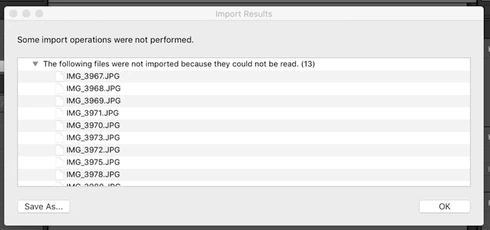


I've also tried importing in smaller batches, no more than 15 images from the one day, and I still have the same problem. 

I did update my Lightroom to the latest version the other day. Could this be the issue? 

I'm at a loss as to what may have caused this. Any insights or suggestions? 

Thanks! 

4 replies

Rikk Flohr_Photography
Community Manager
June 17, 2016
This error message is typical of a permission problem with the destination folder to which you are copying your image.  Using your OS's tools verify that your User ID has read/write permissions on the folder where the images will ultimately end up.  
Rikk Flohr: Adobe Photography Org
Participant
June 17, 2016
Correct: this is beyond me. I Assume of course that you habitually view your jpegs in Safari prior to Lr import and that you have never had this problem before. I'm no Apple fan, so I would not know whether or not Safari leaves dirty footprints in files.

Example: I used to work with Nikon software. Around 2011, a (fortunately shortlived) version of their import and conversion software ViewNX2 did that and I'm still having to throw away pics from that period because of suddenly appearing random color banding.

I hope someone can help you.
Inspiring
June 17, 2016
Thanks JaapV, 

Yes all the intended imports were jpg files, produced by the same camera (my iPhone), and there were no other intervening software (apart from safari open). 

I have had no problems with importing in the past and I haven't changed anything recently, except the update. I'm as confused as you may be! 
Participant
June 17, 2016
I have no cure immediately available, but I'm curious: were all the intended imports
1) jpg files,
2) produced by the same camera,
3) with no other intervening software?
(Just to exclude possible perpetrators outside Lr)