

P: Incorrect behavior when changing the year before 2001 in Edit Capture Time
When you change the year in Metadata > Edit Capture Time to before 2001, the milliseconds goes negative and one is added to whatever value you enter for seconds. This is likely related to the Cocoa timestamp epoch of 1/1/2001.
If instead you change the year to 2018, the milliseconds gets decremented by one (also incorrect).
To reproduce on LR 15.2 / Mac OS 26.2:
1. Open the attached tiny catalog.
2. Select the photo and do Metadata > Edit Capture Time.
3. Click in the year and type 2019 (quickly, to avoid another Edit Capture Time bug). Observe that the milliseconds field stays at 22 (correct).
4. Click cancel, do Edit Capture Time, click in the year, and type 2018. Observe that the milliseconds field gets changed to 21 (incorrect)
5. Click cancel, do Edit Capture Time, click in the year, and type 2001. Observe that the milliseconds field gets changed to 21 (incorrect).
6. Click cancel, do Edit Capture Time, click in the year, and type 2000. Observe that the milliseconds field gets changed to -97 (incorrect).
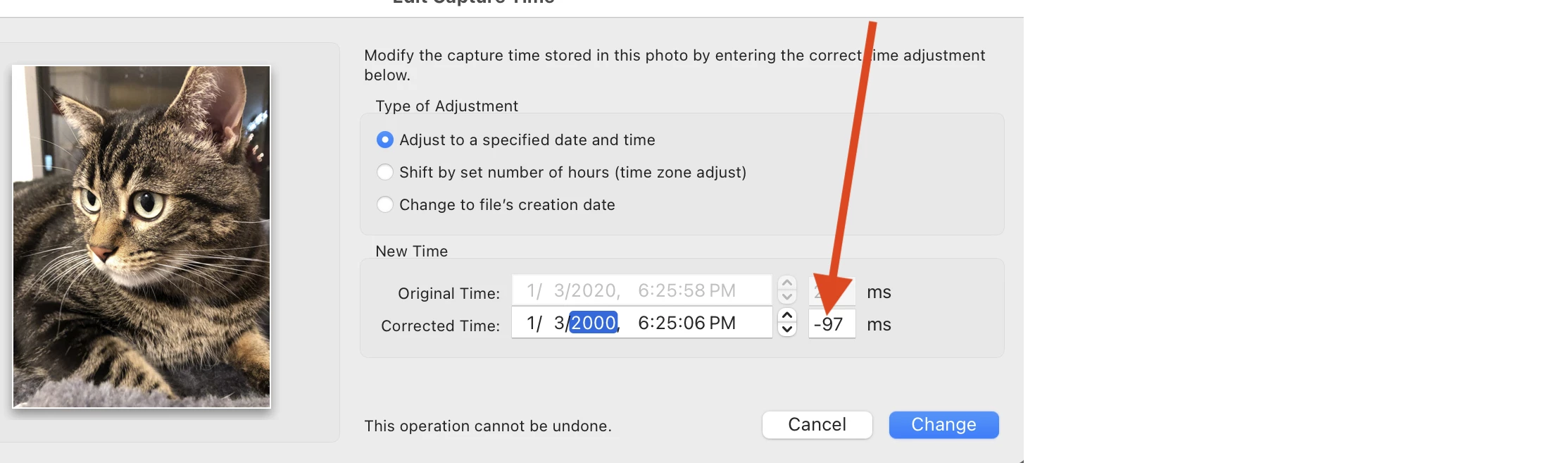
7. Click the seconds field and type 42. Observe that the seconds changes to 43 (incorrect).


 AdChoices