

ShootingPixelsAndy
Inspiring
April 24, 2015

P: Invalid constraint size error

  • April 24, 2015
  • 4 replies
  • 1128 views

Perform the following steps in this order.

Library module
Select an image
Choose export
Set resize mode to long edge
Set inches and enter 12 for size
Set pixels per inch
Enter 300 for resolution

On Windows 8.1 64bit I get the following error:

Invalid constraint size. Must be a number between 1 and 217. Closest value inserted.
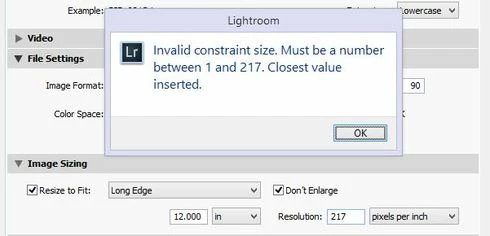


This only happens when I try to change ppi in long edge or short edge mode. Other modes work fine.

Also if I switch from inches to pixels I can set the ppi to 300. If I then switch back to inches the 300 value will stick as long as I don't attempt to change it.

This topic has been closed for replies.

4 replies

johnrellis
Legend
November 5, 2015
This was fixed in LR CC 2015.1 / 6.1: http://blogs.adobe.com/lightroomjourn...
Inspiring
June 11, 2015


In Lightroom CC, when I export an picture, I've got the following bug (which others could reproduce):

When I select "long side" in sizing options, enter the size in cm or inch and enter 600dpi Lightroom will immediately show an error message like:
"The dpi is too high, it needs to be in the range of 1 to 275"
and sets the dpi to 275.
Higher values will produce different max for the error, but do not work, either.

I can work around this problem by selecting "width by height" or enter the pixel count instead of the cm/inch-size. But this is annoying since I use this kind of export a lot.

Cheers Sam
Inspiring
May 5, 2015


In the Export dialogue: Resizing area... DPI selection is being restricted for a couple of output options:

In the Image Sizing area...

1: untick the Resize to Fit check box (output at image size) and I can enter 300dpi.. no problems..
2: tick the Resize to fit, Longest or Shortest edges.. and only up to 217 allowed...
3: tick Resize to Fit, Width & Height... and can set 300 dpi..

LR v6

https://d2r1vs3d9006ap.cloudfront.net...
Rikk Flohr_Photography
Community Manager
April 24, 2015
I tried it on Windows 7 and got the same result as you. Then I tried it in LR 5 and it didn't throw an error. I am going to file a bug and have it looked at. Thank you!
Rikk Flohr: Adobe Photography Org