

johnrellis
Legend
April 28, 2015

P: JPEG format tripping up other programs

  • April 28, 2015
  • 63 replies
  • 1918 views

Lightroom CC writes JPEGs in an atypical layout that trips up other programs. While they appear to be strictly conforming to industry standards, the unusual layout has caused problems for at least two users: one who had problems uploading photos to real-estate services, and another whose own software tripped over the layout.

LR writes the APP1 header as: TIFF header, 114 unused bytes, ExifIFD, IFD1, IFD0. Whereas Photoshop CC uses a more traditional layout: TIFF header, no unused bytes, IFD0, ExifIFD, IFD1. Here's an Exiftool dump of the beginning of a LR JPEG:
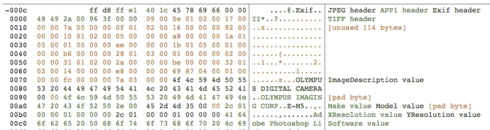
And here's a dump of the beginning of a Photoshop JPEG:

I've tested LR JPEGs with 12 Mac and Windows programs and 2 online services, all of which read them just fine:

Mac: Preview, Photoshop CC 2014, ColorSync Utility, Firefox, Chrome, Lattice, Paintbrush, Safari, Word
Windows 8.1: File Explorer Preview, Irfanview, Paint, Windows Photo Viewer
Online services: Flickr, Zenfolio

Even though LR's JPEGs may be strictly conforming, if it wrote the JPEGs without the unused header bytes and it put IFD0 immediately after the TIFF header, as Photoshop does, then there would be fewer problems with other programs choking on LR's JPEGs.

This topic has been closed for replies.

63 replies

Participating Frequently
May 3, 2015
Yes indeed, we use Lightroom 6.01 to export our photos as JPEG for Piwigo under PHP 5.6. Und here you can see http://s.edv-tipp.de/fpvth that

COMPUTED.Copyright: efan Uchrin, (C) by St
COMPUTED.Copyright.Photographer: efan Uchrin
COMPUTED.Copyright.Editor: (C) by St

are broken. OK, we go back to LR 5.7.1 and wait for a better LR 6!
Known Participant
May 3, 2015
That user was using PHP 5.6.
Known Participant
May 3, 2015
This problem with Picasa is caused by the XMP bug: http://feedback.photoshop.com/photosh....
Known Participant
May 3, 2015
PHP's exif_read_data() appears to be incompatible with LR 6 JPEGs. PHP, of course, powers a huge number of Web sites. See this thread: https://forums.adobe.com/thread/1835290
Known Participant
May 3, 2015
To work around the problem described here, you can use the Run Any Command plugin: http://regex.info/blog/lightroom-good...

Use this command line in the Command To Execute box of the Run Any Command post-process action:

exiftool -all= -tagsfromfile @ -all:all -unsafe "{FILE}"

This idiom deletes all of the existing metadata from the image and rewrites it from scratch using a more typical layout that doesn't confuse software that doesn't strictly obey the industry standards. Make sure you have Exiftool version 9.94 or later -- earlier versions would choke on LR images containing large numbers of brush strokes from the adjustment brush.
Known Participant
May 2, 2015
LR 6 can write invalid XMP metadata (a true bug), as described here: http://feedback.photoshop.com/photosh...

To distinguish that bug from the issue here, you'll have to use a photo with and without a large number of develop settings.
Known Participant
April 29, 2015
The problem seems to strike TIFF files as well (which use the same representation of metadata). In this thread:

https://forums.adobe.com/message/7493633

a user reports that HP MediaBin (HP's enterprise digital-asset management product) is not able to display the metadata of TIFFs exported from LR 6.
Known Participant
April 29, 2015
Unfortunately, I'm not able to reproduce the problem using that plugin, on either Mac or Windows. It would have been nice to narrow down the problem and confirm whether or not it is caused by the atypical JPEG format.
Known Participant
April 28, 2015
Jeffrey Friedl's "Export to PicasaWeb" plugin.
johnrellis
Legend
April 28, 2015
Which publish service/plugin are you using?