C.Cella
Legend
November 19, 2017

P: Large numbers of brush strokes leads to slowdowns and can cause an image's edits to reset.

  • November 19, 2017
  • 31 답변들
  • 9171 조회

In Lightroom it is impossible to edit a photo as much as we want or need, using Masking regardless of the hardware you have.


EXPLANATION 

Let's say you want to edit a photo with Masking to your heart's content OR because you need to change many aspect of the photo.

Logic tells you "we have Masking so obviously it's possible to do masking safely and as much as I want"

Reality is that in Lightroom Classic there is an "upper limit" of local edits that we can have on a photo: once we reach that "upper limit" the photo will be be reset.

So in Lr it's not possible to sue Masking as much as we want/need.


Usually if you have lots, lots of edits on an image other editing software struggle and get progressively slower and slower (if one has powerful hardware generally slowdowns don't happen or appear later) but in LR a photo can reach a point where it's no longer editable and it will be reset NO MATTER THE HARDWARE YOU HAVE.


All Masking tools (gradients, spot removal, brush, Ai, et...) contribute to reaching this "upper limit" of local edits BUT Brush is the tool that contributes the most because each strokes is made of countless of dab points that are heavy to process.

Here I have attached a preset for everyone to use.
Apply it on one of your photos that already has Masks and your photo will be reset. (Please be sure to undo, or use another another history step or Snapshot to revert back to your safely edited photo)

This "Reset Bug" is a huge problem/limitation AND as long as it exists we users will never, ever be able to use Masking as much as needed/wanted in Lr.

For the record this issue is not present in Adobe Camera Raw or other non Adobe softwares: it is totally unique to Lr.

As far as I have tested we can have "infinite" number of local edits in ACR...logically with many, many mask ACR becomes progressively slower but there is no photo reset.


Best Practice When Working in ACR and LrC using Masking


If you are doing Masking in ACR and import the photo in LrC (or import settings form disk if the photo is in the LrC catalog) then the photo will either be slower to edit OR be reset in LrC.


If a photo is resetting in LrC then you must go one step back beore the reset after that you can finish editing it in ACR but unfortunately you can't safely open/import that photo in LrC again as the edits will be unusable by LrC


Keep a Virtual Copy in LrC before you edit in ACR or import form ACR.

That Virtual Copy will be always usable in LrC.


Best Practice with Brush Tool


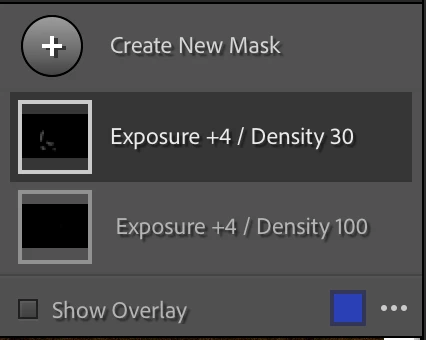
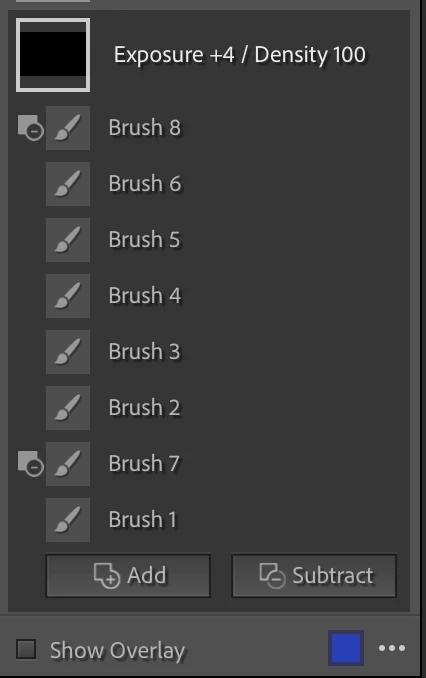
  1. Create a new Brush Mask for every single stroke you do. This way you can delete the stroke(s) that you don't like, redo them better and go back to an editable photo when the reset happens.
  2. I recommend to ONLY use Subtract as and never user Erase Brush that adds dab point but are not visible in the overlay. Subtractions are always visible in the overlay and can be deleted.
  3. If you are working with Brush Density I recommend to ALWAYS keep the same Brush Density in the same Correction and ideally write it in the Correction's name. On the same correction a new brush with different Density will overwrite the previous stokes adding more dab points above the ones created but in the overlay it looks like you did fewer. It you find a that a brush at the current density is not giving you what you want then: create a new correction > use the same settings AND use Brush with a different Density in that correction.

I personally work with very low flow and keep always Density at 100 for all my corrections. When is see that a brush is not enough or too much and is not giving me the result I want I: delete it > create a different Correction with  higher/lower different settings and brush there but the Density is always at 100.


P.S.
I was the first to discover and report this back in 2017 in this thread. (The username is different but it's me)
I bring it back as a full fledged Bug Report upon request of the Adobe team so please moderators do not merge this with existing Bug reports as this needs to be traceable as a standalone.


31 답변

Community Expert
November 7, 2022

There's using another app, and there is using the same app in another way that doesn't cause you the same problem.


For example I've found it possible to make and tweak quite specific and complex masks in LrC with the aid of AutoMask. I don't mean the rather crude outcome from dragging the brush around with autoMask active; I mean repeatedly single-clicking a larger radius brush with AutoMask active, working off the crosshair for each click, both adding and subtracting as necessary. This pulls the needed detail from the image itself.


I honestly am not surprised if tens of thousands of simultaneous parametric 'dabs' might cause an issue. Not least, of patience! This sounds like a lot of avoidable work to me.... An equally complicated mask could be made parametrically in PS - say, using tens of thousands of overlapping vector shapes - and also cause an issue there. A pixel mask within PS would be the massively more straightforward way. So there are also tactics in LrC along the same lines.


For example: intersecting with a tonal or hue restictive mask, or using adjustments that are natively restricted in their tonal application, may mean a less tightly and laboriously drawn brush mask is nonetheless equally acceptable towards the end result you want..The painted extent of a mask does not always need to do all of its selective work, IOW.  In LrC, or in PS.

C.Cella
C.Cella작성자
Legend
November 7, 2022

@defaulte1bptwq3szfa 


LrC can handle Brush but only up to a certain point.

After that first you get slowdowns then then the reset.


ACR form my experience doesn't have performance problems.

I was able to work in ACR without performance issues my heavily edited photos, the very same ones that are not editable in LrC...but as soon as the photos are loaded back to LrC they will reset.


Doing the local editing in another app, in Photoshop is a workaround...I could also suggest to use the competition like Capture One.


Let's not forget that there is a standalone license for Lightroom and so many users might not have Photoshop.


Perhaps Adobe should give a free Photoshop license to all Lightroom users so that we all can edit our photos in full since LrC prevents us to.


I discovered and reported this bug internally back in 2017 and yet nothing has been done because back then nobody was expected to use LrC to do local edits.

I was laughed at when I was telling people "I don't use Photoshop for local edits".

With Maksing one should use and do local edits in Photoshop ONLY because of this bug.


Masking is a marvellous tool but as long as this limit exists Maksing is doomed.


If we want to get this bug fixed in Lightroom then the solution is to upvote the bug, so please, I beg of you: vote!


Using another app is not a solution...it's an escape.


P.s.

I am a total Lr fanboy, it pains me much to speak about this...I wish this bug didn't exist.


.


Participating Frequently
November 7, 2022

Apparently LRC can't handle the brush strokes. You can achieve it in Camera RAW (Photoshop), but you will suffer from performance issues. Best hint I can give is to duplicate your photo and split the brushing, for example top left, top right, bottom left and bottom right. Then merge the photo's together in Photoshop.

C.Cella
C.Cella작성자
Legend
November 7, 2022

@Fnc21 


There is no solution in LrC for this.


What I suggest for your workflow is the following.


1. Use Brush only when indispensable.

The other tools do contribute to reaching the "upper limit" but much less than Brush.


2. Always create a new Brush component when you start drawing.

So you draw, stop drawing > Shift + N to create another new brush component in the same mask.


This means that when you reach the reset point you can undo and go back to the edited photo and delete components that could be done better, this means you keep 99% of your work.

Having a single brush component is bad.

Never do that, ever!


Yes your Mask might have lots of different Brush components BUT it's the right way to work.


Always keep track of every edit you make using separate components...masking is great for this reason as well as it process total trackability of all stpes and edits, its better than Layers in Photoshop.


3. Never use Brush in Erase mode!

Always remove part of a Brush you don't like using another Brush in Subtract mode.


Erase mode should be removed form Lightroom altogether as it's just a legacy of the past and tis terrible because it does not allow to keep track of your edits separately.


Edited to clarify.

.

C.Cella
C.Cella작성자
Legend
November 7, 2022

@Rikk Flohr: Photography 


Why was my bug report for the poor performance in LrC vs ACR merged with his one.


One can get poor performance way before a reset even take place.


It's not the same issue.

Countless of users over the years have experienced poor performance using LrC never got a reset, but the poor prefrormancd has never been addressed.


C.Cella
C.Cella작성자
Legend
October 20, 2022

@Rikk Flohr: Photography 


One of my photo had the reset BUT with 2,3 Million dap points (that's what your engineers told me I had on my photo)...which is about 200-250Mb of data.


250k dab points is tolerable by Lr Classic in my experience.


( I don't think it's possible to have 250k individual brush stokes, each made of thousands of dab points!

That would mean having a history of 250k steps, a Catlog potentially in Terabytes in size...no sane human being would do that, not even I can do that and I am insane 🤣🤣🤣)

Rikk Flohr_Photography
Community Manager
October 20, 2022

Yes, in this most recent example, posted by @defaulte1bptwq3szfa the Mask 6 contains over 250,000 individual brush strokes.  The team is evaluating next steps based upon the sample file submitted. Thanks. 

Rikk Flohr: Adobe Photography Org
Rikk Flohr_Photography
Community Manager
July 14, 2022

setting status to Investigating

Rikk Flohr: Adobe Photography Org
U2Fan61
Participating Frequently
February 10, 2021

Hi

I am experiencing very odd behaviour when using the adjustment brush.

I have used the brush to lighten text on a gravestone. This worked well but has stopped working for some reason.

Every time I try to make a new brush stroke, Lightroom resets all my previous edits back to Import.

This is very frustrating as I was just finished brightening the text.

I use a Wacom tablet and have disabled touch and side buttons but this has't helped.

Any suggestions other than restarting Lightroom and PC as that hasn't helped either.

Thanks in advance

U2Fan61
Participating Frequently
February 10, 2021

Using latest version of LrC 10.1.1, updated yesterday evening

Participating Frequently
February 9, 2021

Hi!


After i use a brunsh and release the muse/pen pressure ALL of my edits on that photo resets!

Does anyone have the same problem and know how to fix it?


I use the following:

Lightroom Classic: V.10.11

Mac bookpro: macOS Big Sur 11.2

Wacomtablet: 6.3.41-2

AxelMatt
Community Expert
Community Expert
February 9, 2021

In the first step i would reset the lightroom prefrences to the default settings

https://www.lightroomqueen.com/how-do-i-reset-lightrooms-preferences/


The next ste should be the deactivation of the GPU support

Go to Lightroom > Preferences > Performance tab > Uncheck "Use Graphics Processor" > Restart Lightroom. 

https://helpx.adobe.com/lightroom-classic/kb/lightroom-gpu-faq.html#troubleshooting 

https://helpx.adobe.com/lightroom-classic/kb/troubleshoot-gpu.html 


You should also installed the latest update of the Wacom driver (6.3.42-1)

https://www.wacom.com/en-de/support/product-support/drivers


My System: Intel i7-8700K - 64GB RAM - NVidia Geforce RTX 3060 - Windows 11 Pro 25H2 -- LR-Classic 15 - Photoshop 27 - Nik Collection 8 - PureRAW 6 - Topaz Photo AI
Participating Frequently
February 9, 2021

Thanks Axel for your tips and links. I will give them a try!