
Participating Frequently
August 19, 2021

P: Lightroom Classic: Applying develop preset to multiple images transfer all settings

  • August 19, 2021
  • 36 replies
  • 8579 views


I have a preset for sharpening. When I select multiple images and apply this develop preset there is a weird behaviour. The preset is applied but also all other images get develop settings from the active image in the selection.


This started happening in 10.4. I use this regularly and it never behaved like this.
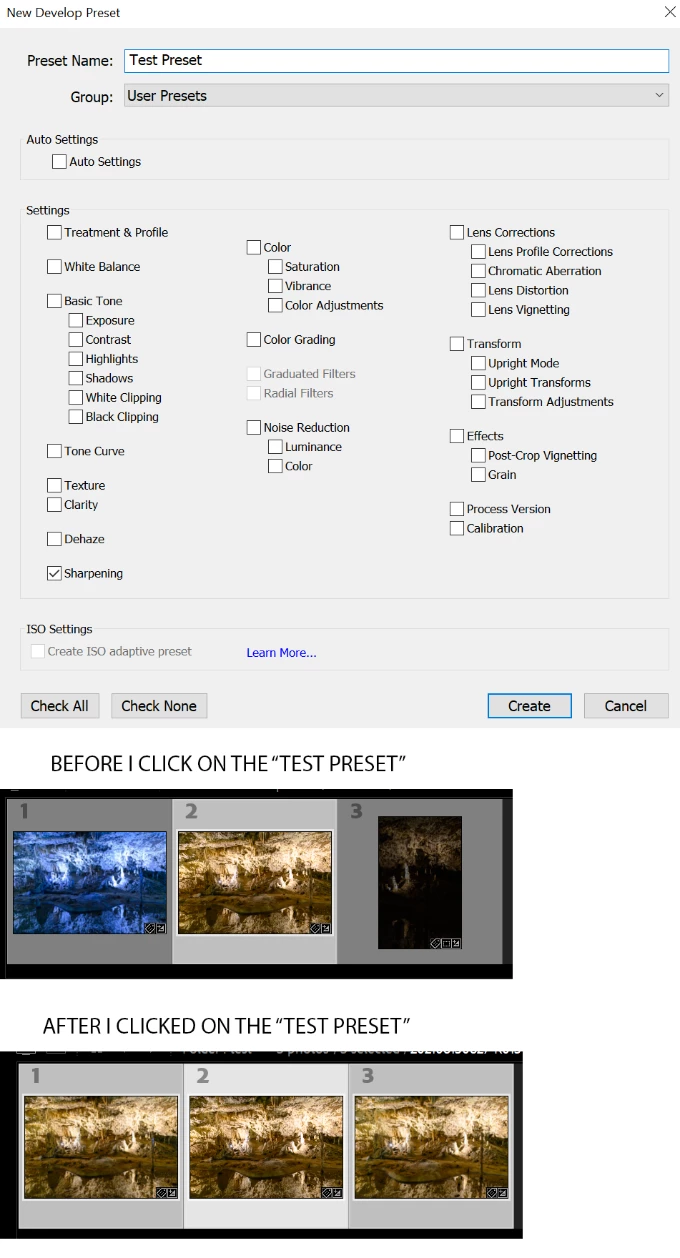


Lightroom Classic version: 10.4 [ 202108071231-af9219b9 ]
License: Creative Cloud
Language setting: en
Operating system: Windows 10 - Business Edition
Version: 10.0.19043
Application architecture: x64
System architecture: x64
Logical processor count: 12
Processor speed: 3,1GHz
SqLite Version: 3.34.0
Built-in memory: 49076,1 MB
Real memory available to Lightroom: 49076,1 MB
Real memory used by Lightroom: 4036,5 MB (8,2%)
Virtual memory used by Lightroom: 5463,4 MB
GDI objects count: 818
USER objects count: 2310
Process handles count: 3956
Memory cache size: 3950,8MB
Internal Camera Raw version: 13.4 [ 872 ]
Maximum thread count used by Camera Raw: 5
Camera Raw SIMD optimization: SSE2,AVX,AVX2
Camera Raw virtual memory: 924MB / 24538MB (3%)
Camera Raw real memory: 932MB / 49076MB (1%)
System DPI setting: 144 DPI (high DPI mode)
Desktop composition enabled: Yes
Displays: 1) 3840x2160
Input types: Multitouch: No, Integrated touch: No, Integrated pen: Yes, External touch: No, External pen: Yes, Keyboard: No

Graphics Processor Info: 
DirectX: Radeon RX 580 Series (27.20.22001.14011)

This topic has been closed for replies.

36 replies

patrickmonteiro
Participant
October 1, 2021

Issue: things get messy when applying preset to multiple images from multiple cameras


Lightroom Version Number: 10.4
OS Version Number: Windows 10pro build 19042.1237


Steps to reproduce:

1. select multiple images from multiple cameras (experienced with around 250 from 4 cameras)
2. apply preset to all images with auto sync on (preset modifies: Basic: only vibrance and saturation, then some values on tone curve, HSL, effects) - profile is ISO adaptive


Expected result: your preset gets applyed to those setting only, and you start working happily
Actual result: your preset messes up: White balance, profile, noise reduction (luminance), and maybe some others that I didn't notice. Then you get frustrated, downgrade to Lightroom v10.3 and all works smoothly again...

JohanElzenga
Community Expert
Community Expert
October 2, 2021

This is a known bug. Adobe is working on a fix.


-- Johan W. Elzenga
Grinnin Barrett
Participating Frequently
September 29, 2021

Adobe Lightroom Classic Version 10.4 

Windows 10 Pro BuildNumber 19043

When I select a User Preset sometimes the image is Cropped and sometimes it is transformed. This happens frequently but not all the time.

Thanks!

johnrellis
Genius
September 29, 2021

In Develop, is the menu item Settings > Enable Auto Sync checked?  There is a bug with Auto Sync and presets.  If it is checked, uncheck it and I'll provide a workaround.

Earth Oliver
Legend
September 28, 2021

why aren't big bugs like this hotfixed? Why does it take (already) more than a month before a patch is released? Why are game developers able to release patches so much faster than Adobe? People's jobs don't depend on playing games, yet those companies are so much more responsive than what we see here... why?

laurenvwphoto
Participant
September 24, 2021

Pretty sure this is a bug since I've never had this issue prior to updating to LRCC 10.4.


Issue: Lightroom Classic presets adjust ALL settings based on primary selected photo when Auto Sync is on instead of only what the preset is assigned to adjust.


Lightroom Classic version: 10.4 [ 202108071231-af9219b9 ]

Provide OS and version: macOS 10.14.6


Steps to Reproduce the Issue:

Step 1: Make individual adjustments to a group of photos (example: 3 photos - photo 1: 5500K Temp, +0.25 Exposure, +10 Contrast, photo 2: 4300K Temp, +1.00 Exposure, -5 Blacks, photo 3: 5100K Temp, +0.5 Exposure, -30 Highlights, +10 Shadows)

Step 2: Select all three photos. Primary selected photo is photo 3.

Step 3: Turn on Auto Sync

Step 4: Click on a preset from the preset panel. Any preset, LR or User created. (Example preset: 68 Sharpening, 37 Luminance)


Expected result: Lightroom should apply preset settings leaving prior individual adjustments untouched.

Actual result: Lightroom applies preset settings AND changes ALL other adjustments on ALL photos to match primary selected photo. (Example result based on above: ALL photos have applied preset settings of 68 Sharpening and 37 Luminance AS WELL AS settings of primary selected photo, photo 3: 5100K Temp, +0.5 Exposure, -30 Highlights, +10 Shadows)

GoldingD
Legend
September 24, 2021
johnrellis
Genius
September 21, 2021

"Now how in the heck is 'crop' being applied when it isn't even a choice when creating an adaptive preset?"


The bug causes all (or most?) of the source photo's develop settings to be copied to the target photo, regardless of what's set in the preset. Until it's fixed, you'll have to use the workaround posted in my previous reply.

m cs16279208
Participating Frequently
September 21, 2021

The issue is further complicated. With a applying an adaptive preset to multiple photos, the crop position of the first photo used in creating the adaptive preset is applied to each of the photos.  Now how in the heck is 'crop' being applied when it isn't even a choice when creating an adaptive preset?

RasheedMistri
Participant
September 18, 2021

Issue: Auto Sync of a Preset causes White balance to be updated

  • Lightroom Version Number: 10.4
  • Camera RAW: 13.4
  • OS Version Number: Windows 10 Pro for workstations version 20H2


Steps to reproduce:

  1. Take a few RAW photos at different times of the day with white balance set to Auto (eg sunrise, mid afternoon, sunset) . Or take some in daylight and others in different indoor artificial lights. The idea is to record different color temperatures and tints with the Auto setting.
  2. Import the RAW files into Lightroom Classic
  3. Switch to Develop Module
  4. By default the white balance will be set to "As Shot" and the files will show different Color Temperatures and Tints.
  5. Select all files. The first file will be highlighted lighter than the others to show it is the active file. You can at this point highlight any other file you wish to apply the preset to.
  6. Switch on Auto Sync.
  7. Select a preset to apply to all files. The preset should not be updating the white balance. For example I use a preset which switches off all sharpening in Lightroom as I do my sharpening outside of lightroom.
  8. Now check the color temperature and tints of each of the files. Even though the white balance is still set to "As Shot" the color temperatures and tints will be updated for the rest of the files to the color temperature and tint of the highlighted file. This is the bug. The color temperature and tints should not have been updated.


Expected result: The color temperatures and tints should be different for each file
Actual result: The color temperatures and tints are identical for each file

Work around: After applying the presets necessary to all the files with AutoSync still on select white balance as "Auto" and then again select white balance "as Shot". The white balance for each of the files will be updated to the original values as shot.

johnrellis
Genius
September 16, 2021

"It will only do this when I have selected all the photos to be changed by "auto sync""


A workaround while awaiting the fix: Go to Library Grid view (g). Select the desired photos and then apply the preset using the Saved Preset menu in the Quick Develop panel in the right column.

katys20443389
Participant
September 16, 2021

Would love some help, I think I might have made a change to my settings without realizing it. When editing my gallery of images in Lightroom, I first go and edit all my photos in color and crop and add adjustments where needed- once this is done, I do "Command + A" to select all my photos then I click on my black and white preset to change all the photos in my gallery to my perfered black and white settings. This is when the issue happens.... as it changes my photos to black and white, it will also crop some and roate them slightly so they are no longer straight. I am sure this is an easy fix but I am not aware of it. This is not a new preset and is one I have used for years without this issue. Also, I will mention, if I apply the preset to each photo individually, all is fine. It will only do this when I have selected all the photos to be changed by "auto sync"

Participating Frequently
September 15, 2021

I am dealing with the exact same Auto Sync issue with LR 10.4. 


Auto Sync on, select a group of images and apply a change (say exposure)... but it also applies every other change made from the selected main photo (like crop and white balance) to all others selected in the group. Very annoying.