Known Participant
July 2, 2026

P: Lightroom Classic v15.4/15.4.1 Causes AI Assist Culling Memory Leaks, Mac Freezes, and Denoise Failures

  • July 2, 2026
  • 1 reply
  • 66 views

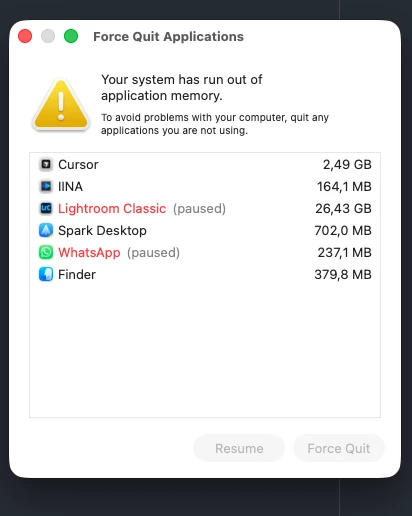
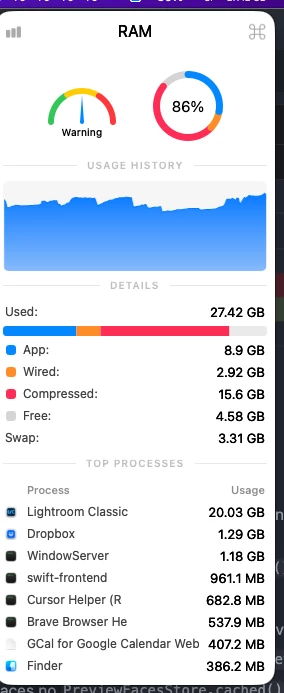
What an awful release. Don't get me wrong, I'm glad to see new developments, but this Lightroom update is an absolute disaster. After culling just 5-10 images, the AI Assist culling tool completely hogs all my RAM, causing my Mac to freeze and throw memory errors. It’s a total nightmare.

Culling images via the library module is practically impossible right now - everything just locks up. Even with previews pre-generated and trying to run AI Assist culling, the performance is still abysmal. On top of that, it frequently fails to even generate a Denoise. What is going on, Adobe?! This is absolutely unacceptable!

P.S. The RAM management is completely broken and goes beyond any acceptable limits!


    Pinned Reply By Sameer K

    Thanks for bringing this up. The team is working on this. 


    Best, 

    Sameer K

    1 reply

    Sameer K
    Community Manager
    Community Manager
    July 21, 2026

    Thanks for bringing this up. The team is working on this. 


    Best, 

    Sameer K

    Participant
    July 26, 2026

    I can reproduce another issue in Lightroom Classic 15.4.1 on macOS Sonoma 14.6.1 (Apple Silicon M1).

    Denoise works correctly on a single RAW image.

    As soon as I select two or more RAW images and run Denoise, only the first image keeps the Denoise result. All following images lose the Denoise update afterwards.

    Masks save correctly.

    Already tested:

    • Preferences reset
    • Imagen plugin disabled
    • Internal SSD
    • External SSD
    • Multiple catalogs
    • Same behaviour everywhere.

    This issue is 100% reproducible on my system.