
Participating Frequently
June 20, 2026

P: Lightroom Denoise suddenly stopped working

  • June 20, 2026
  • 121 replies
  • 1794 views

Hi everyone,

I'm having an issue with the latest version of Lightroom CC on a MacBook M5 Pro running macOS Tahoe 26.5.1. (I was experiencing the same problem on 26.5 and decided to update hoping it would fix it, but unfortunately it didn't.)

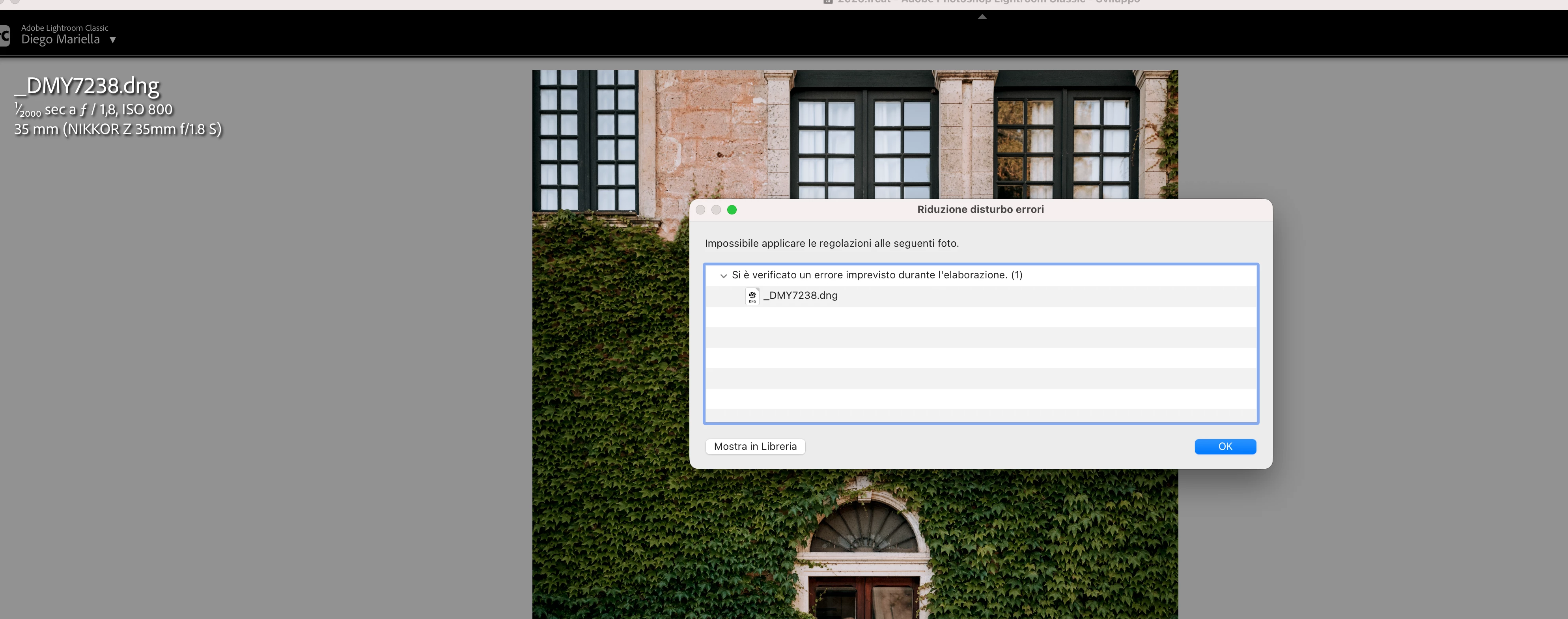
Since this morning, it's been impossible to to use Noise Reduction, even though my internet connection is working perfectly. I've already updated both Lightroom CC and macOS, cleared the cache, and optimized the catalog, but I keep getting this error screen whenever I try to use Noise Reduction.

Has anyone experienced the same issue or knows how to fix it? Any help would be greatly appreciated. Thanks! 🙏
 

    Pinned Reply By Sameer K

    Hi All! Lightroom Classic v15.4.1 is now available for downlaod via the Creative Cloud desktop app with the following critical bug fiixes for the issue reported in this thread and the other: 


    Thanks!
    Sameer K

    121 replies

    Ian Lyons
    Community Expert
    Community Expert
    June 21, 2026

    There are a number of similar reports from past few days. The thread linked below provides a potential solution. See the reply marked as ‘Correct Answer’.


    https://community.adobe.com/questions%2D675/lightroom%2Dcc%2Ddenoise%2Dissue%2D1628761?postid=7688398#post7688398

    IsaBI
    Participant
    June 21, 2026

    anche a me da ieri sera e sto letteralmente impazzendo!

    Participant
    June 21, 2026

    l’unico modo per farlo funzionare è stato andare sul  folder
    /Library/Application Support/Adobe
    e cancellare la cartella camera raw.
     
    Ora funziona, in attesa che adobe rilasci la versione con la patch

    Participant
    June 21, 2026

    same here. Fantastic, I’m paying for a product that’s not working. I need to go on with my workflow, I have people waiting for it. we need to be able to go back to previous version and restart to work


    ignaciog25375503
    Participant
    June 21, 2026

    Y que se supone que tenemos que hacer, esperar a la actualización o ellos lo solucionan antes??

    Ian Lyons
    Community Expert
    Community Expert
    June 21, 2026

    There are a number of similar reports from past few days. The thread linked below provides a potential solution. See the reply marked as ‘Correct Answer’.


    https://community.adobe.com/questions%2D675/lightroom%2Dcc%2Ddenoise%2Dissue%2D1628761?postid=7688398#post7688398

    Pascal+STINFLIN
    Participant
    June 21, 2026

    Thx for tour help. It works, indeed ! Thx again 🙏🏻

    cdavies2home
    Participant
    June 21, 2026

    Same issue. Spent an hour following the suggestions still stuck. Can;t see to go back a version on Camera Raw as suggested. I’m all unto date and on a current generation powerful Mac. I’m stumped!

    JohanElzenga
    Community Expert
    Community Expert
    June 21, 2026

    If you download Camera Raw 18.3 from here (Mac) - https://download.adobe.com/pub/adobe/photoshop/cameraraw/mac/18.x/CameraRaw_18_3.dmg

    Run the installer and DO NOT update in Creative Cloud - make sure auto updates are turned off before you start - until Lightroom Classic 15.4 is released.

    Lightroom Classic 15.4 update has been pulled by Adobe due to a serious bug.

    -- Johan W. Elzenga
    Joan29540354t4c3
    Participant
    June 21, 2026

    Johan, thank you SO much!!!  This fixed it.  I can’t thank you enough!

    Joan

    Ian Lyons
    Community Expert
    Community Expert
    June 21, 2026

    There are a number of similar reports from past few days. The thread linked below provides a potential solution. See the reply marked as ‘Correct Answer’. You should also try upgrading to LrC 15.4


    https://community.adobe.com/questions%2D675/lightroom%2Dcc%2Ddenoise%2Dissue%2D1628761?postid=7688398#post7688398

    JohanElzenga
    Community Expert
    Community Expert
    June 21, 2026

    The Lightroom Classic 15.4 update was pulled due to a bug. Until it is up again, you’ll have to reinstall camera raw 18.3 to solve the Denoise problem.

    -- Johan W. Elzenga
    AXD_Lille
    Participant
    June 21, 2026

    Ma configuration : 


    Version Lightroom Classic: 15.3.1 [ 202605261338-e36f8566 ]
    Licence: Creative Cloud
    Paramètre de langue: fr-FR
    Système d'exploitation : Mac OS 26
    Version : 26.5.0 [25F71]
    Architecture de l'application : arm64
    Nombre de processeurs logiques: 10
    Vitesse du processeur : NA
    Version SQLite: 3.36.0
    Version Adobe GSDK: 1.4.0.213

    Source d’alimentation: Branché, 32%, En charge
    Mémoire intégrée : 16 384,0 Mo
    Mémoire GPU dédiée utilisée par Lightroom: 4 000,3Mo / 12 124,1Mo (32%)
    Mémoire réelle disponible pour Lightroom : 16 384,0 Mo
    Mémoire réelle utilisée par Lightroom : 3 276,4 Mo (19,9%)
    Mémoire virtuelle utilisée par Lightroom : 428 814,7 Mo
    Taille de la mémoire cache : 1 014,3Mo
    Version interne de Camera Raw: 18.3 [ 2530 ]
    Nombre maximal de liens utilisé par Camera Raw  : 5
    Optimisation SIMD de Camera Raw : SSE2
    Mémoire virtuelle de Camera Raw: 389Mo / 8191Mo (4%)
    Mémoire réelle de Camera Raw: 390Mo / 16384Mo (2%)

    Cache1: 
    Final1- RAM:366,0MB, VRAM:2 549,0MB, AXD_3683.CR3
    NT- RAM:366,0MB, VRAM:2 549,0MB, Combined:2 915,0MB

    Cache2: 
    m:1 014,3Mo, n:352,3Mo

    U-main: 127,0Mo

    Taille d’aperçu standard: 2940 pixels
    Affichages : 1) 2940x1912

    Informations relatives au processeur graphique : 
    Metal: Apple M5
    État initial: GPU pour l'exportation pris en charge par défaut
    Préférence utilisateur: Auto
    Activer la HDR dans Bibliothèque: Désactiver
    Processeur graphique pour la génération d’aperçu :Activé (S5_11)

    Dossier de l'application : /Applications/Adobe Lightroom Classic
    Chemin d'accès à la bibliothèque : /Users/adevos/Pictures/Lightroom/Lightroom Catalog.lrcat
    Dossier des paramètres : /Users/adevos/Library/Application Support/Adobe/Lightroom

    Modules installés : 
    1) Adobe Stock
    2) Flickr
    3) Module externe d'importateur Aperture/iPhoto

    Marqueurs Config.lua: 

    Kev1KL
    Participant
    June 21, 2026

    i have the same problem !
    In Lightroom it’s OK but impossible in LRC