
Known Participant
September 16, 2011

P: "Lights out" mode: Dialogs are partially obscured

  • September 16, 2011
  • 2 replies
  • 298 views

Just worked in "lights out" mode (development module) and wanted to export a photo. I noticed that the export dialog is partially obscured like the main LR window - screenshot:
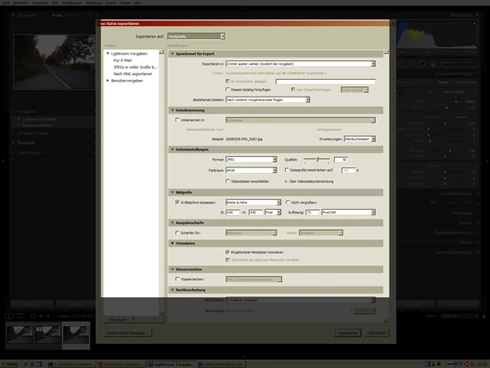


Happens in 3.4.1 and 3.5RC. Does _not_ happen in full-screen mode. Also happens for the settings dialogs and the import (!) dialog. After switching to other applications and back, the dialogs become completely obscured (really confusing if you are in 100% lights out - screen goes completely black). Also, moving the dialogs causes some different areas of the dialogs to be affected by the lights out.

Win XP 32 Bit SP3, 1600x1200 screen resolution. Edit: Video: NVidia GeForce 7600 GS, latest driver from NVidia website.

This topic has been closed for replies.

2 replies

Adobe Employee
September 19, 2011
Thanks, I've logged a bug about this.
areohbee
Legend
September 16, 2011
Problem confirmed on win7/64:

Lightroom version: 3.5 RC [769362]
Operating system: Windows 7 Ultimate Edition
Version: 6.1 [7601]
Application architecture: x64
System architecture: x64
Physical processor count: 4
Processor speed: 3.4 GHz
Built-in memory: 7934.1 MB
Real memory available to Lightroom: 7934.1 MB
Real memory used by Lightroom: 1233.6 MB (15.5%)
Virtual memory used by Lightroom: 1269.1 MB
Memory cache size: 455.1 MB
System DPI setting: 96 DPI
Desktop composition enabled: Yes
Displays: 1) 1920x1200, 2) 1920x1200

Although I'm not sure how many years would have gone by before I would have noticed ;-}