
Participant
May 19, 2012

P: "Limit file size to" on export is not working in LR4

  • May 19, 2012
  • 7 replies
  • 1445 views

Hey there,
following problem exists with export function and setting limit file size to" on Lightroom 4.0.

Description to reproduce:
Trying to export the sample file as jpg with max. width of 600px and limit file size to 150k.
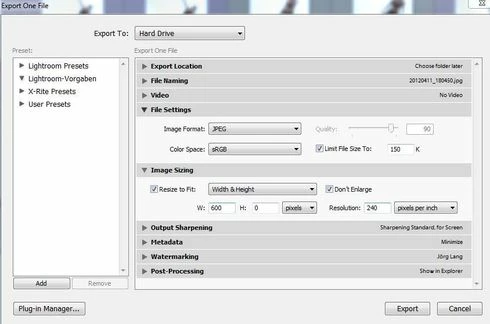

Current behavior:
Export will not be done. The error message "Could not create a JPEG that met your limit of 150k bytes" is shown.
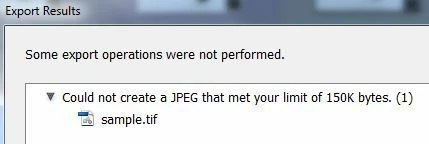

Expected behavior:
JPEG quality should be automatically be adjusted to create a file with size of 150k or lower.

Manual export setting:
Doing manually the export without using "limit file size to" and setting quality to 80, the result is an file of 142k bytes. So reaching a file with correct size is absolutely possible.
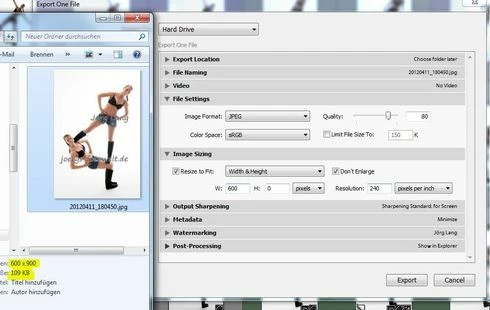

This problem can be also reproduced on LR 4.1 RC1 and 2.
Seams that only files with hight high white content are affected.

Please tryout the problem yourself with the sample file and promote for this bug.

Thanks
Jörg

This topic has been closed for replies.

7 replies

Inspiring
July 12, 2020
Yet another person 'down the road'. 🙂
Inspiring
October 23, 2018
It also helped yet another "person down the road"!!
Inspiring
June 7, 2016
Here is another person "down the road" that it helped.  Thank you.
Inspiring
May 22, 2016
Thank you! This did help someone down the road. 🙂
Inspiring
June 26, 2015
If your image is too big to compress to your desired KB size as a jpg using quality 0 then lightroom will return the error that is stated above.

This happens because the restrict file size adjusts the quality of the jpg but does not adjust the actual image size.

If you have an image that is 2500 x 3000 pixels, even if you compress the image quality to quality 0 on the jpg image quality slider, the image may still be bigger than your desired file size of say 100 KB.

To fix this you need to play with your image size settings in the export field. If you adjust the image size to say 500 x 600 and then set the 'limit file size' to 100 KB you will most likely be able to get that image under 100 KB.

The file size of the image is affected by the size of the image (The pixel aspect ration) as well as the quality of the image.

I hope this makes sense and will help someone down the road.
Hal P Anderson
Inspiring
January 7, 2013
Master file: 12 MP NEF with perhaps 50 brush strokes.

Exporting as JPEG, 1700 pixels on longest side, only include Copyright.

With 600 kb limit, Lightroom refuses the Export on grounds of "Could not create a JPEG that met your limit of 600K bytes"

If I set the limit at 900kb, the export works OK, producing a 340KB JPEG.

It looks like LR is taking the extra XMP data into account in figuring out if the export will work, not realizing that the data won't be included.

I can furnish the NEF and associated XMP on request.

Win 7, 64-bit. 8GB.

Hal

Victoria Bampton LR Queen
Community Expert
Community Expert
May 28, 2012
Verified and bugged.
Victoria - The Lightroom Queen