
evikne71
Known Participant
December 13, 2025

P: LrC v14.1 & later Profile Browser icons of profiles appear very small

  • December 13, 2025
  • 6 replies
  • 640 views

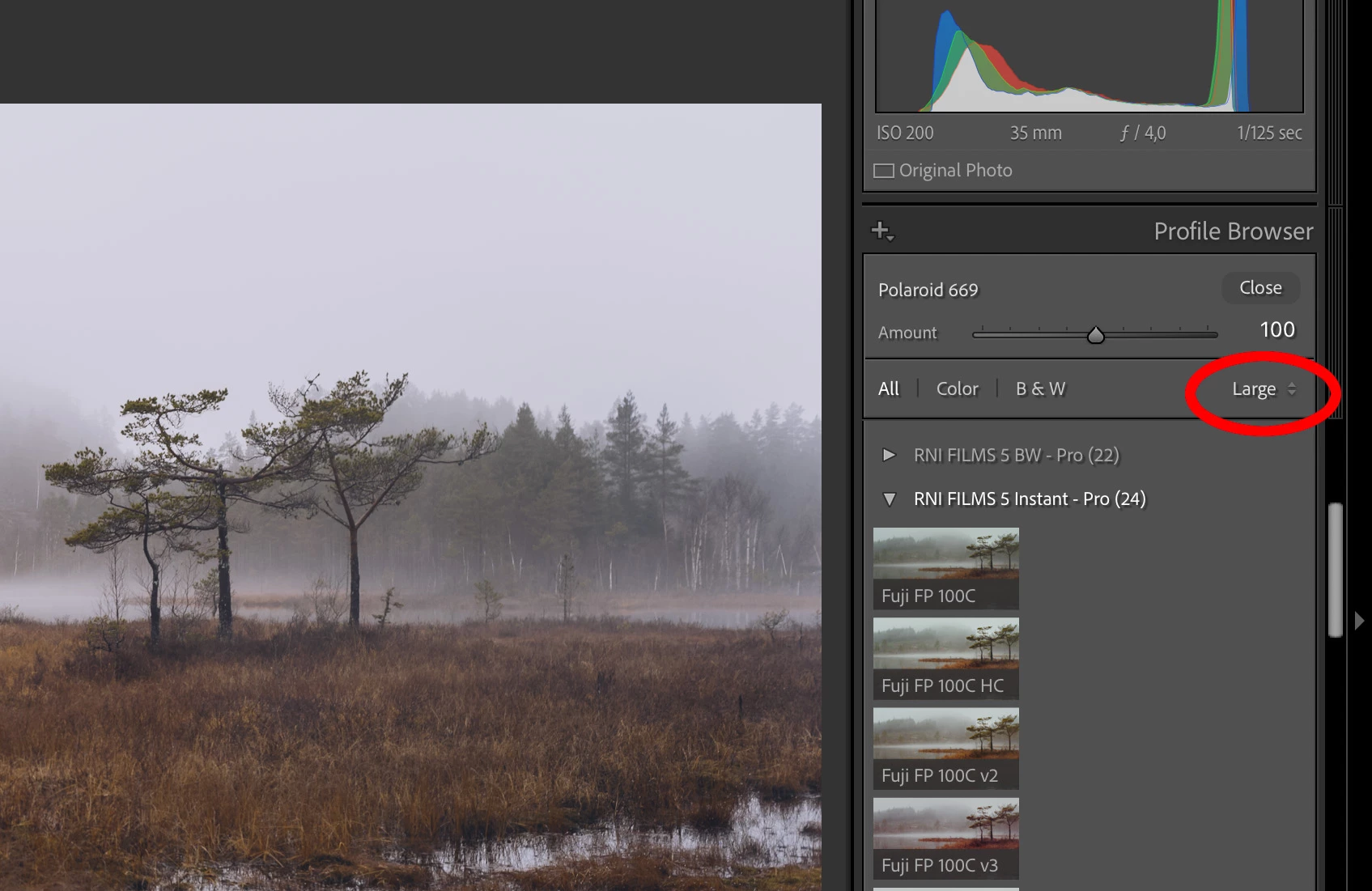
Every time I open a group of profiles in the profile browser, the thumbnails are much smaller than they should be. I prefer to use large thumbnails that should fill the entire width of the side panel. But they only fill about a third of it. I have to select one of the other view modes (Grid or List), and then go back to Large again, then they get the right size. But it's incredibly annoying that this happens every time I open a new group of profiles.


It has been like this for a long time, and a new Mac and new updates to Lightroom have not solved the problem. Am I the only one experiencing this?
 

Skjermbilde 2025-12-26 kl. 11.54.jpg

6 replies

Inspiring
January 19, 2026

The ACR 18.1 profile browser is fine. Can they compare what the differences are between. the two? Or use the ACR browser in LR, unless LR is the cause and the ACR 18.1 browser will have the same problems in LR.

JohanElzenga
Community Expert
Community Expert
January 19, 2026

I agree this is frustrating, but it is also understandable. First of all, not everybody knows all bug reports. That is why people keep posting new threads rather than adding their experience here, and why other people suggest this must be a local problem. Secondly, this seems to be a bug that is very difficult to reproduce. Some people experience it, most people don't, even if they use the same hardware and software. That makes it understandable that those people think this must be a local issue, otherwise why don't they see the same thing? I get the impression that this is also why the bug has not yet been fixed. To fix it, you must first be able to reproduce it. If Adobe can't reproduce it, then all they can do is the same as any other persoon can do: suggest workarounds that hopefully work.


-- Johan W. Elzenga
Inspiring
January 19, 2026

I am not sure why some keep telling every poster "this is not a bug, its you". I reoprted this a while ago and got the response "its you".  Maybe the two threads can be merged? Is there a defect open or is Adobe still ignoring this and telling us to keep rebooting, changing views back and forth, which we tried and it doe NOT work


[Threads merged by moderator]


Inspiring
December 23, 2025

So I nstalled the latest versions of LR and PS.

1- All previous presets and profiles show up in PS/ACR

2- Many, many presets and prfiles no longer show up in LR. They were there yesterday.

3- I double checked the profile prowse and preset browser (all the problems seem to be on the profile side).

4- I did a LR prefereces reset.

5- Nothing is hidden in the profile/preset browsers.


What should I do? Ayway to sync ACR presets and profiles with LR? Re-install LR?

Community Manager
December 23, 2025

Hi @nabile59528865, thanks so much for reaching out!
Could you let us know which version of Lightroom you’re using? Also, if your presets were stored locally, are they still showing up in the folder?
If you were using Lightroom in the cloud, you can check Lightroom Web to see if your presets are still there:
https://adobe.ly/49vl0HV
Thanks!
Alek

*(If you mention me with an @, like @Aleke, I’ll get a notification and can respond faster.)*
Known Participant
January 2, 2026

The Profile Browser in LRC 15.1 is broken, acting erratically, cutting off the profile thumbnails to the point of not being usable.


I suddenly started having this issue with the LRC Profile Browser today. Whether in List, Grid, or Large mode, the profiles are cut off on the right; the sets don't wrap around, so they show only one row (that is, 2 or 3 profiles out of, say, a set of 12), and the entire panel is hiding under the central image panel, so the complete names of the profiles can't be read. There's no arrow on the bottom to push the profile window to the right so they come out from under the central panel. I have the latest LRC version 15.1. 


I saw that another person posted here about this problem in December, and one of the Adobe folks responded with: Oh, you're the only one having this problem so it's not a bug. Well, no, he isn't the only one. I'm having it too. IT IS A BUG.


As suggested, I rebooted and the problem seemed to resolve. The profiles were all back as before. BUT only for a moment. The minute I adjusted the width of the right panel the Profile Browser problem reappeared. I have been using Lightroom since the very beginning and have NEVER seen this problem. This is a BUG. 


I need to be able to adjust the width of the side panels because I'm on a 14 inch laptop and I need to maximize the screen real estate. Adjusting the size of the panels has never caused any issues until now. So this is definitely a bug, and I hope Adobe will fix it in the next update. It's most urgent.


My specs: I'm on a Macbook Pro Apple M2 Max, running Sequoia 15.7.1., 96 GB memory. 

I'm using Adobe Lightroom Classic, 15.1 release, the latest one.


Please somebody tell me how to fix this or that this is being fixed. I use Profiles all the time and this is a big work-stopping issue for me!


Thanks in advance!


dj_paige
Legend
January 2, 2026

One thing you can try is to reset your preference file. https://www.lightroomqueen.com/how-do-i-reset-lightrooms-preferences/

Anshul_Saini
Community Manager
Community Manager
December 26, 2025

Hi @evikne71,


Thank you for reporting this and providing a clear description of the behavior.


A couple of quick questions to help us narrow this down:

• Did this start happening recently, or has it been present across multiple versions for you?
• Which exact version of Lightroom Classic are you currently using? (Help > System Info)


On my end, I’m able to reproduce the same behavior in the Profile Browser, where large thumbnails initially render too small until switching to a different view mode. I’ll be sharing this with the product team so they can investigate why the thumbnail size state isn’t being retained.


I’ll follow up here once I have an update. Thanks for flagging this.


Best regards,
Anshul Saini

evikne71
evikne71Author
Known Participant
December 26, 2025

Thank you very much! As mentioned, this has been going on for a long time, probably for several years, across multiple versions of LR. I am now using the latest version, 15.1, together with a brand new 14" 16 GB MacBook Pro M5.

Anshul_Saini
Community Manager
Community Manager
December 26, 2025

Thank you for confirming the details, @evikne71, and for sharing that this issue has been occurring across multiple versions and machines. That’s very helpful.


Since I can reproduce the same behavior on my end, I’ve already shared this with the product team for investigation. I’ll follow up here as soon as I hear back from the team.


Thanks again for taking the time to report this and confirm the history.


Best regards,

Anshul Saini

Inspiring
December 13, 2025

Recently the profile browser in LE classic is acting very strange. The thumnail (grig view) is messed up. Thumbnails that run of the page. Showing only what fits in one row instead of wrapping around when a profile set contains many profiles.

JohanElzenga
Community Expert
Community Expert
December 13, 2025

Please post a screenshot (a proper screenshot, not a phone picture of the screen, please). Do not attach it, but embed it in the message using this button:EmbedScreenshot.JPG

-- Johan W. Elzenga
Inspiring
December 13, 2025
[image.png] <>

And I click on any thumbnail other then the left most one I get


[image.png]