



Califdan2
Inspiring
Oct 26, 2022 12:09 AM UTC
Released

P: "lrcat-data" folder missing from Backup Zip files

Hi,

Running LrC/12.0 on Windows/10. and have discovered a problem with the backup taken when LrC exits.


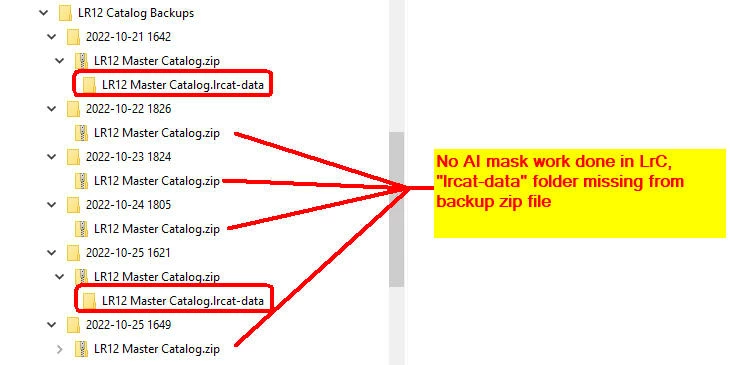
The "lrcat-data" folder is missing from the zip file if there has been no AI Mask work performed since the last backup even if the catalog contains AI Masks.


1)  Cteate an AI mask on an image

2)  Shut down LrC, and have it take a backup (I have Optimize and verify unchecked)

3)  Observe that the "lrcat-data" folder is present in the backup zsip file.

4)   Open the LrC again with same catalog

5)  Do whatever you want but don't create or touch any AI Masks

6)  Close LrC and again have it back up

7)  Observe that the zip file contains the catalog but not the "lrcat-data" folder
 

This topic is closed to new replies. Start a new post to keep the conversation going.

3 replies

Known Participant
Oct 28, 2022 8:53 PM UTC

I'll bet that's what my issue has been. I've noticed my backup goes between 8.9 and 17.9 GB. It's only been 8.9 a couple of times. I never looked inside the backup. I was going to investigate later, after catching up on some stuff. I'm about to do the upgrade and was looking at fixed issues.

Translate
Rikk Flohr-Retired
Adobe Employee
Oct 28, 2022 9:23 AM UTC

Lightroom 12.0.1 was released today and contains a fix for this issue. Please refresh your Adobe Creative Cloud App ([Ctrl/Cmd]+[Alt/Opt]+[ R ]) and download the updated version.


Thank you for your patience. 

Translate
Rikk Flohr: Adobe Photography Org
Bob Somrak
Legend
Oct 26, 2022 1:51 AM UTC

This is a known issue.

Translate
M4 Pro Mac Mini. 48GB