
Inspiring
May 9, 2018

P: Luminance range masks do not work for grayscale images

  • May 9, 2018
  • 8 replies
  • 287 views

When Trying to restrict the effect of a gradient in a grayscal image with a luminance mask there is no visible difference in effected areas.
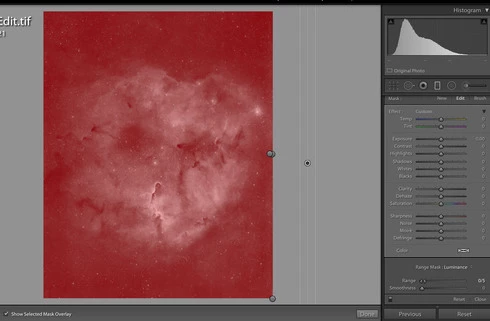
Running Mac Os X 10.13.4 on a 2014 Macbook Pro 15"

This topic has been closed for replies.

8 replies

Inspiring
May 1, 2019
I also have this issue. I'm running lightroom classic cc v8.2.1 on Windows 10. Luminance masks do not work with gray scale images (.tif format). Pretty frustrating.
Rikk Flohr_Photography
Community Manager
January 24, 2019
Different than original reported issue.

Please reference the new conversation here: Lightroom Classic CC: Luminance Range Masking fails on PS Images where Desaturate...
Rikk Flohr: Adobe Photography Org
Todd Shaner
Legend
January 24, 2019
I can confirm what you're seeing with LR Classic 8.1 on my Windows 10 1803 system when using RGB TIFF, PSD, or JPEG files that have been completely desaturated (i.e all pixels R=G=B) in PS.

Actual grayscale TIFFs, RGB TIFFs with only some desaturation, and Leica Monochrome B&W DNGs work correctly with the Luminance Range Mask controls.
Carlos_Oliveras
Known Participant
January 23, 2019
Hi, I've noticed this issue with LR Classic 8.1 and Win 10 (1803). I had experienced this problem on a few occasions, but couldn't notice a pattern until now: it only happens with desaturated tiff images (maybe with psd's too). Then I found this report, but I see that, in theory, it was fixed with v7.5.

Anyway, I've captured this small video to show the issue, so that others can check too:

https://youtu.be/AmBHYC90Mcs

Is it me or is this same problem back? I've also tried disabling GPU, it didn't seem to make a difference.
Thanks.
Rikk Flohr_Photography
Community Manager
August 22, 2018
Lightroom Classic CC 7.5 was released today and should address this issue.  If you don’t see the update in your Creative Cloud App, hit the [Ctrl/Cmd]+ [Alt/Opt]+[R] to force a refresh. 

Give the new version a try and let us know if it solves the issue. 
Rikk Flohr: Adobe Photography Org
Inspiring
July 31, 2018


I cannot seem to get the Lightroom  luminosity range mask to refine a selection working with Leica Monochrom DNG files.  The Select —> Color Range works in Photoshop.   I can make a selection in Lightroom using the brush/gradient tools but I cannot refine them with the Luminosity Sliders.
Inspiring
May 9, 2018
Thank you for your quick reply. I didn't find any mention of it with a quick search. I am sorry if I am being redundant about this. I can btw add to the issue, that it is not related to the file mode. Both RGB 16 bit tiffs containing only grayscale information as well as proper 16 bit grayscale tiffs show this behaviour. Cheers,

Ben
JohanElzenga
Community Expert
Community Expert
May 9, 2018
I believe this has been reported before and is being looked at.
-- Johan W. Elzenga