



evikne71
Known Participant
Feb 6, 2021 9:33 PM UTC
Released

P: Mac: Tooltips not showing up

I work on a small screen and the side panels have to be as small as possible most of the time. This means that I cannot always read the entire name of folders and collections. If I could just hold the cursor over to view the full name, it would be very helpful. But usually no tooltip is showing up, even if I hold the cursor there for a long time. 


Sometimes it appear after a while, and then not only one, but two tooltips appear. First one that it hardly legible because of a shadow under the text, then – some seconds later – another tooltip appear. The last one is much clearer and easier to read. But I would prefer that only this last tooltip appeared, and that it always showed up, not only from time to time. 
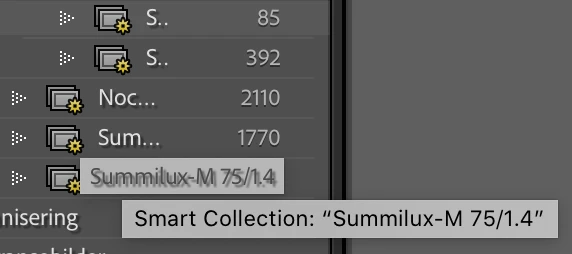
 

This topic is closed to new replies. Start a new post to keep the conversation going.

14 replies

Known Participant
Feb 6, 2021 9:54 PM UTC

On Windows, if I point at at folder, the whole name pops up. 

Translate
evikne71
evikne71Author
Known Participant
Feb 6, 2021 9:47 PM UTC

I deactivated it now, but no change. 

Translate
johnrellis
Legend
Feb 6, 2021 9:43 PM UTC

Also, if you're on Mac, tooltips have often been fussier than on Windows (slow to appear, not appearing at all sometimes).  The double tips you're seeing appears new, though.

Translate
TheDigitalDog
Inspiring
Feb 6, 2021 9:40 PM UTC

If you disable GPU in preferences, any better ?

Translate
Author “Color Management for Photographers" & "Photoshop CC Color Management/pluralsight"