

johnrellis
Genius
April 22, 2022

P: Metadata panel doesn't display captions containing double quotes

  • April 22, 2022
  • 9 replies
  • 4284 views

Captions (or any field in the Metadata panel, including GPS) containing double quotes disappear from the Metadata panel. Setting the option Catalog Settings > Metadata > Automatically Write Changes Into XMP works around this bug.  The programmer probably forget to properly escape double quotes when constructing a SQL update query.


To reproduce:


1. Create a new catalog.


2. Disable the option Catalog Settings > Metadata > Automatically Write Changes Into XMP.


3. Import a single photo.


4. In the Metadata panel, enter this into the Caption field:


a"b


5. Do Edit > Select None.


6. Select the photo and observe that the Caption field is incorrectly blank.


8. Use the Show Catalog Metadata plugin's Show command to see all the photo's metadata as recorded in the catalog. Observe the line:


caption = "a\"b", 


indicating that the caption actually got recorded in the catalog.


9. Do Metadata > Save Metadata To File. Observe that the Caption now correctly shows:


a"b


Note on GPS Coordinates


This bug strikes all fields in the Metadata panel when they contain double quotes, including the GPS field.  LR's default display of coordinates uses double quotes for seconds, e.g.


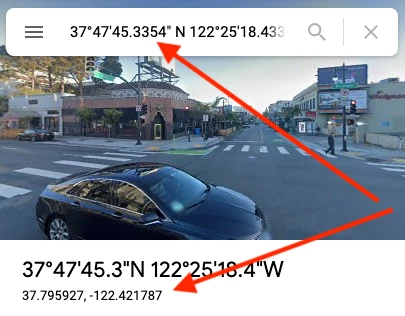
37°47'45.3354" N 122°25'18.433" W


If you try to copy/paste such coordinates, they'll disappear from the Metadata panel, even though they in fact get copied. A workaround is to paste the coordinates into Google Maps and copy/paste the decimal form of the coordinates:
Tested on 11.3.1 / Mac OS 11.6.2.

This topic has been closed for replies.

9 replies

Rikk Flohr_Photography
Community Manager
Community Manager
June 14, 2022

Greetings,


Updates to the Adobe Photography Products were released on June 13. The update contains a fix for this issue.  Please download and the latest version of your application via the Adobe Creative Cloud Application or your respective device app store.

If you do not see the update (Mac and Win) you can refresh your Creative Cloud App with the keyboard shortcut [Ctrl/Cmd]+[Alt/Opt]+[ R ]. 


Note: App store availability can take several days for the update to appear and be available. 


Thank you for your patience.

Rikk Flohr: Adobe Photography Org
Participant
May 22, 2022

When I add a caption in the metadata panel, it disappears after I move on to the next photo and then come back to the photo in question. I've tried restarting both Lightroom and my computer. I've tried it on other photos that I've imported in the past and the issue still happens. It doesn't matter whether I copy and paste the captions in or type them out. The odd thing is that Lightroom does seem to remember the caption that I wrote because it will autofill once I start typing it again. But, once I leave that photo and come back, the caption field is empty.


The odd thing is that the first photo I added a caption to is perfectly fine and still displays the caption. But no other photos are able to remember their captions.


Running Lightroom Classic v. 11.3.1 on a MacBook Pro running MacOs Catalina 10.15.7.

johnrellis
Genius
May 22, 2022

Do the captions that disappear contain double quotes (")?

johnrellis
Genius
April 27, 2022

"Confirming that deleting the "<catalog> Helper.lrdata" file worked for me...for the time being"


I think that fixes the display of existing captions in the catalog, but if you enter new ones containing double quotes, the problem will occur with them.

nickynqns
Inspiring
April 27, 2022

Many thanks, @johnrellis -- I appreciate your assistance.

Confirming that deleting the "<catalog> Helper.lrdata" file worked for me...for the time being 🙂 

Looking forward to squashing that bug!

Regards.

Participating Frequently
April 26, 2022

Hi there,


I've noticed an odd bug (I think) where captions I have just entered into a photos metadata in the metadata panel dissapear after clicking away and clicking back on the image. However it's not consistent across photos. Some captions stay, some dissapear. I'm wondering if anyone has insight on why this might be happening? It seems like a pretty serious bug if I'm not missing something... The lightroom catalogue is saved to the computer's internal hard drive and most of the media is saved to an external hard drive. Machine specs are below:


Mac Pro (Late 2013)

3.7 GHz Quad-Core Intel Xeon E5

64 GB 1866 MHz DDR3

AMD FirePro D300 2 GB

johnrellis
Genius
April 27, 2022

It's a bug introduced in LR 11.3 as the result of Adobe trying to speed up metadata display.  It only appears to happen when the caption contains double quotes (").  A workaround is to set the option Catalog Settings > Metadata > Automatically Write Changes Into XMP.

johnrellis
Genius
April 27, 2022
Rikk Flohr_Photography
Community Manager
Community Manager
April 26, 2022

Under Review - bug number assigned. 

Rikk Flohr: Adobe Photography Org
sea-gal
Known Participant
April 25, 2022

Captions that I add to photos are disappearing from view on my PC (Windows 10). They still appear when I look at my photos in my library at lightroom.adobe.com, but the are not visible in the metadata in Lightroom on my PC. If I start to type the caption in the now blank field, the existing caption auto fills and I can hit enter to insert it, but if I leave the image and come back, it is gone. Some captions "stick", but most now disappear. I am using the most recent update.


Caption as entered:


What I see when I leave and come back to the image:


As you can see, it appears with the image in my library at  lightroom.Adobe.com:


johnrellis
Genius
April 25, 2022

How precisely did you add those captions?  Did you type a caption for each photo individually, or did you use metadata Auto Sync (at the bottom of the right column in Library), metadata Sync, or metadata Copy/Paste?

sea-gal
Known Participant
April 25, 2022

I typed each caption individually. I have been doing this for several years and have only had the problem since the recent update. Some captions "stick" and but most disappear. 

nickynqns
Inspiring
April 24, 2022

Something is wrong with my Lightroom.

Please see/watch video at: https://photos.app.goo.gl/PyWvDkhaMZ2M4pyJ8

You can observe a few odd behaviors in the software:

* at 0:05 you see the title pre-populates because I've already typed it, before creating this screenshot

* at 0:09 you can see the title is committed

* at 0:19 you can see I return to this same image and the title is gone

* at 0:29-0:39 you can see I'm playing with the "Rating" and randomly clicking into other fields, but all the while the title is still gone

* at 0:42 I click away from this image with the title gone

* at 0:54 I click back to this image and the title is now committed

* the first and second image all the while never save any data

No matter how many times I click into the Title and Caption fields of the first two images, it never saves any data in those fields; the 3rd image saved, but it reappeared on its own after it displayed empty.

What is going on with Lightroom?

johnrellis
Genius
April 25, 2022

Did you use metadata Auto Sync to originally copy the same caption to these photos? There's a known bug with that.


If not, try resetting LR's preferences:
https://www.lightroomqueen.com/articles-page/how-do-i-reset-lightrooms-preferences/


LR sometimes soils its preferences file, and resetting it can fix all sorts of wonky behavior. That article explains how to restore the old preferences if resetting doesn't help.

nickynqns
Inspiring
April 25, 2022

Thanks for the assist, johnrellis.

Unfortunately the bug still persists...

I have however narrowed it down a bit. It specifically is an issue with new (not former) Titles & Captions that start or end with "quotation marks" - here's a video:

https://photos.app.goo.gl/GCaYn9uutDdBW7h29

* I zoomed in; you see the first image title/caption has no "quotes" - but the second one does (this was the original image where I wrote the "Title" and "Caption" and then wanted to copy them to the other files, that are not committing the save

* at 0:13 I click into the first image's caption, and insert "quotes" at the beginning & end

* at 0:22 going off advice from this thread I then go to menu > Metadata > Save Metadata to File

* at 0:31 I commit the save, and then you can see the "quotes" disappear from the file's caption

I can commit Titles and Captions, as long as they are wrapped in "quotes" - which was possible up until the moment that it wasn't possible - and I don't know what changed.

Participant
April 22, 2022

Using LrC 11.3.1 with macOS 12.3.1. 


This issue is happening erratically. Sometimes LrC behaves normally, and sometimes, I have the following problem. 

In Grid mode, I am trying to change the text for the initially entered Title and Caption for a series of selected photos using the View and Edit mode in the Metadata panel on the right side. 

"Selected Photos" is chosen. 

LrC accepts the entered text and displays the upper left progress bar. But none of the entered text is saved and the original titles and caption remain the same. 

The same happens when using the Edit Only option. 

The Catalog has been optimized and no issues were reported. 

This started just a few days ago and the latest update did not fix the problem. 


Any suggestion or help would be appreciated. 

Inspiring
April 22, 2022

Same problem.
contacted adobe support Case ADB-24218605-P5N2 but we found no solution.

When using XMP files it was working as expected, but this is no choice for me.