
P: [Minor] Wrong brush settings when beginning to paint a new brush stroke
To begin with, I am not sure whether this is RC-specific or a general 3.x problem, so I post it as a separate problem and not in the "3.5 RC bugs" thread.
1. Open adjustment brush.
2. Draw some strokes, set "A" brush to size 20 and "erase" brush to size 2
3. Reset adjustment brush (or alternatively, click on "new" to deselect current pin and create new brush stroke)
4. Position cursor over image
5. Hold down ALT key, note that brush shape does NOT change to (-) because there is no active pin
6. Draw something while still holding down the ALT key....
7. The brush shape immediately changes to the erase brush (-)
8. Observe what is drawn:
... the initial "blob" is drawn correctly using the "A" settings (size 20)
... the continuing brush stroke is drawn using the "erase" settings (size 2)
9. After releasing the mouse button, the brush operates correctly again.
WinXP 32 Bit.
Edit: Here is an example how it looks after drawing the brush stroke as described: For this example, I set flow to 90 for "A" and 100 for "Erase", and density to 50 (N/A for erase): 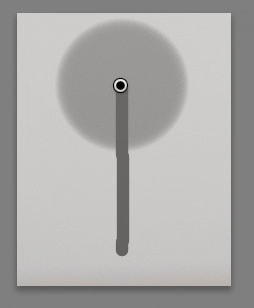
For the continued line, size, feather and flow seem to come from "Erase", while the density is still and correctly that of "A/B".


 AdChoices