
Inspiring
August 19, 2019

P: Missing photo counts for folders with UNC paths

  • August 19, 2019
  • 15 replies
  • 417 views

Lightroom Classic 8.4 August 2019 parent folder photo count not appearing!

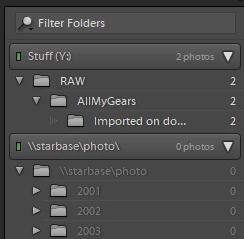
This bug is related to UNC paths only (e.g. your NAS). When Folder is mapped to a drive letter, it works as before.


Look at this image:
This topic has been closed for replies.

15 replies

Fred_66
Participant
September 19, 2019
Fix ist ok, UNC-path issue has gone. Thanks a lot!
Inspiring
September 19, 2019
8.4.1 has fixed this bug. Many thanks, guys.
Rikk Flohr_Photography
Community Manager
September 19, 2019
Lightroom Classic 8.4.1 was released earlier today and has a fix for this issue. Please install the update and let us know if you are still seeing this issue. 

Thank you for your patience!
Rikk Flohr: Adobe Photography Org
Califdan2
Inspiring
September 12, 2019
check the "Show Photos in subfolders" item in the pull down menu activated by clicking the tiny down arrow just to the right of the "+" sign on the "folders" panel title line.


johnrellis
Legend
September 12, 2019
See the first post in the merged topic for a workaround.
Inspiring
September 12, 2019


The parent folders in Lightroom show a photo count of '0' images and the names are greyed-out, while the subfolders each show the correct amount of images (and are white). This is only present on the folders on my NAS; the parent-folders on my laptop-SSD show the correct amount of images. When I click on a parent-folder the images are shown.

This happened after re-installing Windows.
Library > Show photo's in subfolders is checked.

Is my library broken somehow?
Jon Hillenbrand
Participating Frequently
September 9, 2019

I've found that folders stored on the network show 0 photos if there's no mapped drive letter for them.  But other folders stored on another part of the network which is mapped to a drive letter show the correct number of items.  For example:


s:\My Folder\My Files (12345)

but...

\\MyNetworkDrive\My_Folder\My_Files (0)

I hope this helps you figure it out.  I never had this bug before.  I hope you fix it soon.  Also, LR has been slow as eff for a while now.  Please speed it the heck up.  It's slow on my very fast work computer and on my home super-super-computer with top of the line everything in terms of hardware.
Inspiring
September 5, 2019
Same issue here!!! I keep my RAW files on NAS (Synology) and following the 8.4 update I can see no aggregate numbers. In fact if I remove a file from a folder which is showing "0" picture count, the number turns negative!!! (-1) 
Fred_66
Participant
August 31, 2019
I can confirm this issue with UNC paths.
Inspiring
August 24, 2019
Have the same issue, started after latest update - no problem prior