



johnrellis
Legend
January 21, 2026

P: Modal dialogs leak Windows GDI objects, crashing Lightroom

  • January 21, 2026
  • 3 replies
  • 113 views

Modal dialogs created by LrDialogs.presentModalDialog() fail to release the Windows GDI objects allocated to them, causing LR to silently crash after a relatively small number of invocations of the plugin, if it has lots of LrView controls.


To reproduce on LR 15.1.1 / Windows 11 (Intel):


1. Save the script below to the file "gdi-leak.lua" in the LR Scripts folder.


2. Restart LR.


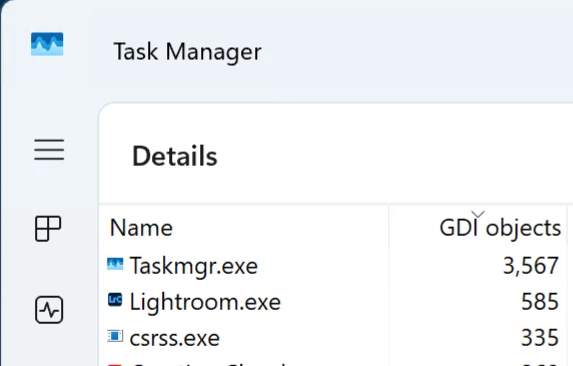
3. Open Task Manager, click Details view in the left column, right-click the column header "CPU", do Select Columns, check GDI Objects, click OK, and drag the column header "GDI Objects" to the first column position. Then click the column header "GDI Objects" to sort by that column.  It should look like:
 

johnrellis_0-1769051719447.png


3. Do Scripts > gdi-leak.  A dialog with 10 columns of 50 rows of text opens. 


4. Repeatedly click OK.  After about 20 iterations, observe that the number of GDI Objects for Lightroom.exe has reached 10,000, the maximum value for a process.


5. Click Cancel, and then try to use LR. Observe that after up to 15 seconds or so, Lightroom silently crashes.


local LrDialogs = import "LrDialogs"
local LrTasks = import "LrTasks"
local LrView = import "LrView"

local f = LrView.osFactory()

local result
for i = 1, math.huge do 
    
    local columns = {}
    for col = 1, 10 do 
        local column = {}
        for row = 1, 50 do 
            table.insert (column, f:static_text {title = col .. " " .. row})
            end
        table.insert (columns, f:column (column))
        end

    local result = LrDialogs.presentModalDialog {title = "Iteration " .. i,
        contents = f:row (columns)}
    if result == "cancel" then break end 
    end


3 replies

Rikk Flohr_Photography
Community Manager
January 22, 2026

Thanks for the report and the analysis. I've logged this with the team. 

Rikk Flohr: Adobe Photography Org
Legend
January 22, 2026

@johnrellis  That's a bad bug in the SDK. Hope that it gets fixed quickly.

Karsten.G
Known Participant
January 21, 2026

With the recent release of my Focus-Points plugin, I introduced the ability to tag photos within the plugin UI (flagging, rating and colouring). This feature supports culling, enabling users to quickly review large quantities of photos based on focus points.


I have received reports from users that the plugin crashed and caused Lightroom to freeze after around 100 images.


Analysis supported by ChatGPT revealed that the problem is caused by the text pane next to the photo, which lists the image's metadata, shooting parameters, and focusing settings/results. As this information changes not only between camera makers and models, but also between images taken by the same camera, the view container is built dynamically depending on the photo's metadata.


With the full UI enabled, I can process 120 images in one go before Lightroom freezes.

This limit applies to the Lightroom session, not the plugin session.

If I process 100 images in an initial plugin run, the next run stops after processing 20 images and crashes.


This limit does not apply when InfoView is removed from the UI.

I tested it with 500 images and there was no crash.

When I partially hid the InfoView sections by setting the visibility of the group boxes to false, I could process 330 images before Lightroom stopped working.


According to ChatGPT, the root cause of this issue is a 'leak of native UI resources', which only occurs on Windows, not Mac.


Can anyone confirm whether there is an issue with UI resources not being freed by the SDK, even when the plugin is terminated?

johnrellis
Legend
January 22, 2026

[This post contains formatting and embedded images that don't appear in email. View the post in your Web browser.]


I ran Focus Points in my LR 15.1 / Windows 11 (Intel) and used Task Manager to observe the number of GDI objects held by Lightroom.exe.  (GDI = "Graphics Device Interface", the lowest level API in Windows for drawing on the screen.)  The number of GDI objects increased linearly as Focus Points displayed more images:


johnrellis_0-1769038710955.png

By default, Windows 11 has a maximum of 10,000 GDI objects per process, though that can be increased to 65K via the registry. 


At the rate I observed, the maximum of 10,000 objects would be reached after displaying 129 photos:


x = (10,000 - 692.86) / 71.886 = 129.471


I never did much serious Windows programming, but I think GDI leaks aren't uncommon. GDI objects include bitmaps, brushes, fonts, and color palettes, some of which are obviously used by the info view of the plugin.  


The first thing to check is whether the LrFunctionContext objects used to create property tables are not being retained after the dialog displaying an info view is closed.  Invoke LrFunctionContext.callWithContext() fresh for each image displayed and be sure to return from callWithContext() before displaying the next image.   Internally, the context object points to the property table, which can point to the LrView objects, which reference GDI objects, and it may be that the GDI objects for displaying various LrView objects don't get released until the LrView objects are "destoryed", either explicitly by exiting callWithContext() or implicitly when they are garbage collected.


If that doesn't help, then that further indicates a GDI leak in the implementation of LrView. To make it more likely Adobe will fix the bug sooner, you could make a single-file .lua script that could be run from the Scripts menu, showing the bug.  Strip out everything that doesn't create the leak -- the keyboard shortcuts, the display of the image, etc.   Then see if it's the use of f:picture() to display icons in the dialog, the use of non-default fonts, or the use of font color that could be causing the link.


Ideally, you'll get to a small number of lines of code in the script that illustrate the leak, which will make it more likely the developers will fix the bug.


johnrellis
Legend
January 22, 2026

One technique that might work in the bug-illustrating script: Have a for loop that displays the dialog for each selected image and then closes it after, say, 0.25 seconds.  Then you could run the code over hundreds or thousands of images automatically.