
Inspiring
July 29, 2016

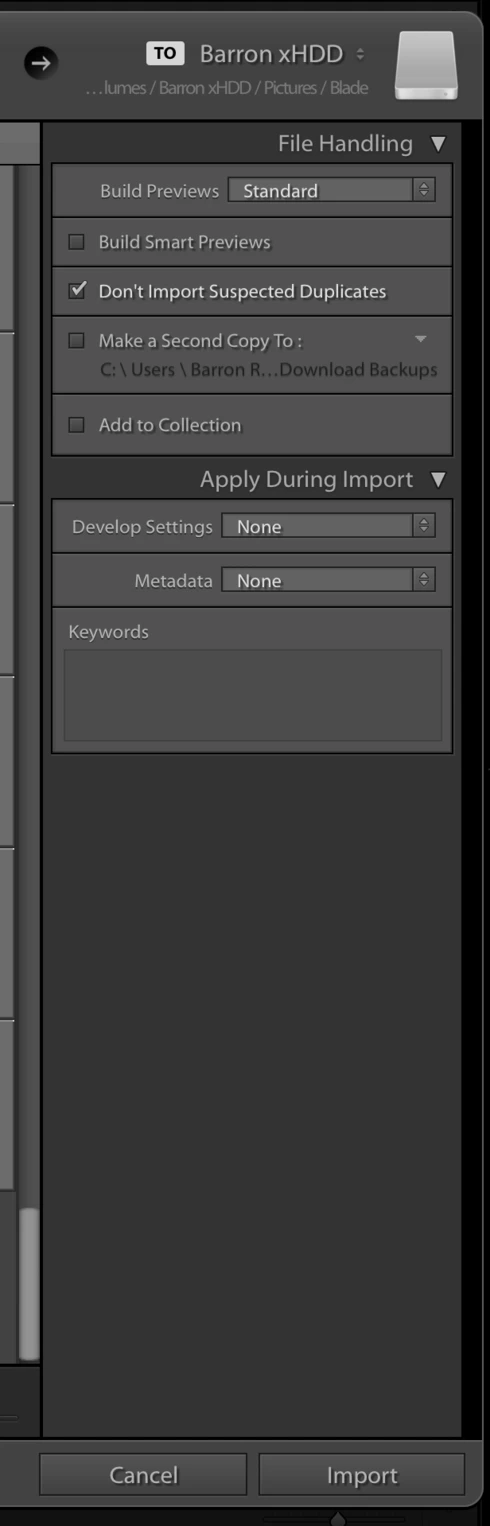
P: Most Import Dialog Settings have disappeared (Sierra Mac OS 10.12)

  • July 29, 2016
  • 14 replies
  • 704 views

During import, most import settings have disappeared save for a couple. Strangely, import presets still apply the settings that are missing. This happens during Copy & Copy as DNG (my default choice).

I'm running MacOS Sierra Beta and the latest LR available on CC.
This topic has been closed for replies.

14 replies

Rikk Flohr_Photography
Community Manager
July 29, 2016
Possible. I hadn't noticed his Make Second Copy to was Active
Rikk Flohr: Adobe Photography Org
Jim Wilde
Community Expert
Community Expert
July 29, 2016
Possibly, Rikk....but in that circumstance the "Make Second Copy" checkbox would be greyed out, wouldn't it? So I'm wondering if the File Renaming and Destination panels have simply become hidden, maybe as a result of the OS.

Suggest the OP tries right-clicking on the File Handling header and ensures that all 4 panels are checked. 
Rikk Flohr_Photography
Community Manager
July 29, 2016
It looks like you have chosen Add instead of Copy or Move at the top center of your Import dialog. 
Rikk Flohr: Adobe Photography Org
Participating Frequently
July 29, 2016
LR 6.6.1 on El Capitan: Import dialogue looks just the way it should and always used to, there is nothing missing.

Mate, you are running a BETA operating system that LR has neither been tested with, nor is it officially supported yet by Adobe. I really don't see the point in posting errors that occur while running that configuration!?¿¿¿

If you use LR professionally, I would strongly advise you to never run it under a Beta operating system, because you will end up not having a smoothly running productive system!

Just my2cents...