
Inspiring
July 16, 2018

P: New book's pictures merge with previous ones!

  • July 16, 2018
  • 6 replies
  • 117 views

Hi. I'm creating a new book in the book module. I have a previous collection with the relative saved book, now I have a new collection from where I'm gathering the pictures for the new book.
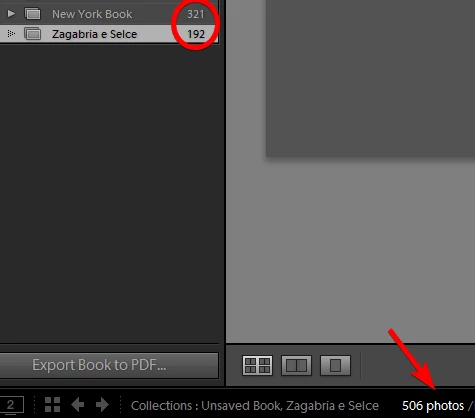
The problem is that when I select the new collection, in the film strip I see also the pictures from the previous one! So if I let the new book auto fill I get the two collections' pics merged together. I found kind of a workaround by deleting the pages of the old pictures, but when I hit "create save book" it creates the new book with all the pictures (old+new) again! Please help! Thank you.
This topic has been closed for replies.

6 replies

Rob_Cullen
Community Expert
Community Expert
April 10, 2021

The problem still exists, and I have seen several suggested work-arounds. Here is mine- (after you see unwanted photos in the Book module.)

1) [CLEAR BOOK]

2) [CREATE SAVED BOOK]

3) Check the option [INCLUDE ONLY USED PHOTOS]

4) Go back to Library [G] and drag only the 'wanted' photos to the Saved Book Collection.

5) [Double-Click] the Saved Book Collection to open the Book module.

6) Design with Auto Layout Presets or manually add pages.

You can use an 'empty' Book Collection as a Book Template if you Duplicate it for each new book.

Turning 'Off' the AutoFill in the Book Preferences is also helpful.

Regards. My System: Windows-11, Lightroom-Classic 15.3, Photoshop 27.5, ACR 18.3, Lightroom 9.3, Lr-iOS 10.4.0, Bridge 16.0.3 .
Inspiring
April 8, 2021

I have a problem that looks exactly like the one described. What is the current status on this? 

Participating Frequently
September 21, 2018
Bhargav, thank you for looking into this. I am afraid your workaround does not work on my system: using "clear book" does not remove the wrongly added old pictures. For a workaround that seems to work for the time being see the user discussion in the forum at https://forums.adobe.com/message/10539774. Will this be fixed in the next dot update? It seems to shame to mar the book module at the very moment when the new custom cells and templates had made it useful.
Inspiring
July 17, 2018
Hi Bhargav. When I first opened the book module I had a blank book page (the previous was already saved and published), so just by clicking on the new collection I had all the pictures merged in the filmstrip. I don't remember actually if I even could issue the "clear book" command, given that it was just a blank template.
So I started with the new book and managed to have it right with only the new pictures, but now I'm kind of stuck because if I save it I'll get also the old pictures, and if I do "clear book" I'll get my book swiped out! Don't know...given that I've just sent it to Blurb I could do the "clear book" anyway, I guess I'll loose everything but at least I'll get the printed book in my hand...
[edit]actually I can't find any "clear book" command..I can see "clear layout" or "delete" if I right click on a saved book.
bhargaveede
Adobe Employee
Adobe Employee
July 17, 2018
Hi Paolo,

We could see the issue while using  "create save book".
Also, a better workaround use "clear book" which will delete the older pictures and keep only new pictures in the Data source [Filmstrip]. 

This step will not cause the "create save book" to include old and new pictures

Thanks,
Bhargav
Adobe Employee
July 16, 2018
Hi Paolo, thanks for bringing this to our notice, and apologise for the inconvenience.
I am able to see the issue that you have reported and have a logged a bug for the Lightroom Team.
Thanks!