Participating Frequently
October 30, 2021

P: New masking features: display for color range is too large

  • October 30, 2021
  • 7 replies
  • 2592 views

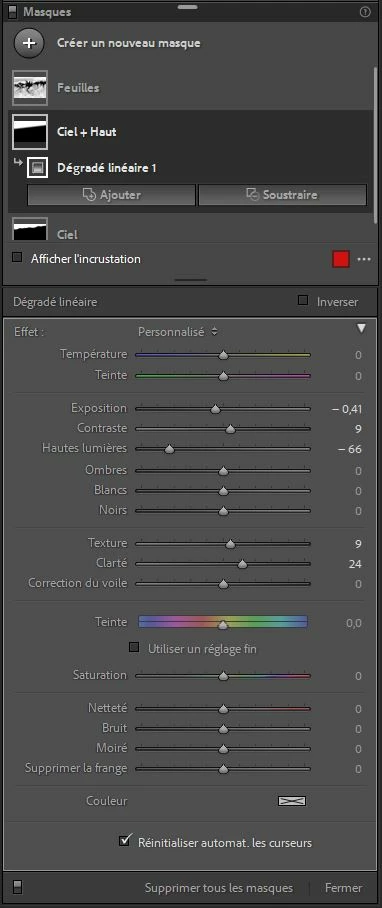
Normal screen copy for a mask:

Screen copy for color range:
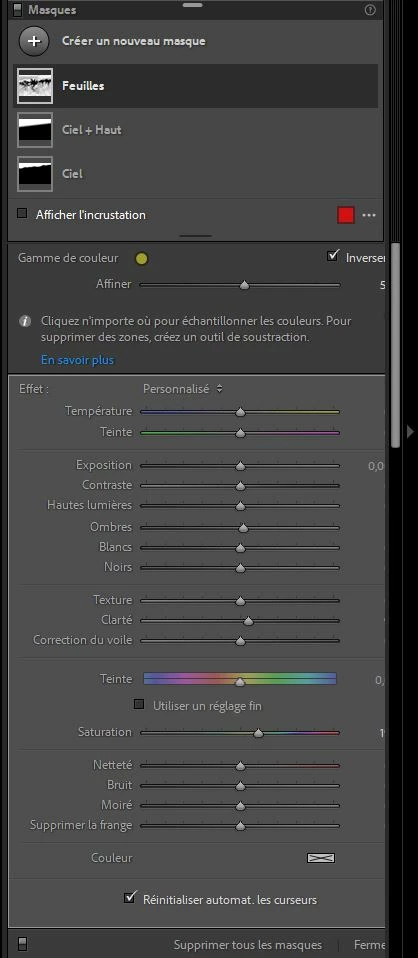
You cannot see the figures on the right. No way to expand the tool window.

Display: 2560x1440, Font: middle size

When using a large font (150%) the window size is good, but unfortunately this window takes 1/4 of the screen! Too much.

I don't know where to contact the support, I post this bug here.

This topic has been closed for replies.

7 replies

Rikk Flohr_Photography
Community Manager
February 8, 2022

Updates to the Adobe Photography Products were released today and contain a fix for this issue. Please install the update via your Creative Cloud Desktop App or your respective App Store. 


Note: 

You may need to refresh the Creative Cloud App for desktop software to show an update available.  ([Ctrl/Cmd]+[Alt/Opt]+ [ R ])

For Mobile downloads, it may take several days for the update to appear in your respective App Stores.


Thank you for your patience. 

Rikk Flohr: Adobe Photography Org
Participant
November 27, 2021

Estou com problemas pra visualizar os controles deslizantes, quando entro no aba das mascaras por exemplo nao consigo visualizar totalmente os controles, ou quando uso a mascara de intervalo de luminosidade nao consigo usar o slider, esta em zoom e nao consigo fazer zoom out.

nikunj.m
Community Manager
Community Manager
November 27, 2021

Hi,


We're sorry about the trouble with Lightroom Classic. Would you mind sharing the exact version of Lightroom you're using along with your computer macOS version? What is the resolution of the monitor you're working on?


You can try to reset the preferences of Lightroom using the steps mentioned here: https://adobe.ly/2JSym5e

Please backup your presets prior to resetting the preferences.


Let us know if it helps!

Regards,

Nikunj


GillesMS
Participant
November 7, 2021

Hello there,

I have a display issue with the last lightroom version on my macbook pro,

when i use the masking tool, the informations on my sliders doesn't show.

I join you a screen capture, better than any words 😉


  • Lightroom Version Number: 11
  • OS Version Number: Catalina 10.15.7


Is someone have the same trouble recently?

Thanks for your answer!

GoldingD
Legend
November 7, 2021

It does not look like you have clicked on a particular mask, if you had it would show the mask components.


Bob Somrak
Legend
November 7, 2021

@GoldingD 

The sliders are there but the right side of the panel is cut off so mask selection is not the issue.

M4 Pro Mac Mini. 48GB
Rikk Flohr_Photography
Community Manager
October 31, 2021

Setting Status to Acknowledged

Rikk Flohr: Adobe Photography Org
Rikk Flohr_Photography
Community Manager
October 30, 2021

Moving to investigating

Rikk Flohr: Adobe Photography Org
Rikk Flohr_Photography
Community Manager
October 30, 2021

Can you confirm your language settings for me? 

Rikk Flohr: Adobe Photography Org
Ged_Traynor
Community Expert
Community Expert
October 30, 2021

Hi

Can you tell us which Adobe application you're using so we can move the thread to the correct forum

Participating Frequently
October 30, 2021

Hi

It is Lightroom classis version 11 (last one, oct 25)

Ged_Traynor
Community Expert
Community Expert
October 30, 2021

Thanks I'll move the thread for you