


Zapf
Participant
March 18, 2017

P: Photo Merge > Panorama - stuck at Creating Panorama Preview

  • March 18, 2017
  • 12 replies
  • 282 views

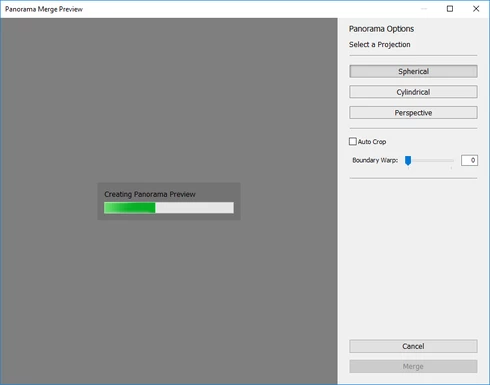
I have 9 images I previously created with the photo merge > hdr function without issue. However, I am unable to process a panorama with these photos. I've used it before, on this machine, on a previous version of lightroom last year. Now, it just gets stuck halfway through "creating panorama preview". I've tried disabling hardware acceleration, increasing the scratch disk size, restarting lightroom / the computer. The program itself doesn't hang - I can hit cancel at any time. but it won't move beyond that point. What is going on?
This topic has been closed for replies.

12 replies

zulucowboy
Participating Frequently
October 18, 2019
Was this ever resolved. I have started having the same issues. It does the preview no problem.
zulucowboy
Participating Frequently
October 18, 2019
Was this ever resolved. I have started having the same issues. It does the preview no problem.
Inspiring
April 3, 2018
Just an update: I deleted preferences and rebooted. That did not work. I did the new update that came out today. That did not work. I uninstalled Lightroom, rebooted and reinstalled Lightroom. That did not work. I got rid of the old catalog and made a new one, reimported the pictures and tried again. That did not work. I tried with just 3 pictures, that did not work.  Everytime it gets to right between the r and the a and stops. I can cancel out but it crashes. I have the last crash report but it is kind of long to post here. Hope this helps figure out what is going on. 
Legend
April 3, 2018
This is still being worked on. I added a note to the issue that you're seeing the issue on a Mac.
Inspiring
April 3, 2018
This is not a Windows issue. I am having the same issue on Mac. I was able to go through the process twice now it gets stuck about 1/3rd of the way in. I have even rebooted the machine.  
Zapf
ZapfAuthor
Participant
September 9, 2017
Hi, was this ever resolved?
Legend
March 23, 2017
Thanks. Our QE could repro and our engineer will look into it. Of note, this appears to be a Windows specific issue.
Zapf
ZapfAuthor
Participant
March 23, 2017
https://1drv.ms/f/s!Alktqt4QCD_4g_QJL...

These were all hdr merged prior without issue. I did try using the earlier, un hdr vesions of the files however. One of these (154 perhaps) might be redundant, but I did test without that file.

Also tried updating my drivers, and forcing a full shutdown on windows 10
Legend
March 22, 2017
Could you post a link to the set of files for us to troubleshoot? (Dropbox or Creative Cloud shared folder)
Zapf
ZapfAuthor
Participant
March 22, 2017
I tried two photos. still stuck